
AI-Generated Fake News: How to Spot It (2026)
By Rado
You read a headline that makes your stomach drop. Is it real or another AI-made trick? You’re not alone. Synthetic articles, voice clones, and deepfake clips can look convincing, and that’s exactly the point. Here’s the short version: you don’t need special software to protect yourself. In this guide, you’ll get a calm, step‑by‑step playbook; fast checks you can do in a minute, smarter ways to verify photos, video, and audio, and a simple family protocol for urgent “breaking news” moments.
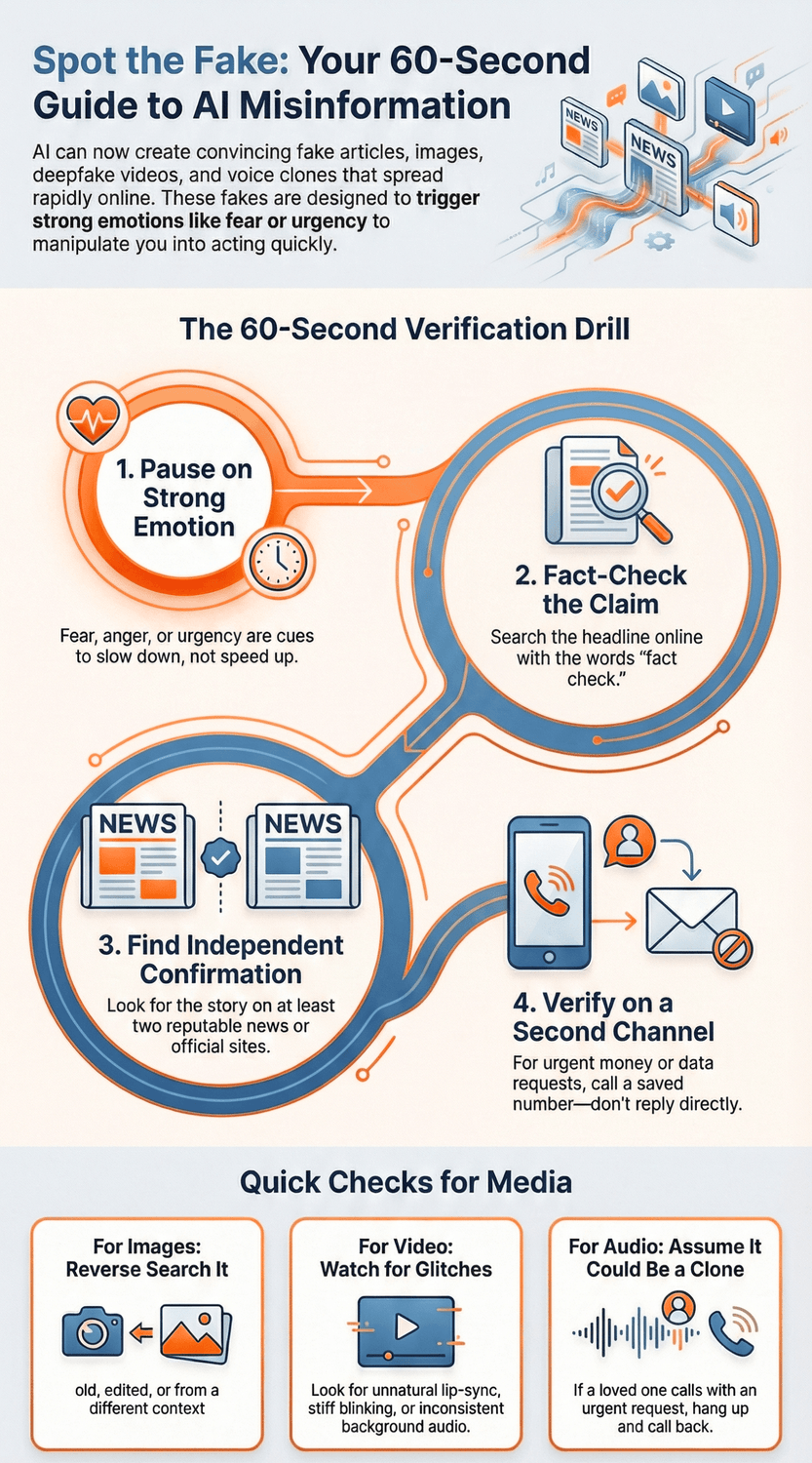
What counts as AI‑generated fake news today?
You’re scrolling while waiting for coffee and see a headline about a bank collapse in your city. The logo looks right. The tone sounds official. Your pulse jumps. Is it real, or did an AI write it and a bot army push it into your feed? That gut‑flip moment is exactly what modern fakes aim to create.
So, what are we dealing with? AI‑generated fake news is any false or misleading claim produced or enhanced by algorithms that mimic human writing, voices, or visuals. It shows up as:
Synthetic text. Systems can spin up entire articles, quotes, and fake “expert” posts that sound polished and specific. They stitch together plausible facts with invented details to feel credible (see the privacy and AI explainer from Stanford HAI (n.d.)).
Images. Photo‑real pictures of people at protests that never happened or “screenshots” of statements no one made. Today’s models handle lighting and texture well, which is why quick visual cues are less reliable than they used to be.
Video. Deepfakes can map one face onto another or alter what someone appears to say. Small glitches still occur, but casual viewing often misses them.
Audio. Voice clones can copy pitch and cadence from a short sample, then “call” you with urgent requests. You might be wondering, how would I know? We will cover fast audio checks later, but assume a clone is possible.
Where do these pieces travel? Through coordinated distribution. Bots, paid click farms, and compromised accounts push the same link across groups, comments, and messaging threads within minutes of each other. During crises, that surge creates a false sense of consensus and urgency. Researchers and journalists have flagged how fake charity appeals, fabricated celebrity endorsements, and manipulated headlines spread this way (Insurance Journal/Reuters, 2025).
Who gets targeted most? Scammers follow emotion and attention. They know health scares, disasters, and money worries make people click fast. Older adults face a double risk: higher exposure during big news cycles and direct outreach through phone or text. Common plays include tech‑support pop‑ups, bogus bank alerts, and grandchild‑in‑trouble stories that now come with a cloned voice for “proof” (NCOA, 2024). It’s normal to feel a bit uneasy reading this. That feeling is useful. It reminds you to slow down.
What are the tells? Not the old grammar mistakes. Modern fakes are polished. Instead, pay attention to behavior. Is someone asking you to act right now, move money, or share the post to “warn others”? Does the story appear only on unknown sites, with no confirmation from outlets you already trust? Are the screenshots conveniently cropped? These questions help you shift from reacting to checking.
You might be wondering, do I need special software? No. Start with a few habits. Search the headline plus the word “fact‑check.” Open at least two reputable sources before you form an opinion. If a message is tied to money or personal data, pause and verify using a second channel you already trust. Those simple steps stop most damage before it starts.
The Key Takeaway
AI‑generated fake news is less about perfect fakes and more about fast manipulation.
Know the formats, expect coordinated pushes, and use simple checks before you click, pay, or share.
Why is it getting harder to tell real from fake?
A short clip pops up in your chat—your favorite mayor “announcing” a sudden tax. The lighting looks natural. The voice sounds right. Friends start sharing it with alarm. In two minutes, the clip is everywhere. You pause. Is it real?
Fakes scale. Quality improved, costs dropped, and distribution got faster. That mix is why your usual cues don’t work as well as they used to.
First, the volume. Attackers can spin up thousands of posts, emails, and clips in minutes. Deepfake attempts multiplied dramatically over the last few years, and voice clones surged as well—criminals need only a short voice sample to mimic you or a loved one (Keepnet Labs (2025)). When there’s more noise, your odds of bumping into a polished fake go up.
Second, the polish. Many of us were trained to look for broken English or odd phrasing. That’s not reliable anymore. A growing share of phishing and scam content is written by AI systems that produce clean, on‑brand language (Sift (2025)). So if you’re scanning for typos, you’ll miss the real tells: urgency, secrecy, and pressure to act.
Third, the human blind spot. Even trained viewers struggle to spot high‑quality synthetic media at a glance. In tests, people consistently overestimated their ability to detect deepfakes; especially when the content confirmed a belief or stirred fear (iProov (2025)). That’s not a personal failing. It’s how attention and emotion work.
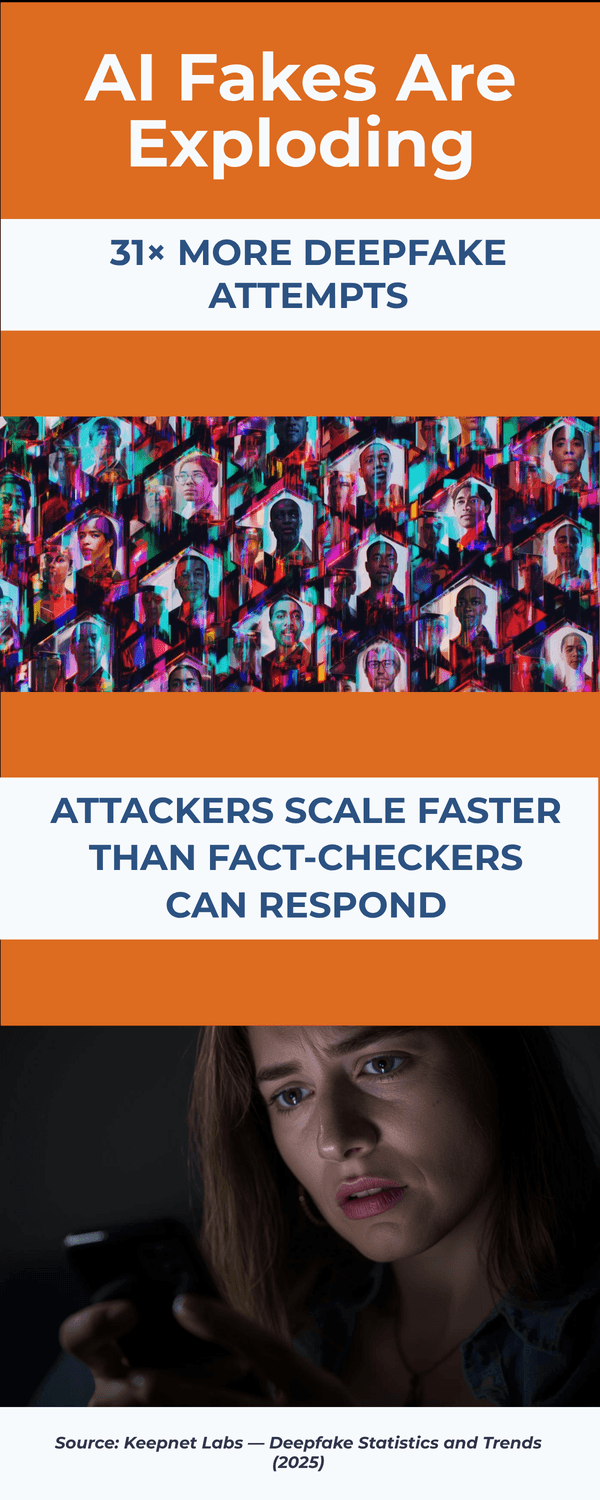
Fourth, the speed of spread. Bot networks, coordinated groups, and recycled pages can push the same link across platforms within minutes. By the time fact‑checkers weigh in, the false claim may have reached thousands. Have you noticed how the same headline follows you from Facebook to a messaging app to an email? That’s not an accident.
You might be wondering, “What clues still help?” Start with context and behavior. Who benefits if I react fast? Who else is reporting this—two reputable outlets or only copy‑paste blogs? Does the message push me to move money, give credentials, or share right away? Those questions work better than scanning for grammar alone.
It’s normal to feel a bit overwhelmed. New tricks appear every month. But the defenses are simple and steady: pause on strong emotion, verify on a second channel, and look for independent confirmation before you act. Would waiting ten minutes change the outcome? Often, that pause is enough to keep you safe.
The Key Takeaway
Fakes are harder to spot because they’re cheaper to make, cleaner to read, and faster to spread.
Shift from “Does it look real?” to “Who confirms it, and why the rush?”
That mindset sets you up for the quick checks in the next section.
What simple checks can you run in under 60 seconds?
You’re at the kitchen table when a “breaking” alert pings your phone. A local hospital is “turning away patients,” it says. Your heart jumps. Before you forward it to the family, try this one‑minute drill. It turns panic into a quick, clear check.
0:10 — Pause and name the feeling. Fear, anger, urgency. Strong emotion is a cue to slow down. Ask yourself, who benefits if I react fast? That single question helps you switch from reacting to checking.
0:20 — Search the headline plus “fact check.” Type a short version of the claim and add the words “fact check.” Look for results from known fact‑checkers or major outlets. If nothing solid appears, that is a useful signal to wait (EDPS TechSonar, 2024).
0:30 — Scan the source in three clicks. Open the site’s About page, check the byline and date, and glance at the URL. Is it a generic domain, a look‑alike, or a site with no history covering this topic? If you cannot find a real About page or masthead, treat the claim as unproven.
0:40 — Look for independent confirmation. Can you find the same claim on two reputable outlets or an official release? Health system, city government, bank, or law enforcement pages are ideal. No independent confirmation, no action.
0:50 — Use an out‑of‑band check for messages. If a friend, relative, or “bank” is asking for money or data, do not reply in that thread. Call a saved number or start a fresh message to a known contact. Voice clones and polished texts are common, so your second channel is your safety net (American Bar Association, 2025).
0:55 — Peek at the link safely. Long‑press or hover to preview the domain before you open it. If you want extra reassurance, paste the URL into a quick checker like CheckPhish or EasyDMARC. This takes seconds and often catches obvious traps.
Bonus, if you have another minute. Search for the same story on the site’s own homepage. If it is not there, be skeptical. For images and videos, we will cover simple media checks next.
You might be wondering, do grammar mistakes still help? Not much. A large share of scam messages are now clean, on‑brand, and persuasive, which is why behavior beats wording (Sift, 2025). It’s normal to feel unsure at the moment. Use these tiny steps anyway. They work even when the content looks polished.
Two final questions to ask yourself: Would waiting ten minutes change anything important? If this were true, where would an official update appear first? When you can answer those, you are ready to act.
The Key Takeaway
In one minute, you can pause, search, scan, confirm, and verify through a second channel.
If a claim fails any step, do not share or pay until you see independent confirmation.
How to verify images, video, and audio without special tools
You open a group chat and see a dramatic photo of a flooded airport. It looks real. Friends are making plans based on it. Before you cancel your trip, try these quick media checks you can do with nothing more than your phone and two free minutes.
Images: fast checks
1) Reverse search the picture. Long‑press the image, copy the link or save it, then use your browser’s “Search image with…” option. Look for earlier dates or versions that prove it is old, edited, or from a different place. Guides from consumer security experts outline this step clearly (Norton, 2024).
2) Scan the edges and reflections. Do street signs, shadows, or window reflections match the claimed time and place? Are fingers, eyeglasses, or edges oddly warped? Small distortions are still common in synthetic images, especially around hands and text.
3) Check the source’s context. Click through to the original post. Is there a clear caption, location, and author with a history of similar work? If the image is only a screenshot with no link to a source, treat it as unverified.
Video: what your eyes can miss
4) Watch the mouth, eyes, and light. Lip‑sync slips, stiff blinking, and inconsistent lighting are still helpful clues in many deepfakes. Slow the clip and watch a second time. Awareness trainers catalogue these tells and how to spot them quickly (SoSafe, 2024).
5) Listen for scene noise. Real videos carry room tone, background hum, or crowd variation. Fakes often have flat, even audio over visuals that should sound messy. If the scene is outdoors but the audio feels like a studio, be skeptical.
6) Find a second angle. Search the event plus the location on a major platform. If something happened in public, other people usually captured it. No second angle within an hour is a strong reason to wait before you share.
Audio: simple ways to avoid voice clones
7) Assume a clone is possible. Criminals can copy a voice from a short sample and ask for money or codes. It is normal to feel rattled when you hear a loved one. Build the habit now. Hang up and call back using a saved number. Do not continue in the same thread. Legal and consumer groups stress this out‑of‑band step for safety (American Bar Association, 2025).
8) Listen for telltale patterns. Cloned voices may have steady speed, fewer breaths, and odd pauses before names. Missing background noise is another sign. Security researchers offer checklists you can use in plain language (McAfee, 2025).
General tips that take seconds
9) Open the uploader’s page. Real newsrooms show a masthead, contact page, and a track record. Throwaway accounts do not. Does the account post only outrage clips and donation links? That pattern is a red flag.
10) Treat cropped screenshots with care. If you cannot find the original article or full video, do not share. Ask yourself, who profits if I react right now, and what changes if I wait ten minutes?
Do I need special software? You do not. A slow scroll, a reverse image search, and a call back to a saved number block most media tricks. It is normal to feel unsure. Use the checklist anyway and you will catch more fakes than you think.
The Key Takeaway
For images, search and scan. For video, rewatch and compare angles.
For audio, verify on a second channel. When in doubt, pause.
Real stories will still be true after you check.
How to read headlines and claims like a pro fact‑checker
You open your news app and see a bold headline: “New city tax starts tomorrow.” Friends are already commenting. Your first instinct is to warn others. Before you do, walk through the same quick habits journalists and fact‑checkers use every day.
1) Start with the source, not the claim. Tap the site’s About page and look for a real newsroom presence: names, emails, and a physical address. Does the outlet have a track record on this topic? If you find a generic domain, anonymous authors, or no masthead at all, slow down. Public guidance for spotting fake news stresses this simple first step (EDPS TechSonar, 2024).
2) Read past the headline. Headlines are hooks, not proof. Scan the first and last paragraphs. Are key details specific and verifiable, or are they vague and emotional? Are dates and numbers clear? If the piece never names a source you can check, treat it as unconfirmed.
3) Look for primary documents. Pro stories link to official notices, press releases, or filings. If a claim mentions a regulation, budget, or recall, click through and read the original. Sector groups recommend relying on official releases when stakes are high, like banking or public safety alerts (FS‑ISAC, 2024).
4) Corroborate across independent outlets. Can you find the same facts on at least two reputable sources that do not copy each other? If only low‑quality blogs repeat the story, that is a signal to pause. You might be wondering, what if it is brand‑new? Then expect a short “we are checking” note on official channels first.
5) Check timing and context. Old stories resurface with new headlines. Verify the publish date and look for updates or corrections. It is normal to miss small timestamps on screenshots. When in doubt, go to the site’s homepage to see if the story is featured.
6) Watch for behavioral red flags. Urgent language that pushes you to donate, move money, or “share to save others” is a classic pressure play. Security experts remind us that strong emotion is a cue to slow down, not speed up (Bitdefender, 2024). Ask yourself, who benefits if I act fast? What changes if I wait ten minutes?
7) Trace the image or clip. If the article leans on a single photo or video, reverse‑search it and look for earlier versions or different locations. If no original post exists, treat the visual as illustrative, not proof.
8) Finish with a simple two‑question test. Who confirms this, by name, in a place I already trust? What do I risk if I wait for a second source? If you cannot answer both, hold off.
You might be wondering, do I need a list of “approved” sites? Not really. Build your own small set of reliable sources and official channels, then use these checks anywhere. It is normal to feel unsure the first few times. With practice, you will move through the steps in under two minutes.
The Key Takeaway
Don’t judge by polish.
Judge by proof. Real stories name sources, link to originals, and appear in more than one reputable place.
If a headline demands speed, your best move is to slow down and verify.
What makes adults 45+ a prime target, and how to protect yourself?
It usually starts with care. You’re checking on a parent, paying a bill, or reading health updates. A “bank alert” or “urgent hospital notice” pings your phone. The message feels responsible to act on—right now. That caring instinct is exactly what scammers try to exploit.
Why adults 45+ get targeted more often
High‑stakes decisions. Money transfers, caregiving, health choices—criminals know these moments carry urgency.
Cross‑channel reach. You’re active on email, texts, and calls, which gives scammers more doors to knock on.
Trust in familiar messengers. People tend to trust clinical or official‑sounding voices, especially for health topics. Surveys find many older adults are unsure about AI‑generated health information and rely on known clinical sources (UMich/AARP, 2024).
Rising losses to imposter schemes. Imposter, tech‑support, and investment scams remain among the most damaging for older adults, with authorities urging fast reporting to limit losses (FBI IC3, 2024; NCOA, 2024).
Voice cloning makes it personal. Criminals can clone a voice from a short clip and call with “proof.” Legal and consumer advisors recommend building an out‑of‑band verification habit now (American Bar Association, 2025).
You might be wondering, “How do I stay open and informed without becoming a cynic?” That’s a fair question. The goal isn’t to doubt everything; it’s to separate urgency from action.

A simple protection plan you can set up in one sitting
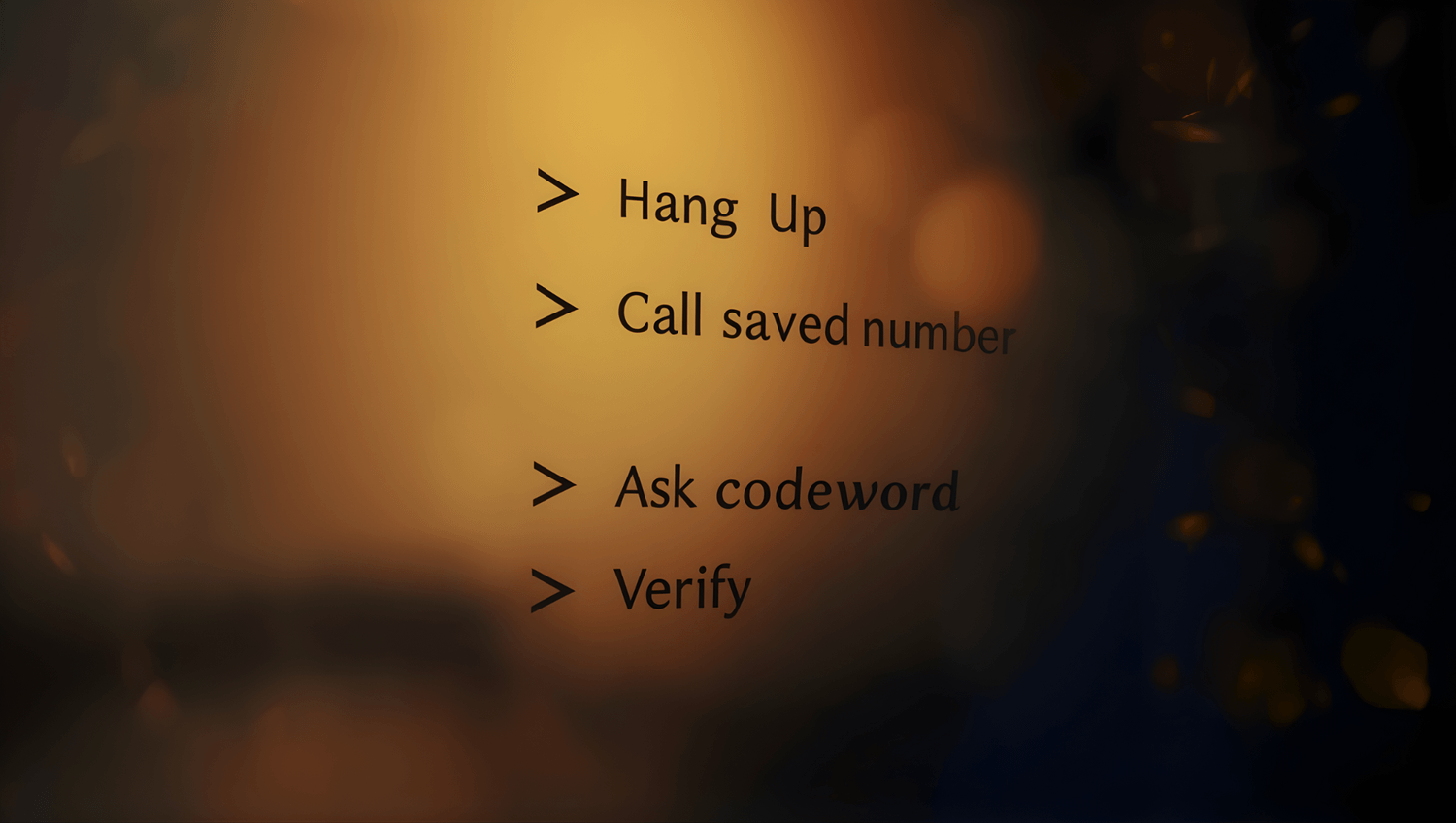
Create a verification list. Save official numbers for your bank, insurer, clinic, and utility. If any alert arrives, hang up and call those saved contacts. Would waiting ten minutes change anything important? Usually not.
Set a family codeword. Share it in person or on a live video call you initiate, then review it twice a year. If a call or text mentions money, ask for the codeword. No codeword, no action (American Bar Association, 2025).
Tighten your accounts. Turn on two‑factor authentication, set bank/credit alerts, and use a password manager. If you reuse passwords, change the important ones first (bank, email, mobile carrier). What would a scammer try to reset first?
Tune your news diet. Follow a handful of trusted outlets and official channels (health system, city, bank). When a claim appears, check those first instead of forwarding.
Use tiny tools for big wins. Preview links before clicking. If needed, run a URL through a quick checker like CheckPhish or EasyDMARC. For images and videos, do a fast reverse search. Small steps, big protection.
Practice the “second channel” rule. If a message asks for money, codes, or urgent sharing, switch channels: call a saved number or start a fresh message to a known contact. Never continue in the same thread.
It’s normal to feel a bit targeted by all this. You’re not alone. With a short checklist, you stay open to good information and shielded from traps.
The Key Takeaway
Adults 45+ are targeted because scammers chase urgency, trust, and life admin moments.
Build small habits—save contacts, codeword, 2FA, second‑channel checks—and you’ll block most tricks without closing yourself off to real news.
What to do if you shared or believed a fake story
You share a dramatic post and feel that small rush of doing something helpful. Ten minutes later, a friend replies, “I think this isn’t real.” Your stomach drops. What now?
First, breathe. It happens to careful people every day. What you do next matters more than the slip. Use this short recovery plan to limit harm and turn it into a positive example for others.
1) Correct the record where you shared it.
Go back to your post or chat and add a clear note: “Update: this appears to be false. Here is a reliable source.” Link to a verification or official page. Public guidance encourages quick, visible corrections because they stop the spread for people who saw your original share (EDPS TechSonar (2024)).
2) If money moved, act fast.
Contact your bank, card issuer, or payment app and explain it was a scam. Ask for a dispute or freeze. Time matters. Authorities encourage immediate reporting, especially for wire transfers or gift card purchases (FBI IC3 (2024)).
3) Strengthen the accounts that touched the scam.
Change any reused passwords and enable two‑factor authentication on email, banking, and your mobile carrier. Security groups recommend protecting email first, since password resets often route there (ISACA (2024)).
4) Save evidence before it disappears.
Take screenshots of messages, receipts, usernames, and transaction IDs. This helps your bank and any report you file. If the content gets deleted later, you still have proof.
5) File a quick report.
Depending on the scam, report to your national cybercrime or consumer agency and the platform where it happened. Reports help investigators see patterns and warn others. You might be wondering, will reporting actually help me? It can. Banks and platforms often ask for a case number.
6) Tell the people you might have influenced.
Send a brief follow‑up: “I found out that post was false. Here is a trusted source with accurate info.” A calm correction models healthy behavior and protects your circle.
7) Add a small safeguard for next time.
Create a note on your phone with the 60‑second verification steps and the “second channel” rule. Would waiting ten minutes change anything important? If yes, pause. If a message asks for money or secrets, call a saved number instead of replying in the same thread.
It is normal to feel embarrassed. That feeling fades. What lasts is the habit you build. By correcting quickly and tightening your settings, you make yourself and your friends harder targets next time.
The Key Takeaway
Fix it where you shared, move fast if money was involved, lock down key accounts, and leave a clear correction trail.
Your quick, calm response turns a mistake into protection for you and others.
Build your family’s quick‑check protocol for crisis headlines
It is 9:07 p.m. A relative texts, “I need help now, please don’t call anyone.” Your chest tightens. A second later a voice message arrives. It sounds like them. What do you do in the next sixty seconds? A simple family protocol turns panic into a plan.
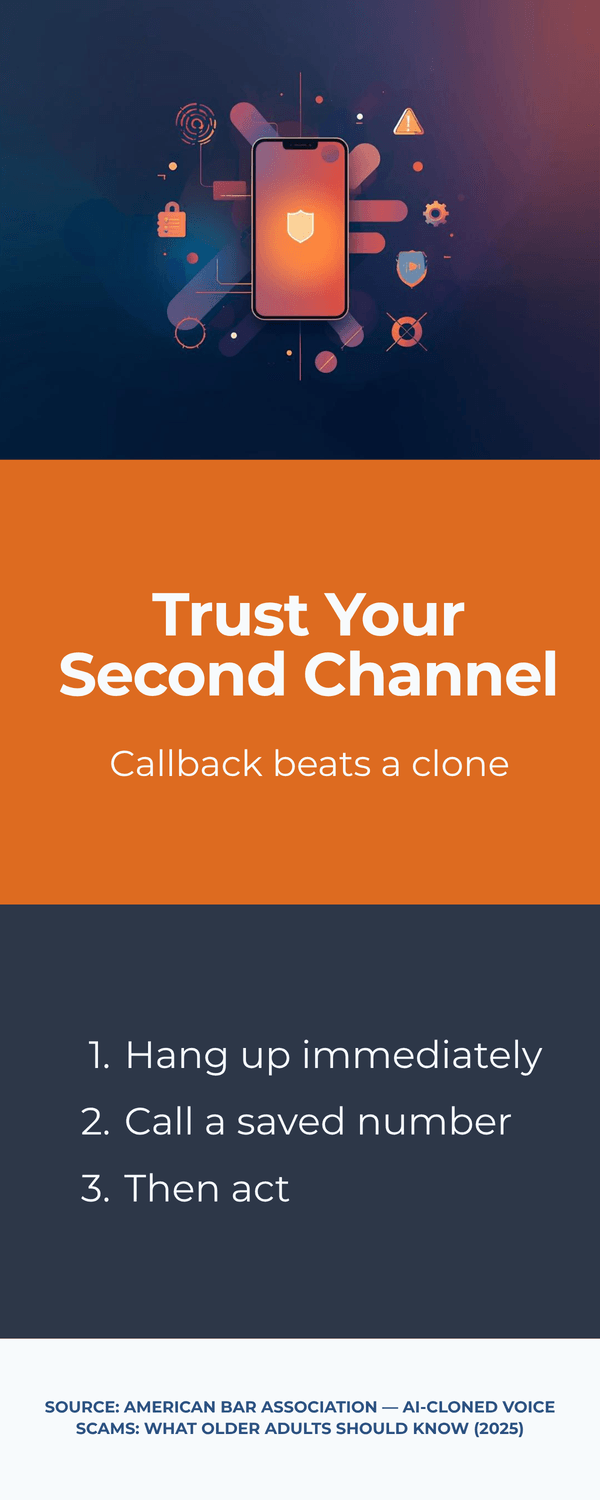
1) Golden Rule: hang up, then call back using a saved number.
Do not reply inside the thread that contacted you. Voice clones and hijacked accounts are common. End the call or text, open your contacts, and call the person or organization using a number you already saved. Consumer and legal advisors stress this out‑of‑band step because it breaks the scammer’s control of the channel (American Bar Association, 2025).
2) Use a family codeword.
Agree on a simple word or two‑word phrase and share it only in person or on a live video call you initiated. Review it twice a year. If a call or message mentions money, ask for the codeword. No codeword, no action. Guidance on voice‑clone scams highlights this small step as a powerful filter (American Bar Association, 2025).
3) Create a verification list.
Save official numbers for your bank, insurer, clinic, school, and local police non‑emergency line. During a crisis, you should not have to search the web while stressed. Who would you call first to confirm a claim? Add that contact now.
4) Decide alert roles.
Pick one family member to verify and one to update the group chat. This avoids cross‑talk and keeps rumors from spreading. If the “news” is real, you will share an official link. If it is false, you will post a calm correction.
5) Use the 60‑second news check.
When a crisis headline hits, name the feeling, search the headline plus “fact check,” and look for official confirmations from your health system, city, or bank. If nothing appears, that is a good reason to wait. Public guidance encourages simple, repeatable checks that fit everyday life (EDPS TechSonar, 2024).
6) Treat voice messages with extra care.
Clones may sound perfect but miss natural breaths, background noise, or timing around names. If you feel pressured, stop and switch channels. Security guides offer plain‑language tips for spotting and handling voice spoofing (McAfee, 2025).
7) Write it down.
Put the protocol on a one‑page note: Golden Rule, codeword, verification list, alert roles, 60‑second check. Stick it on the fridge and save it to your phone notes. Could a teen or an older parent follow it under stress? If not, simplify.
You might be wondering, will this make me ignore real emergencies? No. Real emergencies withstand a call back to a saved number and appear on official channels within minutes. It is normal to feel anxious the first time you use the protocol. That feeling fades as the habit forms.
The Key Takeaway
In a crisis, change the channel, ask for the codeword, call a saved number, and run a one‑minute verification.
A short, written family plan turns alarming messages into simple next steps.
Tools and settings you can turn on right now
You sit down after dinner and open your laptop. There is a little time before bed. This is the perfect moment to add a few quiet safeguards. None of these require special skills, and each one blocks common tricks used in AI‑boosted scams.
1) Turn on two‑factor authentication (2FA).
Start with email, bank, and mobile carrier. Use an authenticator app instead of SMS where possible. If a scam tries to reset your password, 2FA stops it at the door. Security groups keep repeating this because it works across many threats (see practical guidance from ISACA (2024)).
2) Add account alerts.
Set real‑time notifications for large transactions, new payees, login attempts, and SIM changes. Your bank and credit card apps usually support these. A quick buzz can save hours of cleanup.
3) Preview links before you click.
Hover on desktop or long‑press on mobile to see the real domain. If you want extra reassurance, paste suspicious URLs into a quick checker like CheckPhish (n.d.) or EasyDMARC (n.d.). These tools catch obvious traps and take seconds to use.
4) Tighten social and platform privacy.
Reduce who can view your posts and who can message you. Limit the public voice or video clips on your profiles, since clones only need short samples. Privacy advisors note that small setting changes can lower your exposure to data scraping and impersonation risks (TrustArc, 2024).
5) Follow official channels for fast confirmation.
Bookmark the alert pages for your health system, city, bank, and utility. When a claim appears, check those first. Financial security groups recommend building this shortlist before a crisis so you can verify quickly (FS‑ISAC, 2024).
6) Use a password manager.
It creates strong, unique passwords and remembers them for you. If you currently reuse a few passwords, start by changing the most sensitive ones: email, bank, and mobile carrier. You might be wondering, is that really enough? Yes. Unique passwords plus 2FA shut down most account‑takeover attempts.
7) Save your verification list.
Add official numbers for your bank, insurer, clinic, and local non‑emergency police. Put the list in your phone and on a small card in your wallet. If a scary message arrives, you will not have to search while stressed.
8) Keep a tiny media‑check routine.
When you see a shocking photo or clip, do a quick reverse image search and look for a second angle. If it is real, others will have it too. If not, you just avoided spreading a fake.
You might be thinking, this is a lot. Start with two items tonight: 2FA and account alerts. Tomorrow, add the verification list and link preview habit. Small steps compound.
The Key Takeaway
Flip on 2FA, set alerts, preview links, tighten privacy, and follow a few official channels.
These five moves give you a quiet safety net against AI‑amplified scams and make verification fast when news breaks.
When to trust, when to pause: a short decision tree
You’re skimming headlines before bed. One story asks you to share “ASAP to warn others.” Another links to your bank and says “verify now.” Which one deserves attention—and which one gets a pause? Use this quick decision tree. You can run it in under a minute.
Step 1 — Who published it?
Trusted outlet or official channel: Continue to Step 2.
Unknown blog, throwaway account, or screenshot of text: Pause and verify with your shortlist of official sources first.
Step 2 — Who confirms it?
Two reputable sources or an official release: Continue to Step 3.
Only copy‑paste sites or no second source: Pause. Set a reminder to recheck in 30–60 minutes.
Step 3 — What’s the rush?
No money, no credentials, no “share now” pressure: Lower risk; read normally and note the date.
Urgent request for money, passwords, codes, or viral sharing: High risk; switch channels and verify.
Step 4 — What do I risk if I wait?
Low stakes: It’s safe to wait for confirmation.
High stakes (banking, health, safety): Call a saved number from your verification list. Do not use the thread or link that contacted you.
Step 5 — Media check (if image/video/audio is central).
Reverse‑search key images. Look for a second angle of events. For audio, assume cloning is possible; call back a saved number. Consumer and legal advisors stress out‑of‑band checks for voice scams (American Bar Association, 2025).
If any step fails → Pause.
Do not share, pay, or enter credentials. Save a screenshot and recheck later from official sources. Public guidance emphasizes simple, repeatable checks over specialized tools, especially under stress (EDPS TechSonar, 2024).
You might be wondering, will I miss something important by waiting? Real emergencies withstand a callback to a saved number and appear quickly on official channels. Waiting a few minutes rarely harms you but it often prevents mistakes.
The Key Takeaway
Trust confirmed facts, not urgent vibes.
If source, confirmation, or motive looks off, pause and verify on a second channel.
Real news will still be true after you check.
To conclude...
You don’t need to be a tech expert to stay safe. A calm pause, a quick search, and a call back to a saved number will stop most AI‑amplified fakes. You’ve now got a simple playbook: a 60‑second headline check, fast image/video/audio checks, and a family protocol for pressure‑filled moments.
You might be wondering, will I really use this under stress? Yes, if you practice once. Save your verification list, set your codeword, and try the drill with a friend. The goal isn’t to distrust everything; it’s to separate urgency from action so you can act on facts with confidence.
If you found this helpful, share the checklist with a family member. Then turn on two‑factor authentication, set account alerts, and bookmark your official sources. Real news will still be true after you check.

🎓 Your "Tech Dignity" Toolkit
Ready to stop surviving the AI era and start owning it? I’ve built a library of resources specifically designed to help you stay safe, stay professional, and stay in control. Whether you want to fix a specific problem or master the whole machine, start here:
[FREE] The "Bypass the Bot" Bundle: Stop screaming at automated phone menus. Get the secret codes and scripts to reach a human every time. Download for FREE Here
Secure Your Family: Protect your loved ones from AI voice clones and deepfake scams with the Family Shield Anti-Scam Kit. Get Protected for $9
Upgrade Your Career: Use my "Strategy Sandwich" method to delegate grunt work to AI while keeping your professional edge with the Executive Director’s AI Workflow. Reclaim Your Time Here
Lock Down Your Privacy: Interrogate the "black box" and secure your data with the AI Truth & Privacy Protocol. Secure Your Data Here
Tame the Machine: Strip the "creepy" fake empathy out of AI and turn it into a silent tool with the "Strictly Business" AI Tuner. Take Control Here
The Ultimate Shortcut: Want the entire library? Secure your digital future with the Complete Mastery Collection (all products bundled for about 57% off). Get the Full Collection Here
Frequently Asked Questions
Q1) What’s the single fastest way to test a shocking headline?
Search a short version of the claim plus the words “fact check,” and look for confirmation on official sites (health system, city, bank). Public guides recommend simple, repeatable checks over special tools (EDPS TechSonar (2024)).
Q2) How do I handle a call or voice note that sounds exactly like a relative?
Hang up and call back using a saved number. Ask for your family codeword. Legal and consumer advisors highlight this out‑of‑band step for voice‑clone scams (American Bar Association (2025)).
Q3) Are grammar mistakes still a good clue that something’s fake?
Not really. A large share of scam content is now clean and on‑brand. Focus on behavior—urgency, secrecy, payment asks—rather than typos (Sift (2025)).
Q4) What should I do if I already shared a false story?
Correct it where you shared it, link to a reliable source, and, if money moved, contact your bank immediately. Then change any reused passwords and turn on 2FA (EDPS (2024); FBI IC3 (2024)).
Q5) Do I need special software to spot deepfakes?
No. Reverse‑image search, a second‑angle check, and a callback to a saved number catch most issues. Awareness resources list simple visual/audio tells you can learn quickly (SoSafe (2024); McAfee (2025)).
Q6) Why are adults 45+ targeted so often?
Scammers chase urgency around money, health, and caregiving. Older adults also report higher losses to imposter and tech‑support scams; fast reporting helps (FBI IC3 (2024); NCOA (2024)).
Q7) What are the best account settings to turn on tonight?
Two‑factor authentication, bank/credit alerts, and tighter social privacy. These reduce account‑takeover and impersonation risks (ISACA (2024); TrustArc (2024)).
Q8) How can I tell whether a site is credible without memorizing a list?
Look for a real masthead/About page, named authors, and links to primary documents. Then corroborate on two independent outlets or an official release (FS‑ISAC (2024)).
Q9) Is it safe to share “breaking” posts to warn others, just in case?
Share after verification, not before. False warnings spread fast and are hard to retract. Ask: Who confirms this? What changes if I wait ten minutes? (Bitdefender (2024)).
Q10) What’s one habit that protects my whole family?
Adopt the “second channel” rule for any urgent money or data request. Call a saved number or start a fresh message to a known contact (American Bar Association (2025)).
Sources
EDPS — TechSonar: Fake News Detection (2024)
American Bar Association — AI‑Cloned Voice Scams: What Older Adults Should Know (2025)
Sift — Index Report: AI Fraud Trends (2025)
iProov — Deepfake Blindspot Study (2025)
Keepnet Labs — Deepfake Statistics and Trends (2025)
SoSafe — How to Spot a Deepfake (2024)
McAfee — Guide to Deepfake Scams & AI Voice Spoofing (2025)
FS‑ISAC — Deepfake Technology: New Threats to Financial Institutions (2024)
Bitdefender — When Crisis Meets Chaos: How AI‑Generated Fake News Undermines Mental Health (2024)
UMich/AARP — Most Older Adults Don’t Trust AI‑Generated Health Info (2024)
FBI — Elder Fraud & Common Scams (2024)
NCOA — Top Online Scams Targeting Older Adults (2024)
TrustArc — How Generative AI Is Changing Data Privacy Expectations (2024)
Norton —What Are Deepfakes? (2024)