The Anti-Herding Guide: How to Reclaim Control When Algorithms Nudge You
By Rado
Last week I noticed something slightly embarrassing. I opened YouTube to watch one simple “how to” video, and 20 minutes later I was deep into clips I never planned to watch. Nothing “bad” happened. But I did feel… steered.
If you’ve ever thought, “Why am I seeing so much of this?” you’re not alone. Algorithms are built to predict what will keep you clicking, not what will keep you clear-headed.
The good news is you can take control back without becoming a tech expert. In this guide, I’ll show you a few practical habits to break out of algorithmic bubbles, check your blind spots, and choose your information diet on purpose. Simple steps. Real control. No guilt.
What does “anti-herding” actually mean, in plain English?
You sit down with a cup of coffee, open your phone, and think, “Just five minutes.” You tap one video. Then another. Then another. Nothing dramatic, but afterwards you feel oddly pulled. Like your attention went somewhere without asking you first.
If that sounds familiar, you might be wondering: Am I being manipulated? That’s a fair question. And it’s normal to feel a bit irritated when you notice your feed seems to have a plan for you.
Here’s the plain-English idea.
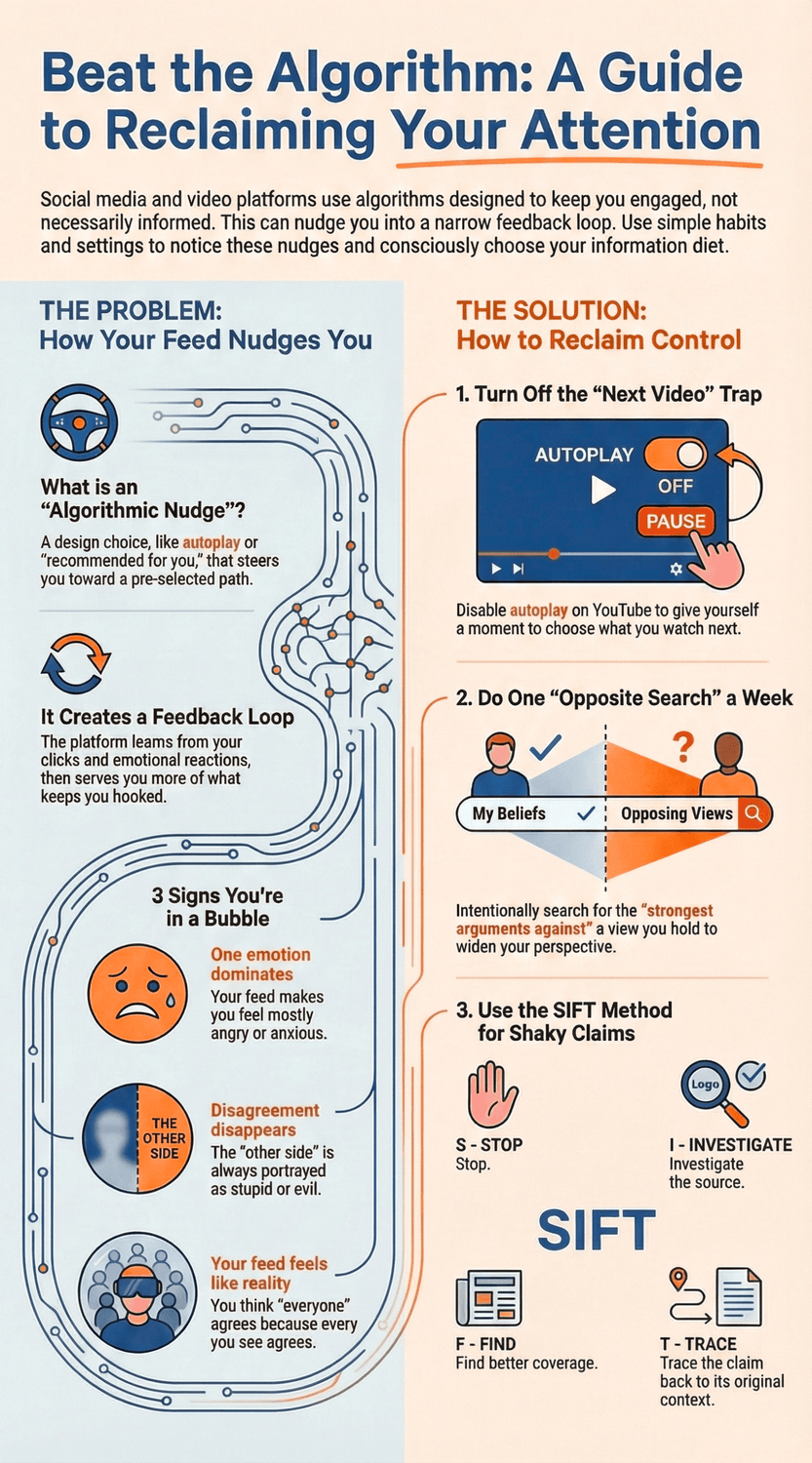
Anti-herding means noticing the nudge, then choosing on purpose.
Not fighting technology. Not deleting every app. Just building a small habit of “Wait, do I actually want this?” before you follow the next recommendation.
Because algorithms do nudge. They can do it gently, through “recommended for you,” autoplay, and endless scroll. And many systems are set up to rank and serve the items most likely to keep you engaged, meaning clicking, watching, reacting, and staying longer on the platform. That’s not a conspiracy. It’s a business model choice, and researchers and policy experts talk about it openly, including how engagement-focused feeds can shape behavior over time. Knight-Georgetown Institute (2025)
So what’s a “nudge” in this context?
A nudge is a small design choice that steers behavior without removing options. In digital spaces, it shows up as defaults, reminders, social proof, and carefully placed suggestions. The point is not that you can’t choose differently. The point is that the easy path is quietly pre-selected. Khound & Mishra (2025)
Now zoom out for a second. Anti-herding is not about having the “correct” opinion. It’s about protecting your ability to think clearly, especially when a feed keeps handing you more of the same. You are allowed to enjoy recommendations. You are also allowed to be the one holding the steering wheel.
One helpful way to think about it is this: personalization is convenience, until it becomes automatic. Features like infinite scroll and autoplay are built to reduce stopping points, which can make it easier to lose track of time and keep consuming what’s “next.” National Academies (2024)
So, here’s a simple gut-check you can use today:
“Did I choose this, or was I guided here?”
If you can’t tell, that’s your signal to slow down for five seconds and decide.
The Key Takeaway
Anti-herding is a tiny daily practice: notice the nudge, pause, and choose your next click on purpose.
Next, we’ll look at how algorithms nudge you without you noticing, so you can spot the patterns faster.
How do algorithms nudge you without you noticing?
Imagine it’s a quiet evening. You open Facebook or YouTube “just to check one thing.” Five minutes later, you’re still there, a little tense, and you can’t even remember what you originally came for. You might be wondering, Why is it so hard to stop? That’s a fair question, and it’s not a personal weakness.
A lot of the nudge is built into the loop.
Here’s the loop in everyday language: you click, pause, watch, react, or scroll. The platform learns from that. Then it serves you more of whatever it predicts will keep you engaged. And “engaged” usually means time, attention, and reactions, because that’s what keeps the business running. Reports on ranking systems point out that when feeds are optimized for engagement, they can end up favoring content that is more emotive, more extreme, or simply harder to ignore. Panoptykon Foundation (2024)
Now add design features that remove natural stopping points.
Autoplay means the next video starts before you’ve had time to choose it. Infinite scroll means there’s no “end of the page” moment where your brain can naturally say, “Okay, done.” Push notifications poke you when you’re not even thinking about the app. The National Academies describes these kinds of features as persuasive design, tools meant to capture attention and time for the platform’s benefit. National Academies (2024)
So if you’ve ever felt like the app is “pulling” you, that feeling makes sense.
And the really sneaky part is that it often doesn’t feel like persuasion. It feels like convenience.
“Because you watched…” sounds helpful. “Recommended for you” sounds personal. Even “Top picks” sounds like the platform is doing you a favor. But ask yourself: Who is it optimized for? Your goals, or their goals? If your goal is to learn, relax, or stay informed, the feed may still prioritize what keeps you watching, not what keeps you clear-headed.
You also get nudged by emotion, not just topic.
If you pause longer on something surprising, alarming, or irritating, the system can treat that as a strong signal. That’s why one anxious video can lead to five more anxious videos. One angry headline can lead to a whole stream of angry headlines. Center for Humane Technology points to infinite scroll and notification design as features that keep people continuously engaged, often by tapping into attention and reward patterns. Center for Humane Technology (n.d.)
So what can you do with this?
Start with one small awareness habit: notice your “nudge points.”
Autoplay starting? That’s a nudge point. “Up next” lined up perfectly? Nudge point. A notification dragging you back in? Nudge point. Once you see the pattern, you can interrupt it.
The Key Takeaway
Algorithms nudge you through a feedback loop plus persuasive design, often by removing stopping points and rewarding emotional engagement.
How can you tell when you’re in an algorithmic bubble?
Let’s make this concrete. You open the news “for a quick check.” You see three posts in a row that all say the same thing, with the same tone, from people who sound like they already agree with you.
It feels comforting for a second. Then you notice something else: you’re more certain, but also more tense.
Is that a bubble? Or is it just… my interests? And it’s worth saying out loud: research on echo chambers is mixed. They’re not always as total as people fear, and exposure can still be more varied than it feels in the moment. Reuters Institute (2022) Still, “not guaranteed” does not mean “not real.” You can absolutely end up in a narrowed feed, especially when both algorithms and your own habits pull in the same direction. CEPR (2024)
So how do you spot it, without overthinking?
7 simple signs your feed is narrowing you
1. Same topic, different wrappers. The headlines change, but the message stays identical.
2. One emotion dominates. Everything makes you angry, anxious, or smug. Rarely curious.
3. You hear more certainty than evidence. Lots of “obvious truth,” not many sources.
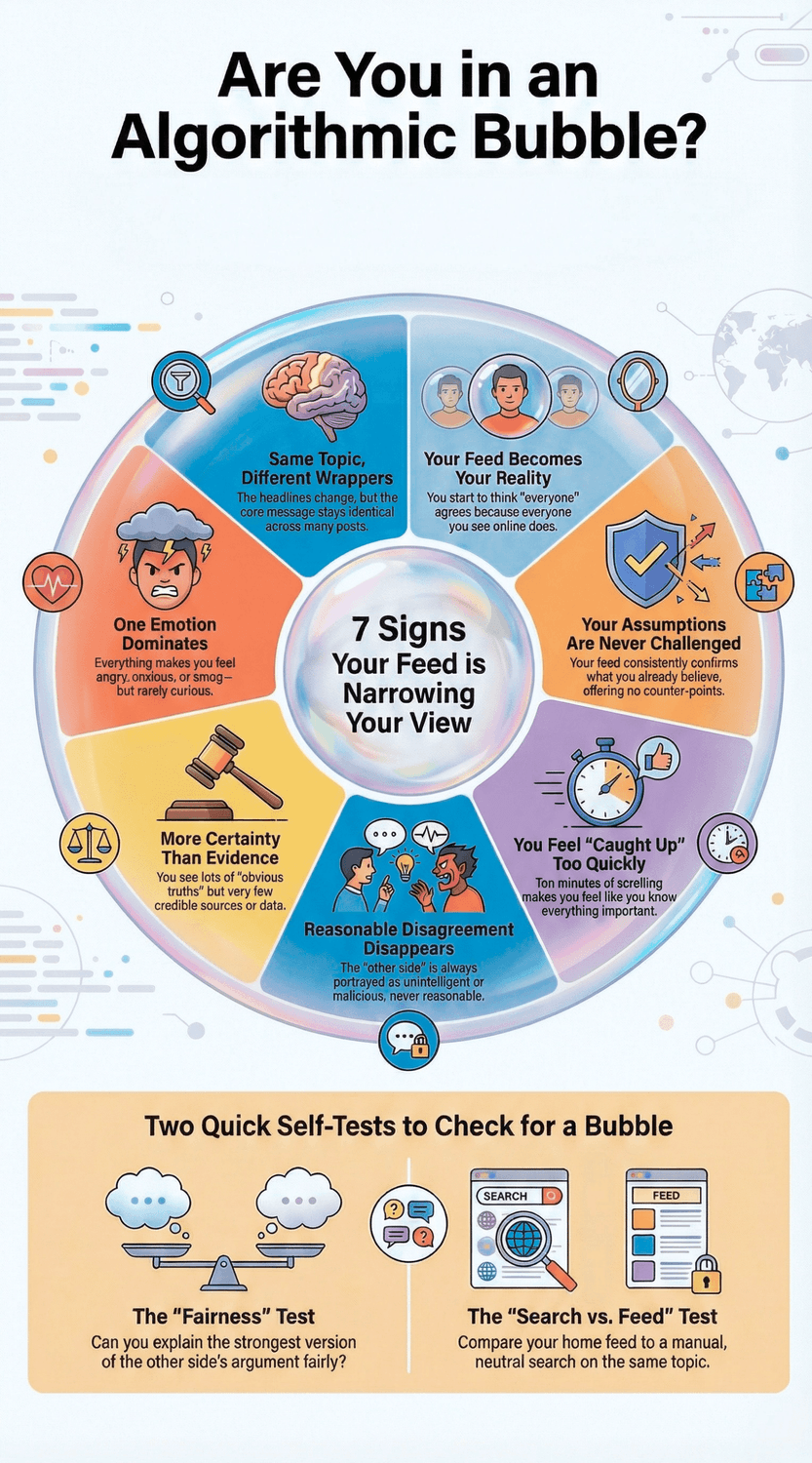
4. You stop seeing reasonable disagreement. The other side is always portrayed as stupid or evil.
5. You feel “caught up” quickly. In 10 minutes, you feel like you know everything important. Do you?
6. Your assumptions rarely get challenged. Not because you’re always right, but because the input is narrow.
7. Your feed becomes your reality. You start thinking “everyone” agrees, because everyone you see agrees.
Here’s a quick self-test that works surprisingly well:
Can you explain the strongest version of the other side in a way they would recognize as fair?
If you can’t, it does not mean you’re wrong. It might simply mean you’re under-exposed. Researchers studying these patterns often stress nuance: different platforms, different habits, and different types of users can lead to very different outcomes. Kitchens, Johnson & Gray (2020)
Another useful test:
Compare your “home feed” with a manual search.
Search the same topic with neutral wording. Then search it again with a phrase like “best arguments against X.” If the tone and facts look completely different, you’ve learned something important about how your feed has been shaping the menu. Guidance for improving recommender systems often highlights that default feeds can narrow choices, while user controls and alternative viewing modes can widen them. Knight-Georgetown Institute (2025)
Now take a breath. It’s normal to feel defensive when you first do this. Nobody likes discovering blind spots.
The Key Takeaway
If your feed is heavy on sameness, certainty, and one emotion, treat it as a signal.
What are the simplest ways to “break the bubble” on purpose?
Let’s say you’re planning a trip. You look up “best place to stay in Rome,” and suddenly every app you open is full of Italy tips. Helpful at first. Then it starts feeling like you’re in a tunnel. Same neighborhoods, same hotel style, same kind of traveler. You might be wondering, If this happens with travel, what about news and opinions? That’s a fair question.
Breaking a bubble does not have to be dramatic. Think small, repeatable habits. The goal is not to “balance everything perfectly.” It’s to widen your options so your feed stops shrinking your world.
1) Do one “Opposite Search” on purpose (2 minutes)
Once a day or once a week, pick one topic you care about and search for the best case against your current view.
Try phrases like:
“best arguments against…”
“strongest criticism of…”
“what would change someone’s mind about…”
Why this helps: bubbles are partly algorithms, and partly our own comfort. Media literacy guidance often focuses on using multiple sources and checking credibility instead of relying on a single stream. Ofcom (2024)
2) Use manual search more than the home feed
Home feeds are built to keep you watching. Manual search is you taking the wheel.
So next time you open YouTube, try this: search a specific question first, watch what you came for, then close the app. Sounds simple, right? But if you usually start on the home page, this one change can cut a lot of “extra” viewing. Researchers describing persuasive design point out that features like recommendations, autoplay, and infinite scroll are designed to hold attention. National Academies (2024)
3) Add one “outside your lane” source each week
This is the easiest way to widen your inputs without exhausting yourself.
Pick just one:
A reputable outlet from another country
A calm long-form podcast from a different profession (nurse, engineer, small business owner)
A newsletter that summarizes research instead of arguing
Ask yourself: When was the last time you learned something useful from someone you did not already agree with? If the answer is “I’m not sure,” that’s a good sign you’re ready for this step.
4) Try a “slow media” rule
Here’s a rule I like because it’s realistic: one calm, longer source beats ten hot takes.
When you feel pulled into rapid scrolling, pause and choose one piece you will actually finish. This protects your attention and reduces that jittery “too much” feeling. And it fits what many verification guides recommend: slow down, check, compare, and only then decide what you believe. UNESCO (2025)
The Key Takeaway
You reclaim control by making your inputs a little wider on purpose: opposite search, manual search, one new source, and a slow-media choice.
Which settings actually help you regain control (without breaking your apps)?
Think of the last time you cleaned a kitchen drawer. You did not remodel the whole kitchen. You just removed the junk, kept the useful stuff, and made it easier to find what you actually use.
Feed settings work the same way.
Do these settings really matter, or is it all too powerful anyway? That’s a fair question. Settings won’t turn algorithms off. But they do create more stopping points, and they change what the system learns from you over time.
Here are the few that give you the most control for the least effort.
1) YouTube: stop the “next video” trap
Turn off autoplay so you get a moment to decide. That tiny pause is where control lives. Google’s own help guidance shows Autoplay controls in settings (and in some places, you’ll see “Autoplay in feeds”). YouTube Help (n.d.)
Pause or clear watch history when your recommendations feel stuck in a rut. If you watch one intense topic for a week, the feed often assumes that’s “you now.” You can reset that signal by pausing or clearing history in the app’s History & privacy section. YouTube Help (n.d.)
Ask yourself: Do I want YouTube to “remember” this phase of my life? Or was it just a short curiosity?
2) Facebook: use Feeds and Favorites like a steering wheel
If you only scroll the default feed, you get the platform’s idea of “top posts.” Facebook also offers a Feeds area where you can switch to Most recent posts. It’s a simple way to reduce the feeling that the platform is choosing for you. Facebook Help Center (n.d.)
Also, use Favorites for people and pages you genuinely want to hear from. Why? Because it turns your feed from “whatever gets reactions” into “the people I actually care about.” Facebook documents these controls under content and feed preferences. Facebook Help Center (n.d.)
Quick gut-check: When was the last time your feed matched your real priorities?
3) Google: reduce ad personalization so you feel less “followed”
Even if you do nothing else, it can feel calming to turn down the “someone is tracking me” vibe.
Google explains that My Ad Center lets you turn personalized ads on or off, and you can also control which activity is used for ad personalization. Google My Ad Center Help (n.d.) Google Policies (n.d.)
One important nuance: turning off personalized ads does not mean you see no ads. It means the ads are less based on your history. Google Policies (n.d.)
A small mindset shift that helps
These are not “set once and forget” controls. Think of them like brushing your teeth. Small, regular, and protective.
The Key Takeaway
Turn off autoplay, manage watch history, switch to Most recent when you want less steering, and reduce ad personalization if it makes you feel watched.
How do you explore opposite viewpoints without falling into misinformation?
Let’s be honest, this part can feel risky.
You open a link someone shares, thinking, “I should understand what the other side is saying.
”Two minutes later you’re staring at a dramatic headline, a blurry screenshot, and a comment section that’s basically a shouting match. You might be wondering, Am I expanding my mind, or just walking into a trap? That’s a fair question.
The goal is not to “consume everything.” It’s to explore on purpose, with simple guardrails.
Start with the safest mindset shift: curiosity browsing vs. belief forming
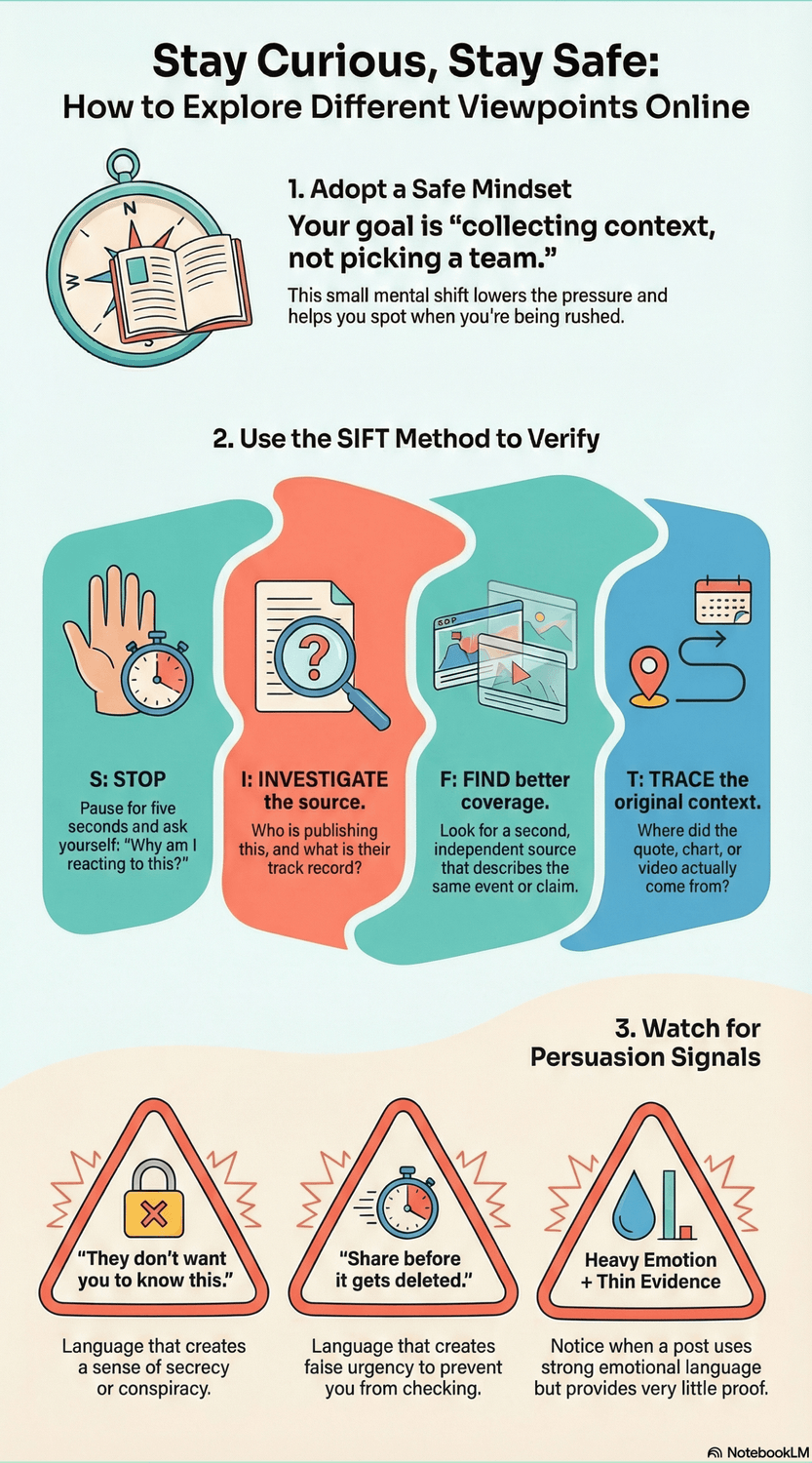
When you explore an opposite viewpoint, tell yourself: “I’m collecting context, not picking a team.” That small sentence lowers the pressure. It also makes it easier to notice when something is trying to rush you into certainty.
So here’s a practical rule that helps a lot.
Use the two-check rule before you believe or share
If a claim matters, or it spikes your emotions, don’t decide from one post.
Find better coverage first. Look for a second, independent source that describes the same event.
Then trace the claim back to context. Where did the quote, chart, or video actually come from?
This is basically what professional fact-checkers do. Research comparing fact-checkers to students and professors found that fact-checkers “read laterally,” meaning they leave the page quickly and open new tabs to check who is behind the site and whether trusted sources confirm the story. Wineburg (2019)
A simple framework you can remember: SIFT
When something grabs you, try SIFT:
Stop. Take five seconds. Ask: Why am I reacting?
Investigate the source. Who is publishing this, and what’s their track record?
Find better coverage. Has anyone reliable reported the same claim?
Trace claims, quotes, and media. Is that image old? Is the quote cut short?
This framework is widely taught as a fast way to avoid getting pulled into shaky content. Hapgood (2019)
Watch for “persuasion signals”
You do not need special skills. Just notice patterns like:
“They don’t want you to know this.”
“Everyone is waking up.”
“Share before it gets deleted.”
Heavy urgency plus heavy emotion, with thin evidence.
UNESCO’s guidance on verification also emphasizes slowing down, checking sources, and looking for original context, especially when content is designed to provoke quick reactions. UNESCO (2025)
And here’s a question I like because it’s hard to fake: If this is true, what evidence would a careful person expect to see? If the answer is “mostly vibes,” you’ve got your signal.
Next, we’ll turn this into a weekly routine so it feels doable, not exhausting.
The Key Takeaway
Explore opposite viewpoints with guardrails: pause, check the source, find independent coverage, then trace the claim back to context.
That’s how you stay open-minded without getting played.
What does intellectual independence look like in daily life?
Picture a normal Tuesday. You’re at the kitchen table, phone in hand, and you tell yourself: “I’ll just catch up for a minute.” Ten minutes later, your mood has shifted. You feel more certain, maybe more irritated, and oddly less calm. You might be wondering, How did I get here so fast? That’s a fair question.
Intellectual independence is not about being “neutral” on everything. It’s simpler than that.
It’s the ability to choose your inputs on purpose, and to keep your mind flexible enough to handle new information. When you do that, you don’t just protect your opinions. You protect your peace. Researchers who review the evidence on echo chambers often stress that the reality is nuanced and depends on platform and behavior, which is exactly why small habits matter. Reuters Institute (2022)
So what does this look like in real life, not theory?
A simple weekly routine (15 minutes total)
You can do this once a week, maybe Sunday evening, maybe Friday morning. Pick a moment that already exists.
5 minutes: Clean your feed signals
On YouTube: tap “Not interested” on a few things you don’t want more of.
On Facebook: unfollow or snooze one source that reliably spikes your stress.
Ask: Do I want more of this next week?
Small choices like these matter because feeds learn from your behavior over time, especially when engagement is the goal. National Academies (2024)
5 minutes: Add one diverse input
One calm source outside your usual lane (another country, another profession, another viewpoint).
Not to agree with it. Just to keep your “information diet” from becoming one-note.
5 minutes: Do one opposite search
Pick one topic you care about and search: “best arguments against X” or “critique of X.”
Then ask yourself two questions:
Could a reasonable person think differently than me?
What evidence would I need to change my mind?
That second question is powerful because it moves you from defending to examining. It’s also the heart of strong verification habits. Wineburg (2019)
One tiny rule that saves you from spirals
Before you like, share, or argue, pause and do the simplest check: can you find better coverage elsewhere? UNESCO’s media and information literacy guidance keeps coming back to the same idea: slow down, verify, and look for original context before you decide what’s true. UNESCO (2025)
And if you’re thinking, “This sounds like work,” I get it. It’s normal to feel that way. But you’re not adding hours. You’re adding small guardrails.
The Key Takeaway
Intellectual independence is a weekly practice, not a personality trait.
A few minutes of intentional input beats hours of accidental scrolling.
Can AI help you break the bubble instead of tightening it?
Imagine you’re reading a post that makes you think, “Yes! Finally, someone said it.” You feel that little spark of certainty. Then you pause and wonder, Wait, am I being fair here? It’s normal to feel torn. You want to stay open-minded, but you also don’t want to get dragged into nonsense.
This is where AI can actually help, if you use it like a thinking tool, not a truth machine.
A simple way to think about it: AI is good at structuring arguments. It’s not automatically good at verifying facts. Even OpenAI has published work explaining why language models can “hallucinate,” meaning they can generate confident statements that are not true. OpenAI (2025)
So, what can it do well for anti-herding?
1) Ask AI to “steelman” both sides
You might be wondering, What does steelman mean? It simply means: “Present the strongest version of a viewpoint, not the weakest.”
Try:
“Explain the strongest arguments for and against X. Be fair and calm. No sarcasm.”
“What would a reasonable person on each side worry about?”
This helps you escape the cartoon version of “the other side” that bubbles tend to feed you.
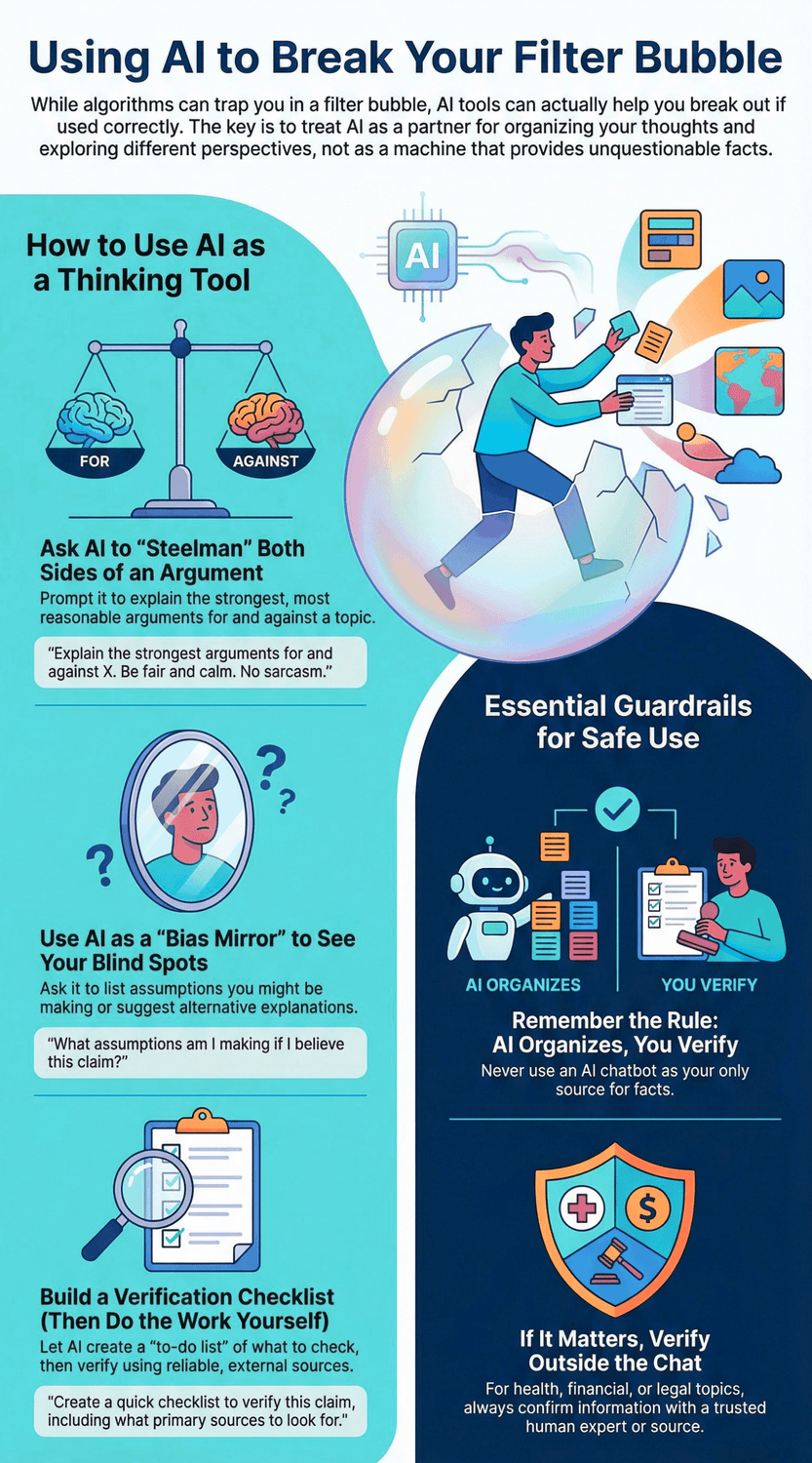
2) Use AI as a bias mirror
A bubble isn’t only the algorithm. It’s also our habits.
Try:
“What assumptions am I making if I believe this claim?”
“What evidence would I need to see to be confident either way?”
“List 5 alternative explanations for this situation.”
Frameworks like the NIST AI Risk Management Framework emphasize that AI systems can have risks around validity and reliability, and that users should manage those risks thoughtfully. NIST (2023)
3) Use AI to build a verification checklist, then do the checking yourself
This is the safest workflow. Let AI give you the “to-do list,” then you verify with real sources.
Try:
“Create a quick checklist to verify this claim, including what primary sources to look for.”
“What would a cautious journalist check first?”
UNESCO’s guidance on generative AI keeps coming back to the same human skill: critical thinking and verification habits, especially when information spreads fast. UNESCO (2025)
Two guardrails that keep you safe
Do not use AI as your only source for facts. Use it to organize your thinking, not to declare what’s true.
If it matters, verify outside the chat. Health, money, legal issues, and anything you might share publicly deserve that extra step. The NIST generative AI profile is explicit that GenAI brings distinct risks and needs stronger risk management in use. NIST (2024)
The Key Takeaway
AI can help you break the bubble by strengthening your thinking.
Just keep the roles clear: AI organizes, you verify, and you decide.
Your “Anti-Herding” Finish Line
You open YouTube to watch one travel video, and suddenly you’ve lost 40 minutes to “one more clip.” Or you check the news, and the next headline feels like it was written just to make you react. You might be wondering, “Is it me, or is this thing steering me?”
Most modern feeds are built to predict what you’ll click, not what you’ll feel good about after 20 minutes. That’s why many researchers and policy groups keep coming back to the same idea: people need real, usable controls, plus safer defaults, so the system works for the user, not the other way around (Knight-Georgetown Institute, 2025). (Knight-Georgetown Institute)
The good news is you don’t need to “win” against the algorithm. You just need a few steady habits that give you breathing room:
Add friction on purpose (pause autoplay, turn off noisy notifications, create stopping points). Design tricks like infinite scroll and autoplay are meant to remove your natural “I’m done” moment (Center for Humane Technology, n.d.). (Center for Humane Technology)
Widen your inputs (one or two “outside your lane” sources, a weekly opposite-view search, a neutral explainer). Evidence suggests bubbles are real for some people and topics, but it’s not as simple as “everyone is trapped,” and your choices still matter (Reuters Institute, 2022). (Reuters Institute)
Upgrade your checking reflex (especially when something spikes your anger or excitement). Simple methods like SIFT and Civic Online Reasoning push you to look for context, sources, and “who’s behind this,” before you share it (Caulfield, 2017; Stanford History Education Group, 2019). (Scholars Crossing)
If you do only one thing today, do this: pick one feed and change one default. Turn off autoplay, clear watch history once, or disable personalized ads. Small moves, repeated, are how you reclaim control.
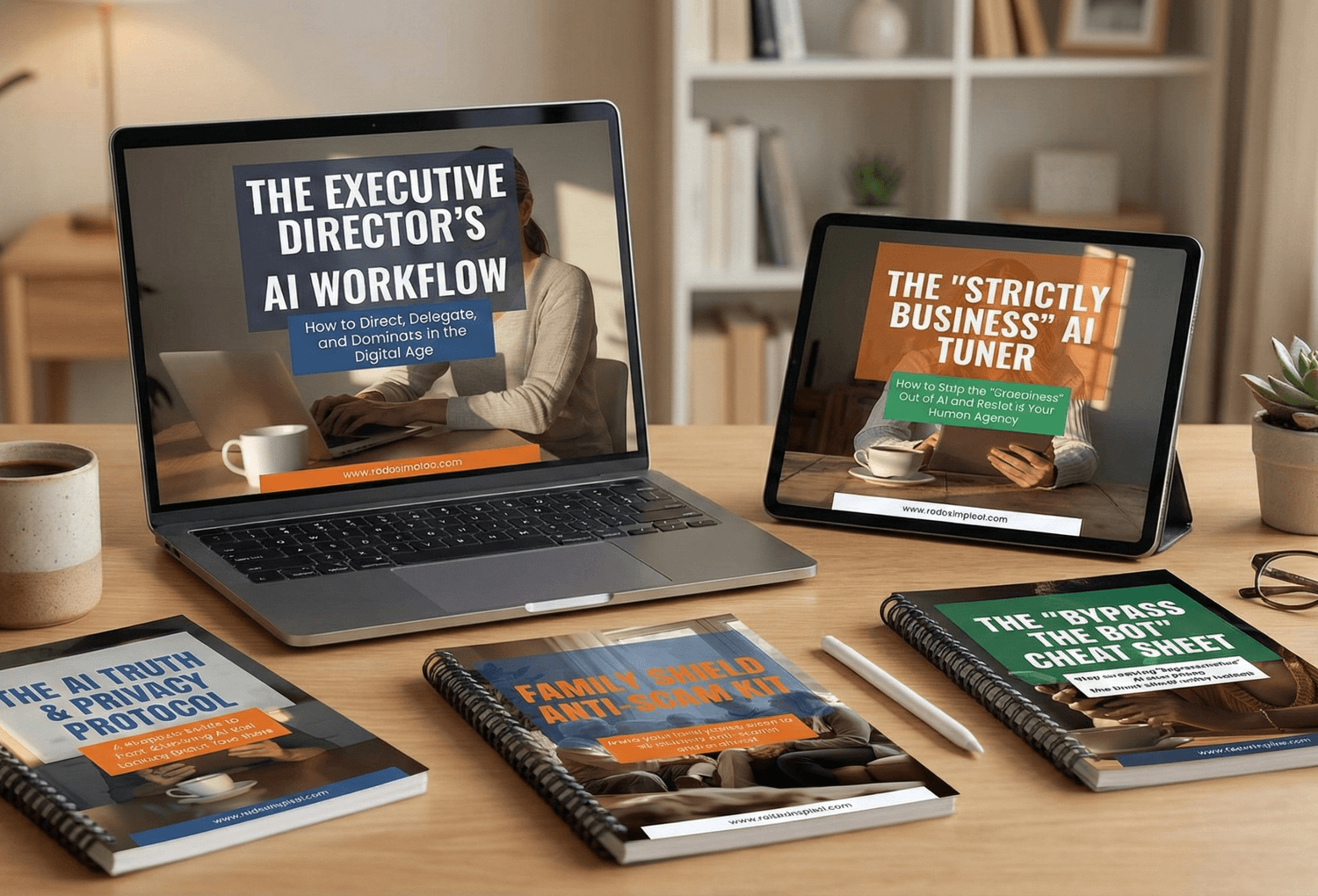
🎓 Your "Tech Dignity" Toolkit
Ready to stop surviving the AI era and start owning it? I’ve built a library of resources specifically designed to help you stay safe, stay professional, and stay in control. Whether you want to fix a specific problem or master the whole machine, start here:
[FREE] The "Bypass the Bot" Bundle: Stop screaming at automated phone menus. Get the secret codes and scripts to reach a human every time. Download for FREE Here
Secure Your Family: Protect your loved ones from AI voice clones and deepfake scams with the Family Shield Anti-Scam Kit. Get Protected for $9
Upgrade Your Career: Use my "Strategy Sandwich" method to delegate grunt work to AI while keeping your professional edge with the Executive Director’s AI Workflow. Reclaim Your Time Here
Lock Down Your Privacy: Interrogate the "black box" and secure your data with the AI Truth & Privacy Protocol. Secure Your Data Here
Tame the Machine: Strip the "creepy" fake empathy out of AI and turn it into a silent tool with the "Strictly Business" AI Tuner. Take Control Here
The Ultimate Shortcut: Want the entire library? Secure your digital future with the Complete Mastery Collection (all products bundled for about 57% off). Get the Full Collection Here
Frequently Asked Questions
Q1) Are algorithms always “trapping” me in a bubble?
Not always. Research reviews find a mixed picture: some users do end up in tighter information loops, but many people still consume a variety of sources, and effects differ by topic and platform (Reuters Institute, 2022). (Reuters Institute)
A better mindset is: assume nudges exist, then build habits that keep you curious.
Q2) How do I quickly reset recommendations without deleting my whole account?
Start with the simplest reset switch: pause or clear watch history and then intentionally watch a few “fresh start” videos from new channels (YouTube Help, n.d.). (The Verge)
If you want a softer approach, just stop clicking a topic for a week and feed the system a new pattern on purpose.
Q3) Won’t “opposite viewpoints” just make me angry or confused?
It can, and it’s normal to feel that way. The goal is not to binge the other side. It’s to sample it in small, controlled doses so you can spot weak arguments in your own camp too. That’s intellectual independence, not self-punishment (Reuters Institute, 2022). (Reuters Institute)
Q4) What’s the fastest way to sanity-check a post before I share it?
Try a quick 30-second routine: check your emotion first, look for the original source, and see what trusted outlets or fact-checkers have already found (Caulfield, 2017). (Scholars Crossing)
If the post has no clear source and only tries to provoke, treat it as “unverified entertainment,” not information.
Q5) How do I reduce “ad personalization” nudges without becoming a tech expert?
You can simply turn off or limit ad personalization controls in your Google ad settings and review what the system thinks you’re interested in (Google Policies, n.d.; Google Ads Help, n.d.). (policies.google.com)
This won’t remove ads, but it can reduce how much they “follow” your recent clicks.
Sources
Knight-Georgetown Institute — Better Feeds: Algorithms That Put People First (2025).
Reuters Institute for the Study of Journalism — Echo Chambers, Filter Bubbles, and Polarisation: A Literature Review (2022).
Center for Humane Technology — Persuasive Technology (n.d.).
National Academies of Sciences, Engineering, and Medicine — Social Media and Adolescent Health (2024).
Ofcom — Ofcom’s Three-Year Media Literacy Strategy (Final) (2024).
Michael A. Caulfield — Web Literacy for Student Fact-Checkers (2017).
Stanford History Education Group — Students’ Civic Online Reasoning: A National Portrait (2019).
UNESCO — Guidance for Generative AI in Education and Research (2023).
Google — Advertising: Privacy & Terms (Technologies) (n.d.).
Google Ads Help —About Privacy and Personalized Ads (n.d.).