
Automate the Chores, Not the Connection: How AI Gives You More Real Family Time
By Rado
It’s a familiar scene. You finally sit down after dinner, thinking you’ll relax with your partner or call your parents… and instead you open your phone to “just quickly” answer messages, plan the weekend, find a gift, or sort photos. Thirty minutes disappears. Then an hour.
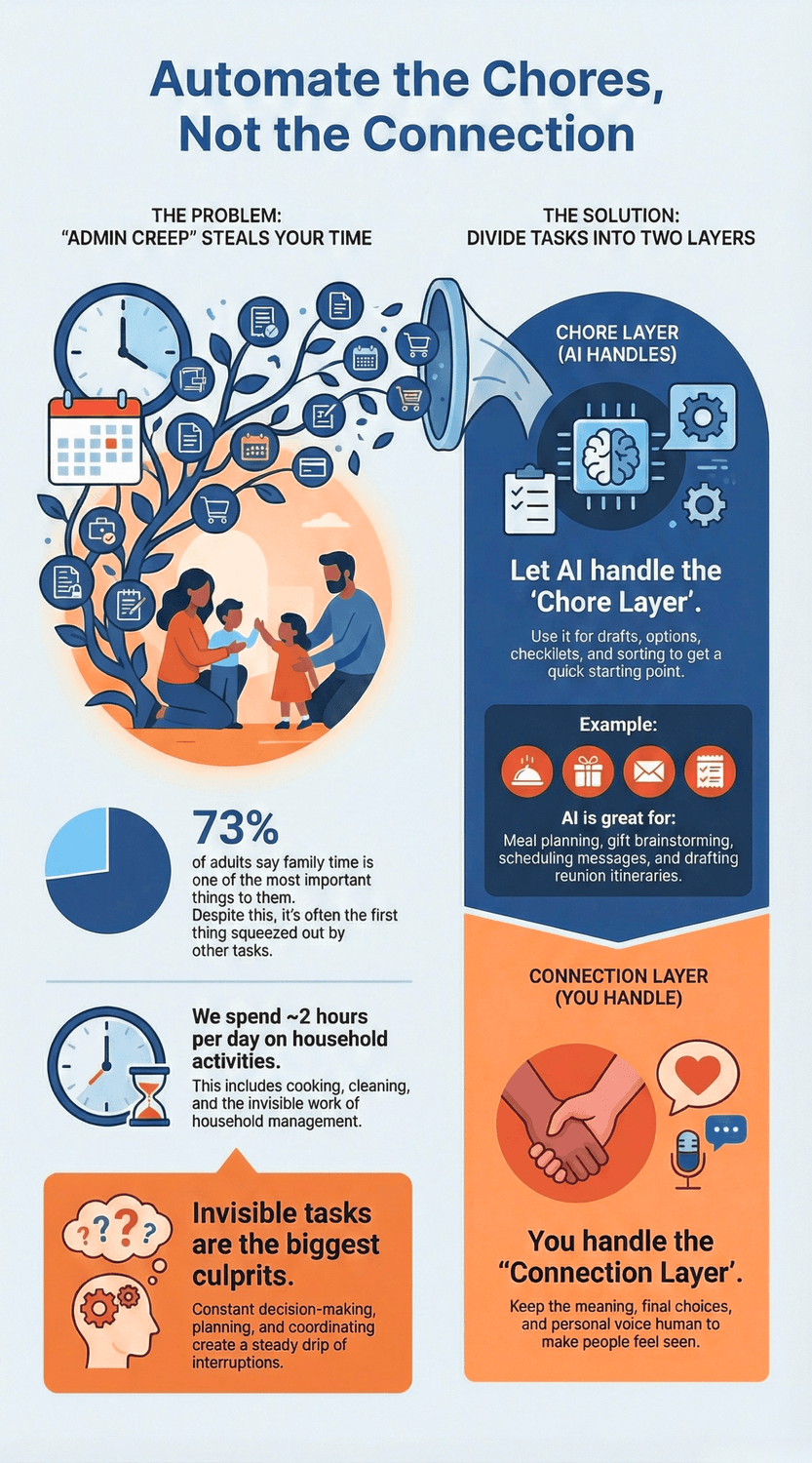
And the frustrating part is this: it’s not that you don’t care about family time. Most people do. In a Pew Research Center survey, 73% of U.S. adults say spending time with family is one of the most important things to them. (Pew Research Center)
So what’s stealing the time? A lot of it is the invisible admin: planning, searching, scheduling, and decision-making. The U.S. Bureau of Labor Statistics estimates that people spend about 2 hours a day on household activities on average. (Bureau of Labor Statistics)
In this post, I’ll show you a simple way to use AI for the “background tasks” (planning, lists, drafts, sorting) so you can protect the “foreground moments” that actually build connection.
Why does family time keep getting squeezed out, even when you care?
Picture a normal evening at the kitchen table. You’ve done dinner, you’ve finally sat down… and then you remember three tiny things. Reply to your sister. Order a gift. Figure out Sunday. You tell yourself, “Just five minutes.” And somehow, it turns into your whole quiet window for connection.
If that sounds familiar, you’re not failing. You’re dealing with a type of work that rarely shows up on a to-do list, but still eats time. The “little admin” tasks.
Here’s a helpful reality check. In the American Time Use Survey, people spent an average of 2.01 hours per day on household activities in 2024. That’s food prep, cleaning, laundry, and household management. It adds up quickly. U.S. Bureau of Labor Statistics (2024) (Bureau of Labor Statistics)
Now add the invisible layer: deciding what to cook, remembering birthdays, comparing options, coordinating schedules, finding photos, responding to messages. None of it is “hard” on its own. But it creates a steady drip of interruptions.
“But why does it feel so personal when I lose that time?” Because family time isn’t a nice extra. For most people, it’s the point. In a Pew survey, 73% of U.S. adults said spending time with family is one of the most important things to them. Pew Research Center (2023) (Pew Research Center)
So when the evening gets swallowed by chores and “just one more thing,” it doesn’t feel like you lost time. It feels like you lost the part that matters.
And for many families, there’s also caregiving in the background. AARP estimates that 21.3% of Americans are caregivers, meaning they provided care to an adult or child with special needs in the past year. AARP (2020) (AARP) That can mean more calls, more appointments, more coordination, and more emotional weight.
So what does this have to do with AI?
AI is not here to “do family.” It can’t replace warmth, attention, or shared memories. But it can reduce the boring friction around family life: the planning, the drafting, the sorting, the “what do we do now?” moments. And when those shrink, you get something rare back: an unbroken stretch of attention.
The Key Takeaway
If family time keeps slipping away, it’s usually because the admin is everywhere.
Use AI for the background chores, so you can show up fully for the people in front of you.
What should AI handle, and what should stay human?
Imagine you’re planning a family Sunday. You want it to feel easy. But your brain immediately fills with little questions.
What should we cook? What time works for everyone? Who’s picking up Dad? Did I already buy a gift for that birthday next week? And where are the photos from last year?
It’s normal to feel a bit irritated by this. You’re not asking for a luxury. You’re trying to protect time with people you actually care about. And most of us do care. In fact, about three-quarters of U.S. adults say spending time with family is one of the most important things to them. Pew Research Center (2023) (Pew Research Center)
So here’s the simple rule that keeps AI helpful, not weird.
The rule of thumb
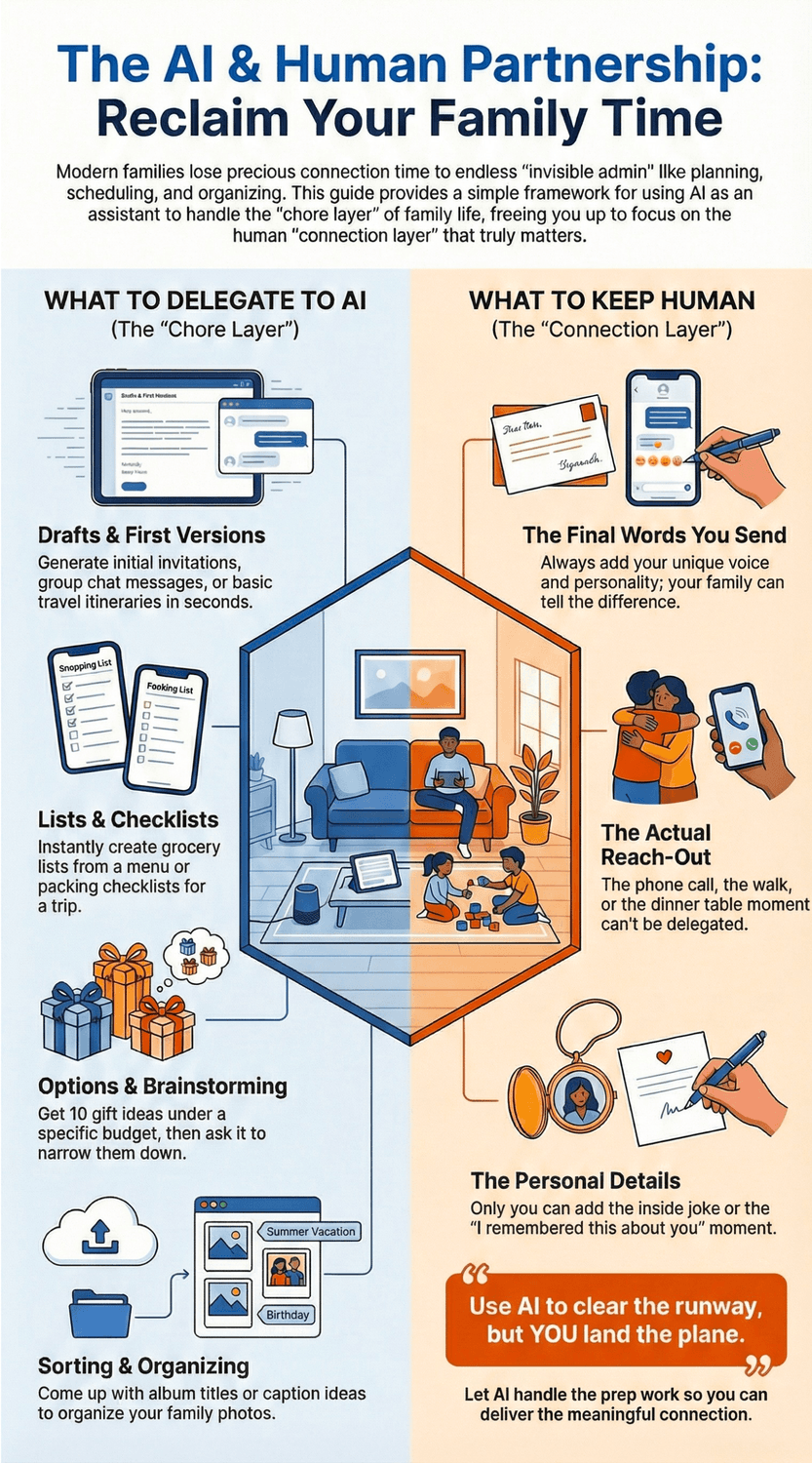
Let AI handle the “chore layer.” Keep the “connection layer” human.
AI is great for: drafts, options, checklists, and sorting.
You are responsible for: meaning, choices, and voice.
“Okay, but what does that look like in real life?” Let’s make it concrete.
What AI should handle (the chore layer)
Drafts: a first version of an invitation text, a message to the family group chat, a basic itinerary.
Lists: a grocery list from a menu, a packing checklist, a “who brings what” list.
Options: 10 gift ideas under €30, then narrowing to the best 3 with reasons.
Sorting: album titles, caption ideas, and a simple system for organizing photos.
This is the stuff that usually steals time because it requires decisions. AI can give you a starting point in seconds, and you can move on.
What should stay human (the connection layer)
The final words you send. Your sister can tell when it sounds like you.
The actual reach-out. The call, the walk, the dinner table moment.
The tiny personal details. The inside joke. The “I remembered this about you.”
Here’s a quick self-check: If the task is meant to make someone feel seen, should a robot do it for you? That’s a fair question. My take is no. Use AI to clear the runway, then you land the plane.
One more safety note, because it matters. Some experts warn that data shared with generative AI tools can be misused or used in ways you didn’t expect, depending on the service and its policies. So keep personal details light. Congressional Research Service (2023) (Congress.gov)
The Key Takeaway
Use AI like a helpful assistant in the background.
It can draft, list, and organize.
But the warmth, the timing, and the final words should sound like you.
How can AI help plan a family reunion (without turning it cold and robotic)?
You know the moment. Someone says, “We should all get together this year.” Everyone reacts with hearts and thumbs-up. Then… nothing happens.
A week later you try to restart it, and suddenly you’re juggling 30 messages: dates, dietary needs, who can drive Grandma, who needs a place to sleep, and whether the kids will be bored. It’s normal to feel overwhelmed here. You might even be wondering, “Why does a happy idea turn into a part-time job?”
This is exactly where AI can help, because a reunion is mostly coordination. Family Tree Magazine’s reunion planning guides push the basics: pick a date and place early, set a budget, communicate clearly, and offer activities for different ages. That’s not complicated, but it is a lot to hold in your head. Family Tree Magazine (2017) (familytreemagazine.com)
Step 1: Stop the “endless date debate”
Instead of 47 messages, run a quick group poll. Doodle’s help docs explain how a group poll works: you propose a few times, send the link, and people vote on what fits. Doodle (2025) (help.doodle.com)
AI prompt (copy-paste):
“Suggest 6 realistic reunion date options across 2 weekends plus 2 weekdays, considering travel time and school schedules. Then write a short message I can send to my family asking them to vote on a poll.”
Now you’ve turned “When?” into a quick decision instead of a group chat marathon.
Step 2: Collect RSVPs and details without chasing people
If you’ve ever asked, “Who’s coming?” and got silence, you’ll love this. Google’s official help explains how to publish and share a Google Form with responders, and how to view responses in the Responses tab. Google Docs Editors Help (2025) Google Docs Editors Help (2025) (Google Help)
AI prompt (copy-paste):
“Write the exact questions for an RSVP form for a family reunion. I need: attendance, number of people, food allergies, lodging needs, and what dish they can bring. Keep it friendly and short.”
Step 3: Build a one-page plan that feels human
Here’s the trick: let AI draft structure, then you add the warmth.
Ask for a simple schedule (arrival, meal, photos, games, quiet time). Ask for activities that work for mixed ages. Family Tree Magazine suggests offering a range of activities so different ages and interests have something to enjoy. Family Tree Magazine (2017)
AI prompt (copy-paste):
“Create a relaxed 1-day family reunion plan for 20–40 people with kids and older adults. Include a calm pace, rest breaks, and 5 simple activities. Add a rainy-day backup.”
Then you do the human part: add one personal tradition. A favorite dessert. A shared story time. A “bring one old photo” table. That’s what turns a plan into a memory.
Next up, we’ll make gift buying easier without losing that personal touch.
The Key Takeaway
Use AI to reduce the planning friction: dates, RSVPs, schedules, checklists.
Keep the reunion’s heart human by adding your family’s details in the final message and plan.
Can AI make gift buying easier while still feeling personal?
You know that “quick job” that turns into an hour of scrolling?
A birthday pops up. Or an anniversary. Or you suddenly remember you promised a small gift for your niece. You open a few tabs, then a few more. You’re trying to be thoughtful, but your brain is tired. And the longer you look, the more you doubt yourself.
If you’ve ever thought, “Why is this so stressful?”, you’re not alone. One survey shared by Etsy found that two thirds of Americans struggle to find the perfect gift, and 71% have felt anxiety about gift shopping in the past year. Etsy (2024) (Etsy) And it’s common to feel spending pressure too. A Bankrate survey reported 51% felt pressure to spend more than they’re comfortable with on holiday gifts. Bankrate (2019) (Bankrate)
So, how can AI help without making it feel fake?
Use AI for the search space, not the sentiment
Think of AI like the friend who helps you brainstorm quickly. It can generate options you would not think of at 9:30 p.m. when you’re tired. But the meaning still comes from you.
Try this workflow:
Give AI clear boundaries.
Person, interests, “already gifted,” budget, and how close you are.Ask for 10 options, then force it to narrow.
This is the magic step. You stop drowning in choices.Add one “only you” detail.
A shared memory. An inside joke. A line like, “This reminded me of our trip to…” That’s what makes it personal.
Here’s a copy-paste prompt you can reuse:
AI prompt (copy-paste):
“I need gift ideas for someone I care about. Person: [who]. Interests: [3–5]. Budget: [amount]. Occasion: [birthday/anniversary]. Gifts I already gave before: [list]. Give me 10 ideas that feel thoughtful and not generic. Then narrow to the best 3 and explain why each one fits. Finally, draft a short card message that leaves space for me to add one personal memory.”
A small trick that makes gifts feel more connecting
You might be wondering, “Should I give something practical, or an experience?” That’s a fair question.
Research suggests experiential gifts can strengthen relationships because they tend to create stronger emotional reactions and shared stories. Chan & Mogilner (2016) (UCLA Anderson School of Management)
So AI can help you find experience ideas too: a local museum ticket, a day trip plan, a class you do together, even a “coupon” for a shared afternoon.
And one more gentle safeguard: if you’re feeling spending pressure, tell AI your limit upfront and ask for options that are meaningful but simple. You don’t need to “prove” love with a price tag.
The Key Takeaway
Let AI do the tiring part (brainstorming and narrowing).
Then you do the human part: one personal detail, one warm sentence, and if possible, a gift that creates a shared moment.
How do you use AI to organize family photos so memories don’t stay trapped in your phone?
Let’s be honest. Most of us don’t have a “photo problem.” We have a “photo pile.”
You take pictures at birthdays, trips, Sunday lunches. Then life keeps moving. Months later, you want to show someone that sweet moment… and you’re stuck scrolling through 3,000 images, half of them screenshots and blurry duplicates. “Why does this feel so heavy? It’s just photos, right?”
It feels heavy because photos are not really files. They’re memories. And when they’re buried, you lose the easy joy of sharing them.
Start with the tools you already have
Before you do anything fancy, use what’s built in.
If you use Google Photos, you can search your library using everyday words. Google’s help pages describe how you can search by people, places, and things, and refine results. Google Photos Help (2025) That means you can try searches like “beach,” “birthday,” “dog,” or “London” and often get surprisingly good results.
If you use an iPhone, Apple Photos can group pictures by people (and you can name them), which makes it much easier to find family members fast. Apple Support (2025)
No new app. No new system. Just better use of what you already have.
The 20-minute “Sunday reset” that actually works
It’s normal to feel like you need a whole weekend to organize photos. You don’t. You need a small routine that doesn’t hurt.
Try this once a week:
Pick one event only. One dinner, one trip day, one birthday. Not “the last three years.”
Create one album. Name it clearly: “Mum’s 60th 2025” or “London Weekend Sep 2025.”
Choose 12–20 photos max. You’re building a highlight reel, not an archive.
Add 5 captions. Not for Instagram. For your family. Small details you’ll forget later.
Want AI to help without taking over? Use it for captions and structure.
AI prompt (copy-paste):
“Here are 12 photo moments from a family event. Suggest 10 short caption ideas that sound warm and human, not cheesy. Also suggest a simple album title and a 2-sentence description for sharing with family.”
You still choose the final words. That’s important. But you won’t sit there staring at a blank caption box.
Share in a way that invites connection
A photo album becomes a connection when other people can respond and add their own pieces.
Google Photos lets you share albums and invite others to view or contribute, depending on settings. Google Photos Help (2025) On iPhone, Shared Albums can do a similar job for families in the Apple ecosystem. Apple Support (2025)
Quick privacy check, because it matters: before you share, look at who can access it and whether contributors can add more photos. It’s better to take 20 seconds now than to have an awkward surprise later.
The Key Takeaway
Don’t aim for “perfect organization.”
Aim for one small album a week that you actually share.
That’s how photos stop being clutter and start becoming family glue again.
Is it safe to use AI for family planning and photos?
Let’s start with the honest feeling most people have here. You want the time savings, but you also don’t want a privacy headache later.
Maybe you’ve had this moment: you’re about to paste a message into an AI tool, and you pause. “Should I include Aunt Maria’s address?” “Should I mention Dad’s health stuff so the plan fits him?” “What happens to this text after I press enter?” That hesitation is healthy. You’re not being dramatic. You’re being careful.
Here’s the simple idea that keeps you safe without turning you into a full-time security expert.
The “two-bucket” rule
Bucket 1: Safe and practical to share
Things like: dates, a rough headcount, general preferences (vegetarian, kid-friendly), gift budget limits, a list of photo themes you want (“beach day,” “Christmas dinner,” “school graduation”).
Bucket 2: Keep private
Anything that could harm someone if it leaked or was misused: full addresses, passport or ID numbers, bank details, medical details, kids’ school information, or anything that identifies a vulnerable person’s routine.
“But how can I plan properly if I can’t share details?” Good question. The trick is to ask AI for structure and options, then you fill in the sensitive bits privately.
For example:
Ask AI for a reunion plan template, not your family’s exact address list.
Ask AI for a gift idea shortlist, not someone’s full personal situation.
Ask AI for a photo album naming system, not a folder that includes everyone’s full names and locations.
Use trusted tools when possible
For photo organizing and sharing, it’s often safer and simpler to use built-in features in Google Photos or Apple Photos, rather than copying lots of personal info into a chatbot.
Google Photos and Apple Photos both have official guidance on searching, grouping, and sharing albums with the right settings. Google Photos Help (2025) and Apple Support (2025)
A quick checklist before you paste anything
Ask yourself these three questions:
Would I be okay if this text showed up on a public noticeboard?
If not, don’t paste it.Could this identify a real person or location in a sensitive way?
If yes, generalize it. “My elderly relative” instead of a full profile.Can I get the same result with less detail?
Most of the time, yes.
And one more important point. Regulators have warned that companies using AI must be truthful about data practices and protect consumer privacy. That doesn’t mean every tool is unsafe, but it does mean you should treat privacy as part of the workflow, not an afterthought. Federal Trade Commission (2024)
The Key Takeaway
AI can save you time, but you stay in charge of what you share.
Use AI for structure and options.
Keep sensitive family details out of the prompt.
What’s the simplest way to start this week without changing your whole life?
Let’s keep this grounded.
You don’t need a new “system.” You don’t need to reorganize your entire home life. And you definitely don’t need another app that makes you feel behind. You just need one small win that frees up a real moment of connection.
If you’ve been thinking, “Sounds nice, but I’m already busy,” that’s completely normal. That’s exactly why we start tiny.
The 15-minute starter plan
Set a timer. Pick one item from each of these two boxes.
1) Pick one connection moment you want more of
Choose something specific and repeatable:
Sunday lunch without phones
A 20-minute walk with your partner
A weekly call with parents
A board game after dinner on Fridays
A monthly “coffee catch-up” with your sibling
This matters because vague goals don’t protect time. Specific ones do.
2) Pick one admin task that keeps stealing that moment
This is the “chore layer” that AI can help with:
planning a simple menu + grocery list
drafting a message to coordinate plans
generating gift ideas under a budget
creating a one-page reunion plan
naming and captioning one photo album to share
Now combine them.
Example: “I want Sunday lunch to feel calm, so I’ll use AI to create a simple menu and shopping list in 5 minutes on Saturday.”
Copy-paste starter prompts (choose one)
Prompt A: Menu + grocery list
“Plan a simple family meal for [number] people with [preferences]. Give me 3 menu options. For the one I pick, create a grocery list grouped by store section. Keep it budget-friendly.”
Prompt B: Family scheduling message
“Write a short, warm group message to plan [event]. Give 3 date options, ask people to vote, and include one friendly line that sounds human, not formal.”
Prompt C: Gift shortlist
“I need gift ideas for [person] who likes [interests]. Budget: [amount]. I want it to feel personal, not generic. Give 10 ideas, then narrow to the best 3 with reasons.”
Prompt D: Photo album reset
“Suggest a simple album title and 10 warm caption ideas for photos from [event]. Keep captions short, natural, and not cheesy.”
“What if I don’t keep it up?”. This isn’t about perfection. It’s about reducing friction once, then reusing what worked.
Here’s the trick that makes this stick: save your best prompt in a notes app as “Family Time Prompts.” Next week, you don’t start from zero.
And one last reminder, because it keeps the whole idea honest: people spend a lot of time on household tasks on average, so even small reductions matter. U.S. Bureau of Labor Statistics (2024)
The Key Takeaway
Start with one connection moment and one admin task.
Let AI shorten the admin.
Then use the saved time for the real goal: being present with your people.
To conclude...
If your family time keeps getting squeezed, it’s usually not because you don’t care. It’s because the small admin tasks quietly expand until they fill every gap. And those gaps are often the only windows you have for a real call, a relaxed dinner, or a simple walk.
The good news is you don’t have to “fix your whole life” to change this. You just need a better boundary between chore time and connection time.
Here’s the simple approach we used throughout this guide:
AI handles the background: drafts, options, checklists, sorting.
You handle the foreground: the final words, the warmth, the decisions, the presence.
Even small time savings matter, because household tasks already take a meaningful slice of the day. According to the American Time Use Survey, people spend about 2.01 hours per day on household activities on average. U.S. Bureau of Labor Statistics (2024)
So this week, pick just one thing to offload: a reunion plan draft, a gift shortlist, or a photo album reset. Then do the part only you can do: send the message, make the call, show up at the table, share the album with a warm note.
Because the point isn’t to become “more efficient.” The point is to protect the moments that make life feel like yours.

🎓 Your "Tech Dignity" Toolkit
Ready to stop surviving the AI era and start owning it? I’ve built a library of resources specifically designed to help you stay safe, stay professional, and stay in control. Whether you want to fix a specific problem or master the whole machine, start here:
[FREE] The "Bypass the Bot" Bundle: Stop screaming at automated phone menus. Get the secret codes and scripts to reach a human every time. Download for FREE Here
Secure Your Family: Protect your loved ones from AI voice clones and deepfake scams with the Family Shield Anti-Scam Kit. Get Protected for $9
Upgrade Your Career: Use my "Strategy Sandwich" method to delegate grunt work to AI while keeping your professional edge with the Executive Director’s AI Workflow. Reclaim Your Time Here
Lock Down Your Privacy: Interrogate the "black box" and secure your data with the AI Truth & Privacy Protocol. Secure Your Data Here
Tame the Machine: Strip the "creepy" fake empathy out of AI and turn it into a silent tool with the "Strictly Business" AI Tuner. Take Control Here
The Ultimate Shortcut: Want the entire library? Secure your digital future with the Complete Mastery Collection (all products bundled for about 57% off). Get the Full Collection Here
Frequently Asked Questions
Q1) What are the best family tasks to automate with AI first?
Start with anything that creates decision fatigue: meal planning, grocery lists, scheduling messages, and gift brainstorming. These are “chore layer” tasks where you want speed and options, not deep emotion.
Q2) Will using AI make my messages feel fake?
Only if you copy-paste without editing. Use AI for a first draft, then add one real detail: an inside joke, a shared memory, or a line that sounds like you. That’s what makes it human.
Q3) What should I never put into an AI chat?
Avoid sensitive personal data: full addresses, passport or ID numbers, banking details, medical info, kids’ school details, and anything that could expose someone’s routine. If you need help with planning, give general constraints and keep private details out.
Q4) Is it safer to use built-in photo tools instead of a chatbot?
Often, yes. If your goal is sorting and sharing, tools like Google Photos and Apple Photos already support searching, grouping, and shared albums with clear settings. Google Photos Help (2025) Apple Support (2025)
Q5) How do I plan a reunion without 100 group chat messages?
Use a poll to reduce the “date debate,” then collect RSVPs and food needs with a simple form. Doodle explains the basics of group polls, and Google Forms makes response collection straightforward. Doodle (2025) Google Docs Editors Help (2025)
Q6) Can AI help me give more meaningful gifts?
It can help you brainstorm and narrow choices fast, which reduces stress and last-minute scrolling. But the meaning comes from you. If you can, lean toward gifts that create shared moments, because research suggests experiential gifts can support relationship strength and positive emotion. Chan & Mogilner (2016)
Q7) What’s the easiest habit to keep photo memories from getting buried?
A small weekly reset: one event, one album, 12–20 photos, and a few captions. Then share it. This turns photos into conversation, not clutter.
Sources
U.S. Bureau of Labor Statistics — American Time Use Survey: Activity by household type (2024).
Pew Research Center — Family time is far more important than other aspects of life for most Americans (2023).
AARP / National Alliance for Caregiving — Caregiving in the United States (2020).
Family Tree Magazine — Family Reunion Planning Guide PDF (2017).
Doodle — Introduction to Group Poll (2025).
Google Docs Editors Help — Choose where to save form responses (2025).
Google Photos Help — Share photos and videos (2025).
Apple Support — Set up Shared Albums in Photos on iPhone (2025).
Etsy — Survey says gifting is stressful, but Etsy’s Gift Mode is here to help (2024).
Bankrate — Holiday Gifting Survey (2019).
Chan & Mogilner — Experiential Gifts Foster Stronger Relationships (2016).
Federal Trade Commission — Keep your AI claims in check (2024).
Congressional Research Service — Generative Artificial Intelligence and Data Privacy (2023).