The “Librarian” Metaphor: How to Use AI as a Research Assistant Without Losing Control
By Rado
Have you ever asked AI a question and thought, “That sounds confident… but is it actually true?”
You’re not alone. It’s normal to feel a little uneasy when a tool can produce a polished answer in seconds.
Here’s a calmer way to think about it: treat AI like a librarian. A good librarian doesn’t “know everything.” They help you clarify what you need, point you to useful sources, and suggest better search terms. You still make the final call.
In this post, I’ll show you how to use the “librarian” approach in real life, whether you’re comparing travel options, checking a health topic, researching a work question, or just trying to understand something without going down a rabbit hole.
Why does AI feel so convincing even when it’s wrong?
You type a question into AI, maybe about a tax rule, a travel connection, or a new supplement your friend mentioned. The answer comes back fast, neatly structured, even polite. And you catch yourself thinking, “Well… that sounds right.” Have you been there?
You might be wondering why it feels so believable. One big reason is that AI is built to produce fluent language. It’s good at sounding coherent, confident, and “finished,” even when the underlying facts are shaky. The OpenAI Help Center even says this plainly: confidence isn’t reliability, and the model may sound sure while being wrong. OpenAI Help Center (n.d.)
Now here’s the part most people don’t realize at first. AI is often rewarded for giving an answer, not for pausing and saying “I’m not sure.” OpenAI’s own research explains that common training and evaluation setups can nudge models toward guessing rather than admitting uncertainty. In other words, a confident guess can “score” better than an honest shrug. OpenAI (2025)
And because the writing is smooth, your brain treats it like quality information. That’s not a character flaw. That’s normal human psychology. The Harvard Kennedy School Misinformation Review points out that hallucinations can seem credible because of fluency, coherence, and an authoritative tone. Shao, HKS Misinformation Review (2025)
So what does “wrong” look like in real life? Sometimes it’s obvious, like a made-up quote or a strange date. But often it’s subtle: the right idea attached to the wrong detail, or a confident explanation with no solid source behind it. In law, for example, Stanford researchers tested AI legal tools and found they still produced incorrect information at notable rates, depending on the product and query type. That’s a good reminder: even in areas where accuracy matters most, you can still get polished mistakes. Stanford HAI (2024)
What do you do with this, without becoming paranoid? A fair question. Try this simple habit: when the answer feels “too smooth,” pause and ask yourself two things. What would I need to see to trust this? And where could this be wrong? That tiny pause is the beginning of using AI like a librarian, not a fortune teller.
The Key Takeaway
AI can sound confident because it’s optimized for fluent answers, not guaranteed truth.
Your best protection is a quick pause and a habit of checking key details before you act on them.
What does a real librarian do that AI can copy (and what it can’t)?
Imagine you walk into a library with a messy question. Not “What’s the capital of France?” More like: “I’m thinking about switching banks, but I’m worried about fees and security, and I don’t want to regret it.”
A good librarian doesn’t guess. They don’t jump straight to a single answer. They start with a few calm clarifying questions: What have you already looked at? Do you need current or historical info? Are you comparing a few options or trying to understand one? That “reference interview” process is a real skill in librarianship, and it’s designed to reduce confusion before anyone starts searching. American Library Association (n.d.)
Now here’s the useful part for you. AI can copy a surprising amount of that librarian behavior.
It can:
help you clarify what you actually need (by asking those same kinds of questions)
generate better search terms so you don’t waste time with vague Google searches
propose a search plan: which topics to check first, what to compare, what to ignore
summarize material you provide, and pull out pros, cons, and key claims
That’s why the librarian metaphor works so well. It keeps AI in the “helper” role, not the “decision-maker” role.
But you might be wondering, what can’t it do?
AI can’t reliably:
guarantee that a claim is true
confirm that a source is legitimate just because it sounds academic
know whether something is outdated unless you force it to check dates and context
replace your judgment when the choice depends on your personal situation
A librarian also has something AI doesn’t: a built-in professional habit of staying objective and not filling gaps with guesses. The ALA-style guidance even mentions maintaining objectivity and avoiding value judgments during remember, and it points out privacy-aware ways of gathering information. American Library Association (n.d.)
So where does that leave you?
Think of AI as the assistant who helps you do the “library work” faster: tightening the question, creating keywords, organizing what you find. Then you do the part that matters most: choosing what to trust, and what to do next. That’s also the spirit behind risk frameworks like NIST’s AI RMF, which emphasize managing AI limits and risks in real contexts, not pretending they don’t exist. NIST (2023)
One more comforting thought: the goal is not perfect certainty. It’s a cleaner process. And that’s very doable, even if you’re not “techy.” Wouldn’t it feel better to research with a method instead of a gut feeling?
The Key Takeaway
Use AI for librarian-style help, clarifying questions, search terms, summaries.
Don’t hand it the authority to declare what’s true.
That part stays with you.
How do you “ask like a librarian” so you get useful research help?
Let’s say you’re planning a short trip. You open a few tabs, prices jump around, and every site claims it’s the “best deal.” So you try AI. You type: “Is this hotel good?”
And AI answers… something confident. But is it actually useful? That’s a fair question.
A librarian would gently push you to tighten the request first. Not to make it complicated, but to make it searchable. The U.S. National Archives’ reference interview guide lists the kinds of clarifying questions librarians use, like what you already tried and whether you need current or historical info. That’s the mindset you want to borrow. U.S. National Archives (n.d.)
Here’s a simple way to “ask like a librarian” in three moves.
Move 1: Start with the decision, not the topic.
Instead of “Tell me about X,” try: “I need to decide between A and B.” Why? Because decisions force the AI to focus. You might be wondering: What decision am I really making here? Is it cost, safety, convenience, or peace of mind?
Move 2: Add the missing context that search engines need.
This is where most people accidentally stay vague. Add:
your country or region (rules and options change)
the time window (2022 info is not the same as 2026 info)
your constraints (budget, health needs, work requirements)
what “good” means to you (quiet, walkable, flexible cancellation, no hidden fees)
Even one extra line can change the quality of what you get back.
Move 3: Ask for a research plan before you ask for an answer.
This is the librarian trick. Ask AI to produce the “path,” not the final verdict. For example:
“Ask me 5 clarifying questions first, then suggest a research plan.”
“Give me 15 search queries I can paste into Google. Include Slovak and English versions.”
“List the top 5 things that would change the conclusion.”
Now you’re steering.
And when you start collecting sources, use a simple evaluation lens. The CRAAP checklist is popular for a reason: it nudges you to check currency, relevance, authority, accuracy, and purpose. Meriam Library, CSU Chico (2010) This lines up with the bigger information literacy idea that “authority” depends on context, and you should match the strength of a source to the decision you’re making. ACRL (n.d.)
One last question to keep you grounded: If this answer were wrong, what would it cost me? If the cost is high, slow down and verify. That’s not fear. That’s good judgment.
The Key Takeaway
Treat your prompt like a librarian’s first conversation.
Define the decision, add context, and ask for a research plan first.
You’ll get clearer results and you’ll trust yourself more while using them.
What’s the simple 5-step “Librarian Workflow” you can reuse anytime?
Let’s make this practical.
Imagine you’re trying to buy something a little expensive, maybe a new phone or a robot vacuum. You read two reviews that say it’s amazing, one review that says it broke in a week, and the company website says “best-in-class.” Your head starts buzzing. It’s normal to feel that. Too much information can make you freeze.
This is where a simple workflow helps. Not a big system. Just a repeatable routine you can run in 10–20 minutes to get your footing.
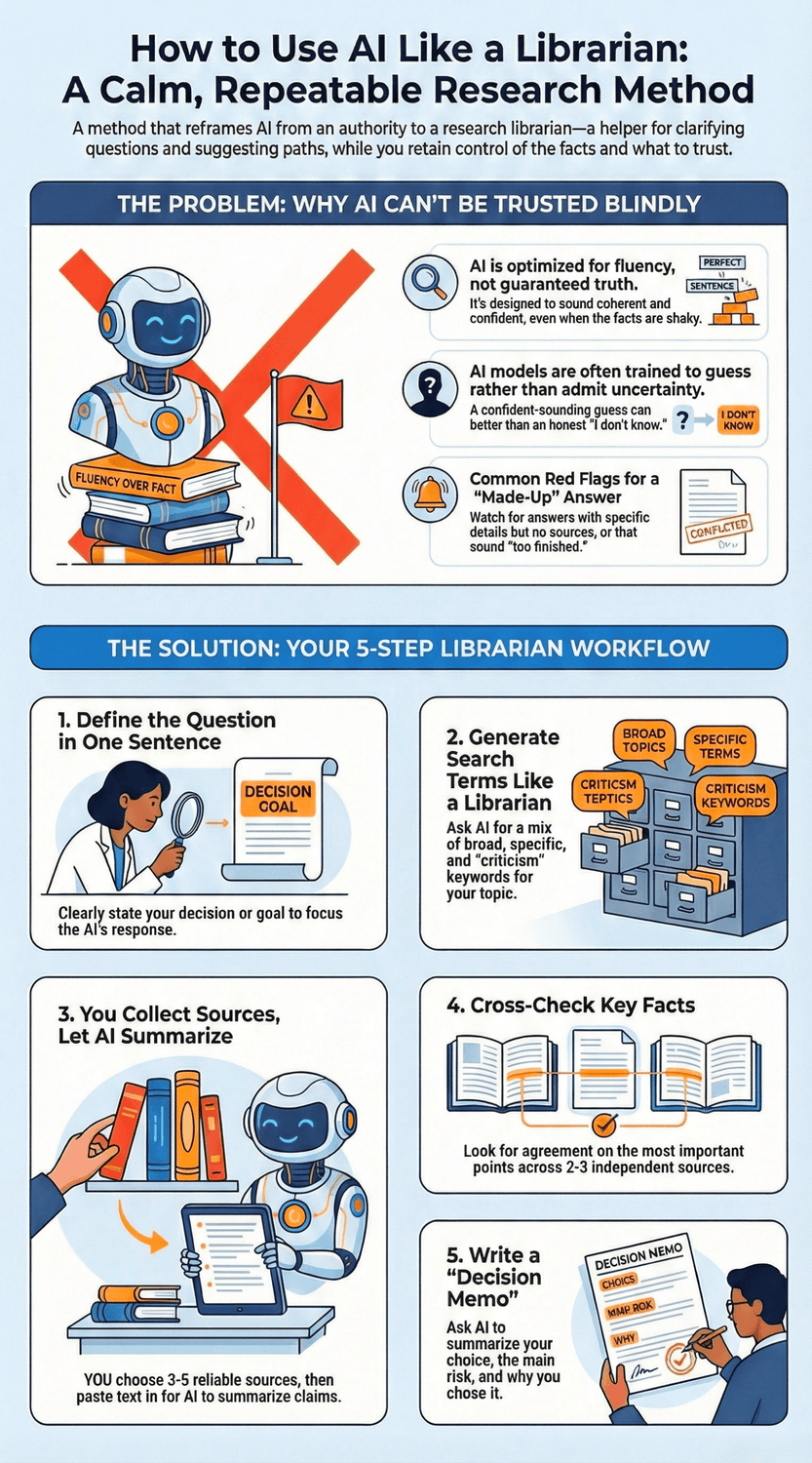
Here’s the 5-step “Librarian Workflow” I use with AI when I want research help without handing over control.
Step 1: Define the question in one sentence
This sounds almost silly, but it’s the difference between drifting and steering.
Write one sentence like:
“I need to choose the safest way to travel from Vienna to Milan in March with one suitcase.”
“I need to understand if this claim about vitamin D applies to people over 50.”
“I need to compare two budgeting apps and pick the one with the fewest hidden fees.”
If you can’t say it in one sentence, you might be dealing with two different questions. That’s a fair moment to pause and split it.
Step 2: Generate search terms like a librarian
Now let AI help with the “keyword thinking.”
Prompt example:
“Act like a librarian. Give me 20 search queries for this question. Include synonyms, official sources, and ‘compare’ searches. Include Slovak and English.”
You want a mix of:
broad terms (to learn the landscape)
specific terms (to confirm details)
“official” terms (to find government, university, or standards bodies)
“critique” terms (to surface problems and limitations)
This mirrors how librarians expand a query to avoid missing key material. Meriam Library, CSU Chico (2010)
Step 3: Collect sources, then let AI summarize
Here’s the rule that keeps you safe: you choose the sources. AI helps you read them faster.
That means:
you open 3–5 sources yourself
you paste key passages into AI
you ask for a summary, plus what the source is claiming and what it’s not claiming
And yes, this also reduces the risk of AI inventing citations, because you’re giving it the text. Stanford HAI’s work on legal AI tools is a good reminder that hallucinations can still happen in high-stakes domains, so grounding matters. Stanford HAI (2024)
Step 4: Cross-check like you’re proving it to a skeptical friend
Now you compare. Not forever. Just enough to build confidence.
Ask:
Do at least 2 independent sources agree on the key point?
Are the dates current?
Is one source just repeating another?
This fits the broader information literacy guidance that “authority is constructed and contextual.” A random blog might be fine for travel inspiration, but not for legal rules or medical decisions. ACRL (n.d.)
Step 5: Write a decision summary you can live with
Finally, ask AI to help you write a short “decision memo” you can understand later.
Prompt example:
“Write a 6-sentence decision summary. Include what I’m choosing, why, the main risk, and what I’ll check again later.”
This step matters because it turns research into action. And it stops you from re-researching the same thing next week.
The Key Takeaway
Define the question, expand keywords, choose sources, cross-check, then write a short decision summary.
Once you’ve done this a few times, AI starts to feel less like a magic box and more like a calm research helper.
How do you spot a “made-up” answer before it wastes your time?
Let’s say you’re doing something ordinary, like sorting out a travel plan. You ask AI: “Do I need a visa for this connection?” It replies with a neat paragraph, a few bullet points, and a confident “yes” or “no.” For a moment you feel relief. Then a little doubt kicks in. What if this is wrong? What if I show up at the airport and find out the hard way?
That hesitation is healthy. “How can something sound so certain and still be shaky?” One reason is that these systems can produce fluent, persuasive text even when they are guessing. OpenAI (2025) And research on AI hallucinations notes that fluency itself can make information feel credible, even when it isn’t. HKS Misinformation Review (2025)
So what are the practical red flags?
Red flag 1: It gives specifics with no anchors.
No dates. No named organization. No clear “where this comes from.” Just a smooth explanation. That’s often a sign the model is filling gaps.
Red flag 2: It sounds “too finished.”
Real research has edges. It has trade-offs. It has “it depends.” If an answer feels like a perfect brochure, pause. What would a careful skeptic ask next?
Red flag 3: It invents citations or legal/medical detail.
This is not rare. Stanford’s Human-Centered AI group tested legal AI tools and found hallucinations still happened at meaningful rates, depending on the tool and query type. Stanford HAI (2024) If it can be wrong in law, it can be wrong in travel rules, taxes, or health questions too.
Now, here’s the part that puts you back in control. When you suspect a “made-up” answer, don’t argue with it. Test it like a librarian would.
Try these quick prompts:
Force uncertainty:
“List what you are least sure about in your answer, and why.”
You’ll often see where the weak spots are.Expose assumptions:
“Write the assumptions you made about my country, dates, and situation.”
That’s where hidden errors usually live.Ask for verification steps, not more text:
“Give me 5 ways to verify this, including the exact search queries and what a reliable source would be.”
Notice the shift. You’re asking for a path you can check.
And one more grounding question: If this answer were wrong, what would it cost me? If the cost is high, treat AI as a starting point only, then confirm with official or primary sources.
The Key Takeaway
“Made-up” answers often show up as confident text without dates, named sources, or clear limits.
When you see that, switch into librarian mode: ask for uncertainty, assumptions, and a verification plan before you trust it.
How do you use AI safely when research touches personal data?
You’re at your desk with a coffee, trying to make sense of something personal: a bank fee that looks wrong, a medical lab result, a complaint email you need to write, or a work document with client details. You copy the text into AI because you just want it explained clearly.
Then the “uh-oh” thought hits. Should I have pasted that? Where does it go? Who can see it later? That’s a fair question. It’s normal to feel unsure here.
The safest rule is simple: don’t treat a chat window like a private folder. Treat it like you would treat a public computer at a library. Helpful, but not the place for sensitive details.
Here’s a practical way to stay on the safe side.
1) Share less than you think you need
Before you paste anything, ask yourself: What’s the smallest version of this that still lets me get help?
You can usually replace details with placeholders:
“My bank” instead of the bank name
“€XXX” instead of exact amounts
“Client A” instead of real names
Dates rounded to month/year instead of exact dates
This reduces risk without blocking progress.
2) Use AI for structure, not for secrets
AI is great at:
explaining concepts in plain language
turning your notes into a clear email
making a checklist of questions to ask a doctor or a support agent
AI does not need your full ID number, medical record PDF, or a full address to do any of that.
If you’re dealing with health topics, privacy experts keep warning that you should be cautious about uploading sensitive medical records to consumer tools unless you understand the protections and risks. Even when products add safeguards, you still want to think carefully. TIME (2026)
3) Check your data settings before you use it for “real” research
Many tools offer controls that limit how your chats are used. For ChatGPT, OpenAI explains you can turn off using your chats to improve the model in the Data Controls settings. OpenAI Help Center (n.d.) OpenAI also describes when and why content may be used to improve services, and points to opt-out instructions. OpenAI (2025)
Is that enough? It helps, but it’s still wise to avoid pasting truly sensitive information.
4) For work, assume there are rules
If your research touches customer data, HR info, contracts, or anything confidential, pause. Many regulators emphasize privacy, accountability, and security as core AI risks, especially when personal data is involved. NIST (2023) The EU’s data protection community has also published specific guidance about generative AI and data protection expectations. EDPS (2025)
If your company has an approved AI tool, use that. If not, keep the prompt generic and do the sensitive work offline.
5) When in doubt, ask for a safer version of your own question
Try: “Rewrite my question in a privacy-safe way, using placeholders, so I can still get help.”
The Key Takeaway
Treat AI like a helpful librarian, not a vault.
Share the minimum, use placeholders, review your data settings, and keep confidential or personal details out of the chat whenever you can.
What are the best copy-paste prompts for the “Librarian” method?
Picture a familiar moment. You’ve got 12 browser tabs open. One says “best option,” another says “avoid at all costs.” You’re trying to compare two choices, and your brain starts to feel a bit foggy. So you open AI and think, “Okay… what do I even ask?”
You might be wondering if you need special “prompt skills.” You don’t. What you need is a few reusable prompts that force AI to behave like a calm librarian: clarify first, show sources, and admit uncertainty. That’s a fair request.
Below are my go-to copy-paste prompts. Keep them in a note on your phone or laptop. Use them the same way you’d reuse a shopping list.
1) The “clarify first” prompt
Use this when your question feels vague.
Prompt:
“Act like a librarian. Before you answer, ask me 5 clarifying questions. Then give me 2 possible interpretations of my question, and tell me which one you recommend we answer first.”
Why it works: it prevents the AI from guessing what you meant. And it makes you feel in control again. Isn’t that the whole point?
2) The “search terms” prompt
Use this when Google searches feel unproductive.
Prompt:
“Give me 20 search queries I can paste into Google for this topic. Mix broad, specific, and ‘official source’ queries. Include Slovak and English versions. Also include 5 ‘criticism’ queries to find limitations.”
This is the librarian move. You’re not asking for truth. You’re asking for better routes to truth.
3) The “source quality” prompt
Use this when you have a few links but don’t know what to trust.
Prompt:
“I’m going to paste 2–3 sources. For each one, rate it on Currency, Authority, and Purpose. Explain in plain language what makes it strong or weak. Then tell me what claim it can support safely, and what claim it cannot.”
This lines up nicely with the CRAAP-style habit of checking currency and authority instead of trusting vibes. Meriam Library, CSU Chico (2010)
4) The “cross-check” prompt
Use this when you suspect the answer might be shaky.
Prompt:
“List the top 5 claims in your answer. For each claim, tell me how to verify it and what a reliable source would be. If you’re unsure, say so clearly. Do not guess.”
This is a practical way to push back against confident-sounding errors. It fits OpenAI’s own warning that systems can sound sure while being wrong. OpenAI Help Center (n.d.)
5) The “decision memo” prompt
Use this when you’re ready to stop researching and choose.
Prompt:
“Write a 6-sentence decision summary. Include: my options, the main trade-off, the biggest risk, what I’m choosing for now, and what I’ll re-check later. Keep it simple.”
That last line matters. You’re allowed to choose “for now.” It’s normal to want certainty, but most real decisions don’t offer it, right?
What does “success” look like after one week of using this approach?
Let’s make it real. It’s Monday evening. You open your laptop to “quickly research” something, and 40 minutes later you’re still reading, still unsure, and somehow now you’re comparing three unrelated things. That swirl is exhausting. If you’ve felt it, you’re not behind. You’re human.
After one week with the librarian approach, success usually looks quieter than you expect.
First, you start feeling calmer at the start of a search. Why? Because you’re not relying on luck anymore. You sit down, write the one-sentence decision, and ask AI for clarifying questions and search terms. It’s a small shift, but it changes the whole mood. Isn’t it easier to think when you know the next step?
Second, you waste less time on weak information. You begin checking basics early: date, who wrote it, and what they’re trying to sell you. That “authority depends on context” mindset is straight from information literacy principles. A random blog post might be fine for inspiration, but not for medical or legal claims. ACRL (n.d.)
Third, you start building a tiny habit. Not a big overhaul. Just a repeatable routine: define, generate keywords, choose sources, cross-check, write a short decision summary. “Can I really make this automatic?” The research says habits take longer than most people think. One well-known study found an average of about 66 days for a behavior to feel more automatic, with a wide range depending on the person and the habit. So after one week, you’re not aiming for autopilot. You’re aiming for consistency. Lally et al. (2010) UCL (2009)
Fourth, you get better at making it easy to start. This matters more than motivation. BJ Fogg’s behavior model puts it simply: behavior happens when motivation, ability, and a prompt show up at the same moment. If you want this to stick, make the first step tiny and obvious. For example: keep one “Librarian Prompts” note pinned on your phone. That note becomes your prompt. Fogg Behavior Model (n.d.)
So what’s the best one-week goal? Not “I will always verify everything perfectly.” That’s too heavy. A better goal is: I will run the 5-step workflow once per day on something small. A restaurant choice. A travel connection. A product comparison. Then you’ll feel the difference.
The Key Takeaway
After a week, success is calmer starts, less time wasted, and one small repeatable routine.
Keep it simple, keep it consistent, and let it grow.
Your calm, repeatable way to research with AI
If AI has ever made you feel a little uneasy, that’s normal. It can sound confident even when it’s wrong, and that mix of speed plus certainty can mess with your judgment. OpenAI (2025)
The “librarian” metaphor gives you a steadier relationship with the tool. You let AI help you clarify the question, generate better search terms, and summarize what you find. Then you do what a good librarian would want you to do anyway: check dates, compare sources, and make the final call based on your real situation. Association of College & Research Libraries (2015)
If you want one simple next step, do this today: pick one small decision and run the 5-step workflow once. Keep it light. You’re not trying to “master AI.” You’re building a calm research habit that you can trust
🎓 Your "Tech Dignity" Toolkit
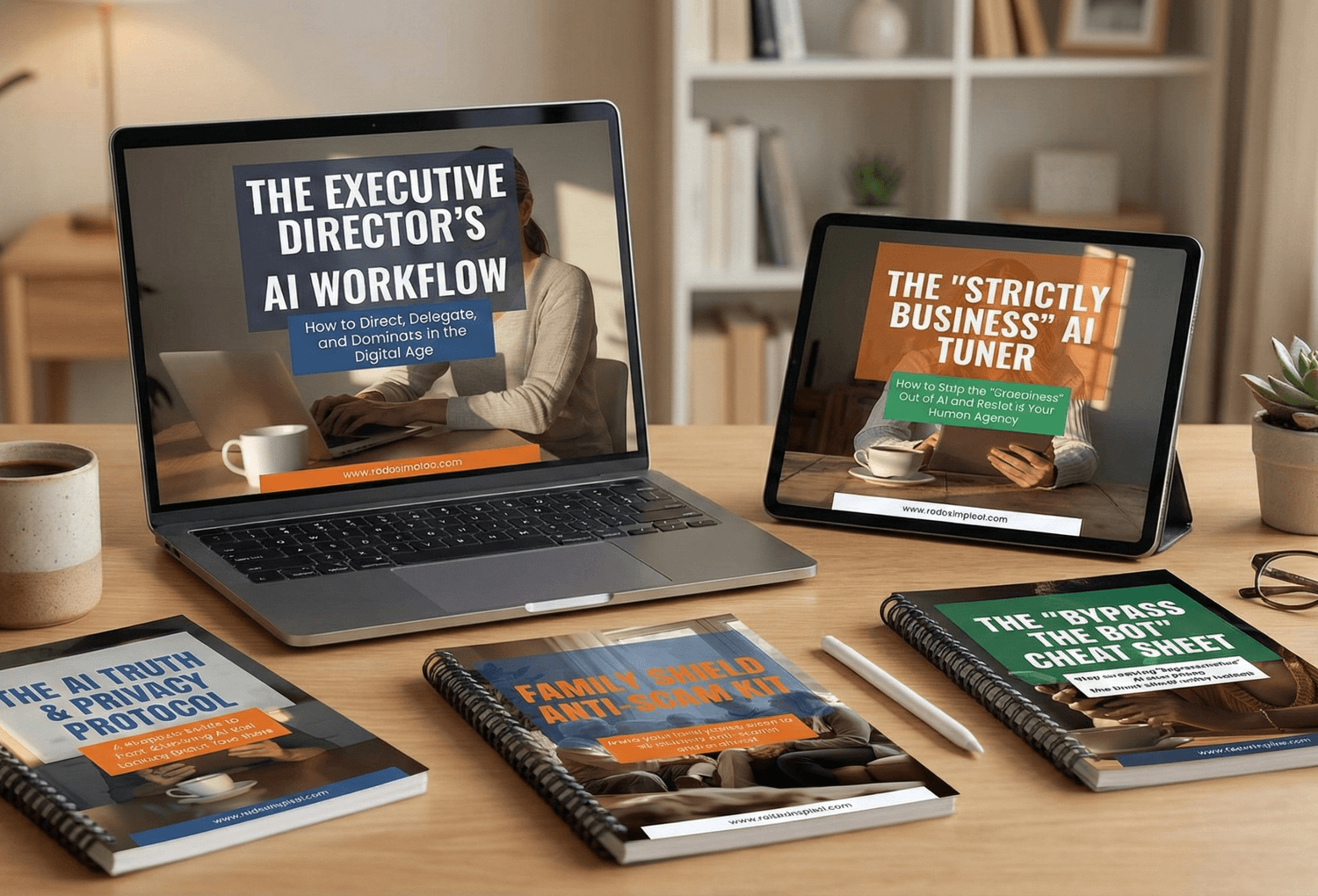
Ready to stop surviving the AI era and start owning it? I’ve built a library of resources specifically designed to help you stay safe, stay professional, and stay in control. Whether you want to fix a specific problem or master the whole machine, start here:
[FREE] The "Bypass the Bot" Bundle: Stop screaming at automated phone menus. Get the secret codes and scripts to reach a human every time. Download for FREE Here
Secure Your Family: Protect your loved ones from AI voice clones and deepfake scams with the Family Shield Anti-Scam Kit. Get Protected for $9
Upgrade Your Career: Use my "Strategy Sandwich" method to delegate grunt work to AI while keeping your professional edge with the Executive Director’s AI Workflow. Reclaim Your Time Here
Lock Down Your Privacy: Interrogate the "black box" and secure your data with the AI Truth & Privacy Protocol. Secure Your Data Here
Tame the Machine: Strip the "creepy" fake empathy out of AI and turn it into a silent tool with the "Strictly Business" AI Tuner. Take Control Here
The Ultimate Shortcut: Want the entire library? Secure your digital future with the Complete Mastery Collection (all products bundled for about 57% off). Get the Full Collection Here
Frequently Asked Questions
Q1) Can I trust AI for research at all?
Yes, if you use it like a librarian, not an authority. It’s great for organizing, summarizing, and suggesting what to look up next. It’s not reliable as a final source of truth, because hallucinations can still happen. OpenAI (2025)
Q2) What’s the fastest way to verify an AI answer?
Ask it to turn the answer into a checklist of claims, then verify the top 2–3 claims with independent sources. This works well because it shifts you from “do I believe this?” to “how do I check this?” The CRAAP test is a simple framework for judging source quality quickly. Meriam Library, CSU Chico (2010)
Q3) Why does AI sometimes invent citations or “sound official”?
Because fluent language is what it’s built to produce, and it can fill gaps when uncertain. That’s why the librarian workflow matters: you choose the sources, and AI helps you read them faster. Stanford’s evaluation of legal AI tools is a reminder that even high-stakes domains still see hallucinations. Stanford HAI (2024)
Q4) How many sources do I need before I decide?
For everyday decisions, aim for 2–3 independent sources that agree on the key point. For higher-stakes decisions (money, health, legal, safety), use more caution and prioritize primary or official sources. This matches the information literacy idea that “authority” depends on the situation. Association of College & Research Libraries (2015)
Q5) What should I never paste into AI?
Anything you’d be upset to see leaked: IDs, bank details, private medical records, client data, internal company documents. If you need help anyway, rewrite with placeholders first. If you’re unsure, regulators and risk frameworks consistently push for data minimization and careful handling of personal data in AI contexts. NIST (2023) EDPS (2025)
Q6) Can I use AI to help with health research?
You can use it to summarize your notes, prepare questions for a doctor, or understand basic terms. But don’t treat it as a diagnosis tool, and be careful with sensitive records. Recent reporting on health-focused AI features highlights both convenience and privacy risks. TIME (2026)
Q7) What’s the best single “librarian prompt” to save?
Use this one:
“Act like a librarian. Ask me 5 clarifying questions first. Then give me a research plan and 15 search queries. Finally, list 3 ways your answer could be wrong.”
It forces clarity, creates a verification path, and makes uncertainty visible.
Sources
OpenAI Help Center — Data Controls FAQ (n.d.)
Stanford HAI — AI on Trial: Legal Models Hallucinate in 1 out of 6 (or More) Benchmarking Queries (2024)
NIST — Artificial Intelligence Risk Management Framework (AI RMF 1.0) (2023)
EDPS — Generative AI and the EUDPR: Orientations for ensuring data protection compliance (2025)
Meriam Library, CSU Chico — Evaluating Information: Applying the CRAAP Test (2010)
Association of College & Research Libraries — Framework for Information Literacy for Higher Education (2015)
U.S. National Archives — Guidelines of a Successful Reference Interview (n.d.)
Lally et al. — Modelling habit formation in the real world (2010)
BJ Fogg — Fogg Behavior Model (n.d.)
TIME — Is Giving ChatGPT Health Your Medical Records a Good Idea? (2026)