
Staying Safe with AI: A Complete Guide to Digital Security for Adults 45+
By Rado
If you’ve felt that scams got smarter overnight, you’re not imagining it. AI now writes flawless emails, clones voices, and fakes video. The good news: you don’t need new gadgets; you need a few steady habits. In this guide, you’ll learn a short verification routine, the strongest settings to turn on, and how to coach your family so everyone stays safe and calm.
1) What has changed with AI, and why does it matter for your security?
You open your inbox and see a spotless note from your bank. No typos. Your name is right. The logo looks crisp. Two minutes later, your phone rings. It sounds exactly like your daughter asking for help.
What would you do next? That is the change. AI has taken sloppy scams and turned them into convincing, tailored messages that aim straight at your emotions.
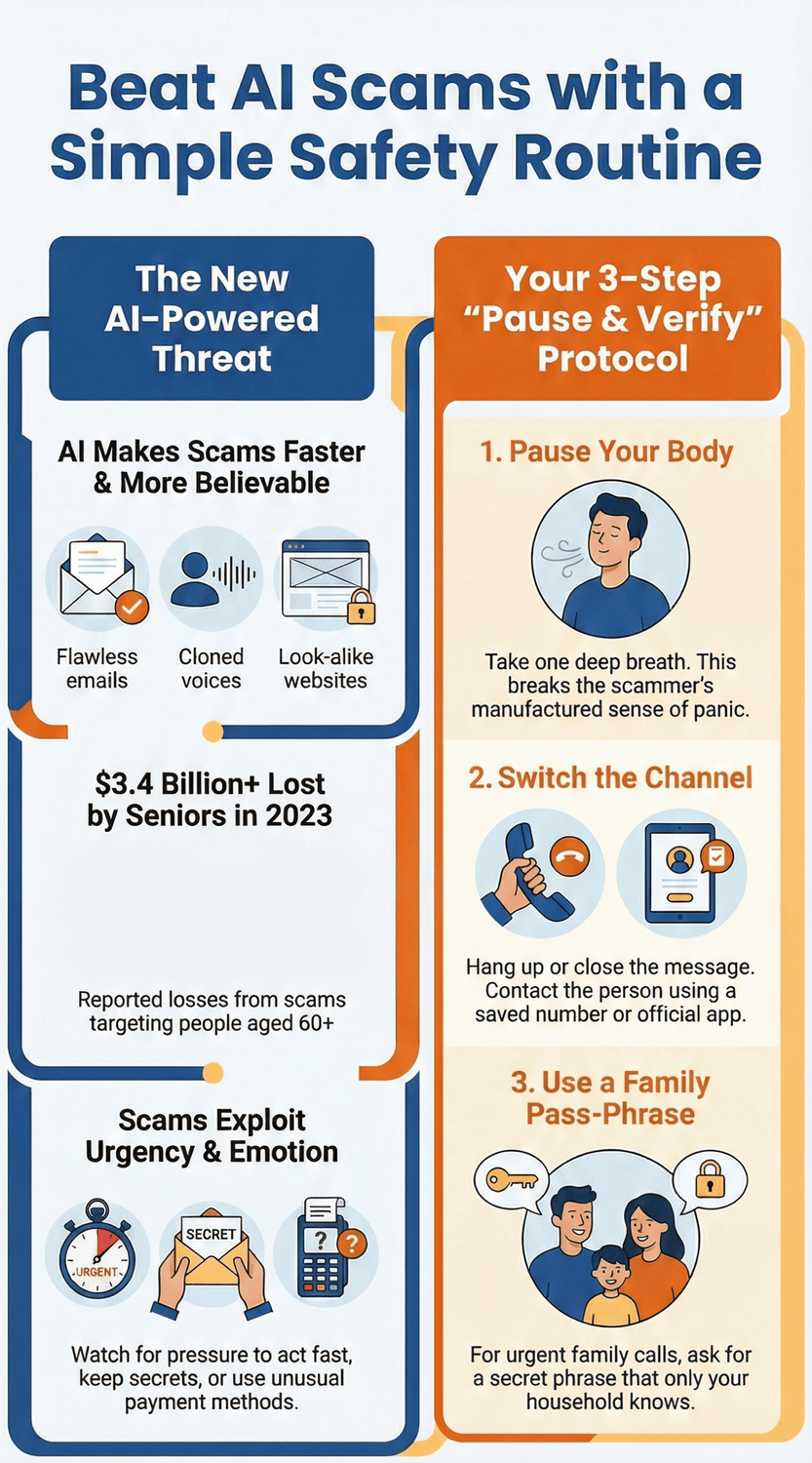
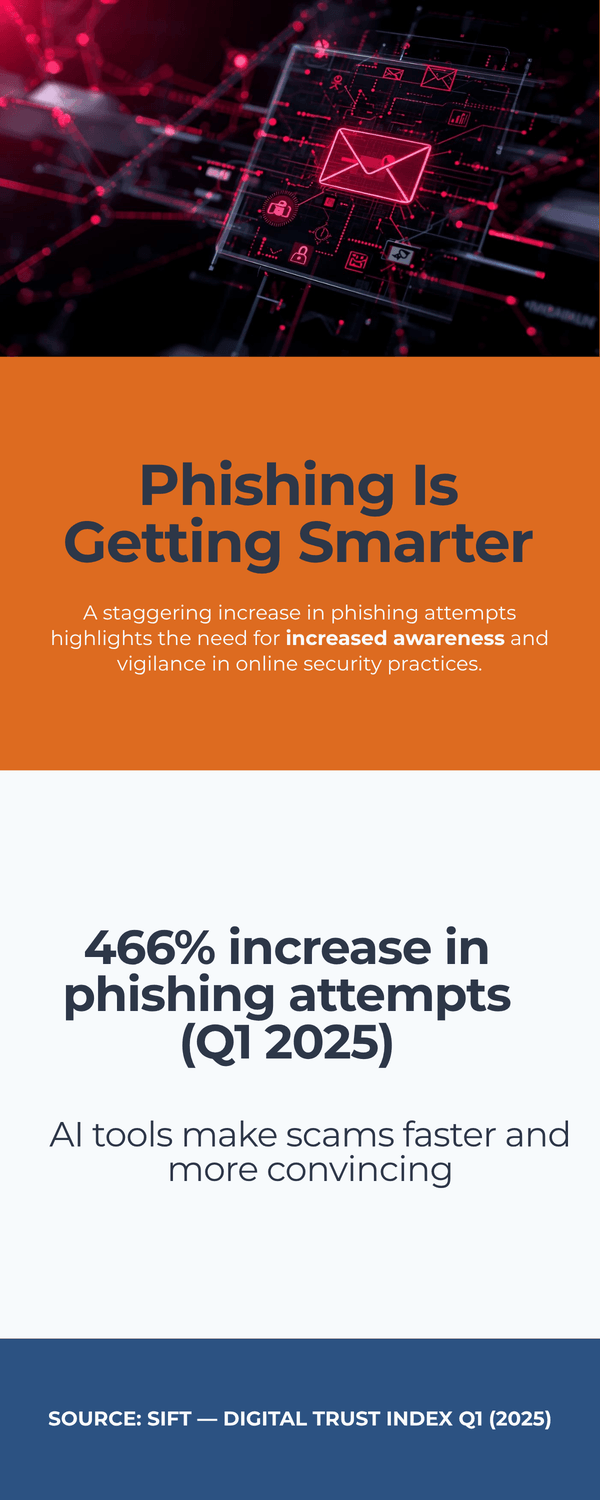
Scammers now use AI to write near‑flawless emails, spin up look‑alike websites, and clone a voice from a few seconds of audio. That shift matters because speed and believability rose together. Recent fraud trend analyses show sharp growth in AI‑assisted phishing and impersonation as mass production and personalization get cheaper (Sift (2025)).
Guidance for banks also warns that deepfake‑enabled fraud could drive losses to about $40B in the U.S. by 2027 (FS‑ISAC (2024)).
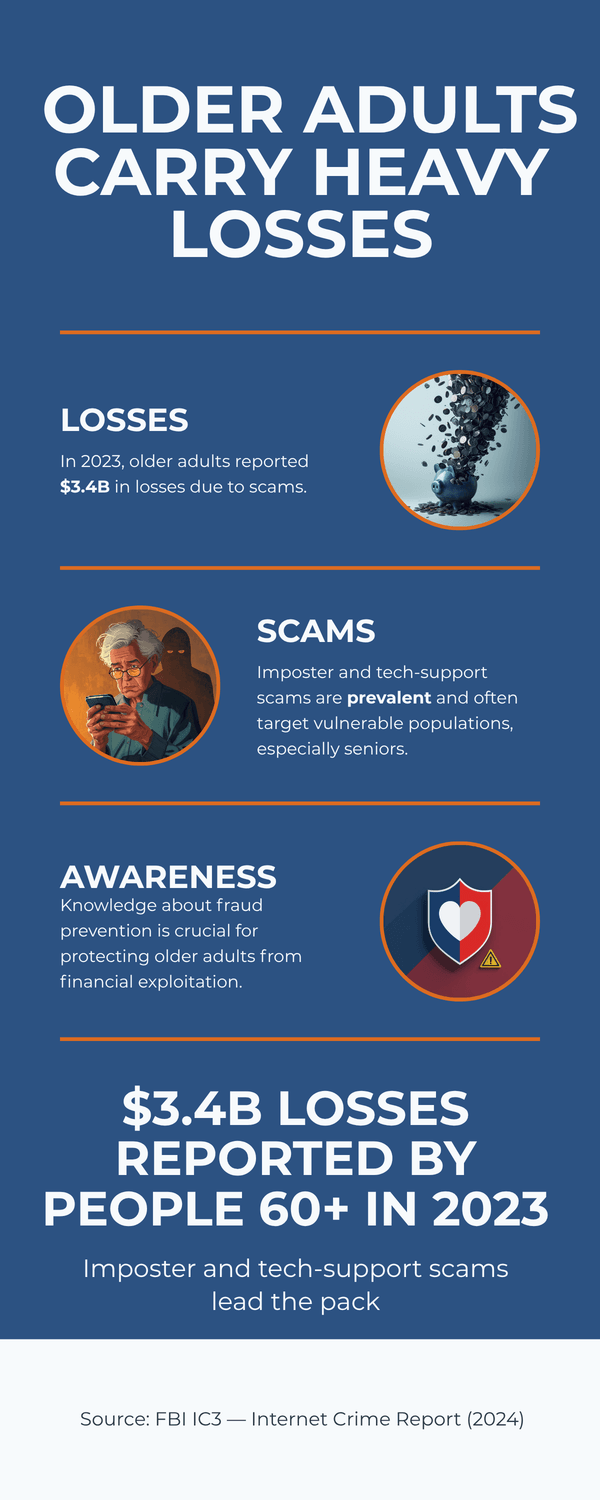
Why are adults 45+ targeted so often? Not because you’re “bad with tech.” It’s because you manage real money, help family, and respond quickly in a crisis. Scams targeting people 60+ caused more than $3.4B in losses in 2023, and the trend kept climbing into 2024 (FBI IC3 (2024) ; FTC (2025)). AI now supercharges those same imposter and tech‑support scams with realistic voices and polished scripts (FTC (2025)).
So, what should you watch for? First, assume any unexpected urgent message could be synthetic until you verify it. If a message pushes speed, secrecy, or unusual payment, pause. AI makes it easy to personalize scams, so the old telltale spelling mistakes may be gone. That’s why process beats gut instinct. Many people feel confident they can “just tell,” yet exposure to fraud schemes rose sharply year‑over‑year (Sift (2025)).
Second, know the hot zones for loss. Investment pitches that feel exclusive. Tech‑support pop‑ups that demand remote access. Family emergencies that ask for gift cards or crypto. These patterns convert at higher rates because AI helps criminals sound calm, smart, and familiar (FTC (2025)).
You might be wondering, can’t we just learn to spot fakes by eye or ear? It’s normal to feel that way. But human detection is unreliable under stress, especially with polished audio or video. A simple routine works better. Slow your breathing. Switch channels. Call back using a saved number. When you follow a fixed protocol, you take away the scammer’s favorite tool, which is panic (AARP (2025)).
The Key Takeaway
AI didn’t invent scams.
It made them faster and more convincing.
Trade “spot the fake” for “pause and verify.”
That mindset protects your money, privacy, and calm.
2) How do you spot an AI‑written phishing email in under 30 seconds?
Imagine you’re paying a bill after dinner. A tidy email arrives: “Unusual activity detected—confirm now.” The tone is polite. The logo looks perfect. So, is it safe? Here’s a quick 30‑second routine that works even when AI writes the message.
0–5 seconds: Read the “shape,” not the words.
Ask three fast questions: Is there urgency (“act now,” countdown, security scare)? Is there an unusual ask (gift cards, crypto, wire, password)? Is the channel odd (a bank asking you to click a link instead of using the app)? If any answer is yes, pause. Scammers push speed and secrecy to beat your thinking time (FTC (2025)).
5–10 seconds: Check the sender path.
Tap or click the “From” line to reveal the full address. Look for slight misspellings, extra words, or free domains for paid services (e.g., @mail‑security‑bank.com). If you use Gmail, select Show original to see authentication results (SPF/DKIM/DMARC); fails are a red flag (Google (2024)). On Outlook, open message details to review the real sender and return‑path (Microsoft (2024)).
10–20 seconds: Hover and preview links.
Without clicking, hover on desktop or long‑press on mobile to preview where a button really goes. Does the domain exactly match the company’s official site, or is it a look‑alike with extra words or characters? When in doubt, do not open links or attachments. Visit the site directly by typing it or using your saved app (CISA (2024)).
20–30 seconds: Run the payment/password flowchart.
If the email asks for money, logins, or downloads, switch channels. Open your bank app or call the number on your card. Never use the contacts or links inside the email. This single move stops most modern phish, including AI‑polished ones (NCSC‑UK (2024)).
Extra tells when AI wrote it
Perfect grammar but odd formality for the brand.
Generic greeting with specific personal details scraped from the web.
Inconsistent branding deep in the email (footer address, copyright year).
Attachments you didn’t request, especially .html, .zip, or macro‑enabled docs (CISA (2024)).
Set your inbox to help you.
Turn on automatic updates for your browser and mail app, enable two‑factor authentication on email, and let your provider’s filters do their job. In Gmail, use Security Checkup; in Microsoft 365, enable report phishing buttons for one‑tap reporting (Google (2024), Microsoft (2024)).
“What if I already clicked?” It’s normal to panic. Breathe. Disconnect from suspicious Wi‑Fi, change the affected password from a clean device, enable two‑factor authentication, and call your bank if payment info was involved. Quick action limits damage (FTC (2024)).
The Key Takeaway
Don’t debate the wording.
Check urgency, sender path, and link destination, then switch channels for anything involving money or passwords.
Thirty seconds is enough to dodge most AI‑written phish.
3) Can you trust a voice on the phone anymore? (Voice cloning and deepfakes)
It usually starts with a jolt. “Mom, it’s me. I’m in trouble.” The voice is right. The background sounds real. Your heart races. What would you do in the next ten seconds? That is exactly what scammers count on. Modern tools can clone a voice from a short clip and read a script that sounds natural and urgent (FTC (2024)).
Treat unexpected crisis calls as unverified until you confirm them through a trusted channel. Voice‑cloned calls are rising because the software is cheap and fast. Many victims say the voice “sounded exactly right,” which is why your process matters more than your ears (AARP (2024)).
Use a Family Pass‑Phrase.
Agree on a simple phrase that only your household knows. Keep it ordinary, not a favorite quote online. Share it in person or on a video call you started. Review it twice a year. If a crisis call comes in, ask for the phrase immediately. No phrase, no action. You might be wondering, “What if the caller gets angry or begs me not to ask?” That is a sign to pause and verify.
Switch channels and call back.
Hang up. Breathe. Call the person using a saved contact or a family group chat. If they do not pick up, call a second trusted relative. Never return the call to the number that just rang you. This out‑of‑band step stops most impersonation scams, including ones that spoof real numbers (NCSC‑UK (2024)).
Watch for payment pressure.
Gift cards, crypto, or wire transfers are automatic stop signs. Real institutions will not demand secrecy or insist you keep the call going. If money is involved, move the conversation to an official channel you can verify, like a bank app or a published phone number (CISA (2024)).
Tighten your public footprint.
The less voice and personal detail online, the better. Make social accounts private. Remove birthdays, pet names, and travel plans. Avoid posting long voice notes or videos that include clean speech samples. Small steps reduce the raw material cloners can use (AARP (2024)).
Set your phone to help you.
Turn on silent unknown callers, spam call filtering, and voicemail transcription. Add favorites and emergency contacts so you can spot real calls fast. Carriers and phone makers offer tools that block or label suspicious calls, and reporting helps improve filters over time (FCC (2024)).
It’s normal to think, “But I will recognize my child’s voice.” Under stress, our brains fill gaps and trust familiar patterns. Your calm routine is the safety net. Ask for the pass‑phrase. Switch channels. Confirm with a number you already trust. If money is requested, stop and verify through the bank’s app before you do anything.
The Key Takeaway
Your ears can be fooled.
Your routine cannot.
A simple pass‑phrase and a call‑back plan turn a scary moment into a quick verification, and that protects both your wallet and your peace of mind.
4) What should you do if a video or photo feels “off”?
A friend messages you a shocking clip. The person looks like a famous doctor. The advice sounds dramatic. Do you forward it to family? Or do you check it first? Here’s a simple way to test images and videos without special tools.
Start with the “three looks.”
Light and shadows. Do the shadows fall the same way on faces, hands, and objects? In fakes, lighting often disagrees between the subject and the background.
Edges and textures. Look at hairlines, teeth, earrings, glasses. Do edges blur or wobble when the head moves? Are skin pores too smooth?
Lips and sync. Mute the sound. Do lips clearly match the words? Odd blinks or rubbery mouth shapes can signal synthetic media (CISA (2024)).
Check the context, not just the pixels.
Ask: Who posted it first? When? Is a reputable outlet covering it? Public agencies recommend cross‑checking claims before you share, especially for health and finance topics (NCSC‑UK (2024), WHO (2024)). Try a quick search with the key claim in quotes plus “site:.gov” or “site:.edu.”
Use quick tools that fit in your routine.
Reverse image search: Save a still frame, then search it to see if the image appeared earlier with a different story.
Official pages: For government or bank videos, open the organization’s website or verified social account directly.
Fact‑check hubs: Look up the claim at a neutral aggregator before sharing (Google Fact Check Explorer (2024), Poynter/IFCN (2024)).
Red flags that deserve a pause.
Strong emotional pull: outrage, fear, or miracle cures.
One‑source proof: no links to original statements or press pages.
Watermarks or usernames that don’t match the claimed source.
Requests for money, sign‑ups, or immediate downloads tied to the clip (FTC (2025)).
What if you already shared it?
It’s normal to feel embarrassed. Correct the post with a short note and a reliable source. Then review your sharing settings and who can tag you. Small corrections reduce the spread of fakes and help your friends trust you more next time (WHO (2024)).
“Do I have to become a video expert?” No. You just need a calm checkpoint. Ask two questions: Does this align with what the official source says today? If money or health is involved, have I verified on the source’s own site? If the answers are unclear, don’t share.
The Key Takeaway
Don’t argue with the video.
Verify the story.
A two‑minute routine (look at light, edges, and lip‑sync, then confirm on an official page) will stop most deepfake clips from spreading through your family chats.
5) How do you protect your money from AI‑boosted scams?
It often starts with a “too good to miss” opportunity. A friendly message about a safe monthly return. A polished site with charts. Maybe a “senior concierge” calls to walk you through it. Would you invest after one call? Or send a quick wire because a “bank investigator” says your account is at risk? Here’s how to keep your money safe when AI makes scammers sound credible.
Know the automatic stop signs.
Gift cards, crypto, and urgent wire transfers are not normal payment methods for banks, utilities, or government agencies. If anyone asks for these, stop and verify with the official number on your card or statement. Criminals push speed and secrecy to short‑circuit your judgment (FTC (2025)).
Pressure and exclusivity = investment red flags.
Promises of “guaranteed” or “no‑risk” returns, limited‑time windows, and requests to move conversations off the platform are classic danger signs. Check the promoter and product on the regulator’s site before you act. Use BrokerCheck for individuals and firms and confirm registration status; imposters often use look‑alike names (FINRA (2024) , SEC Investor.gov (2024)). If you cannot find a clear registration, walk away.
Lock in simple bank protections.
Turn on account and card alerts for transactions, ATM withdrawals, and new payees. Set daily transfer limits. Use your bank’s app, not links in messages. When traveling, tell your bank and card issuers so unusual transactions trigger checks. These small settings catch problems early (CFPB (2024) , FDIC (2024)).
Use the “Pause & Verify” rule for any money move.
If someone says your funds are at risk, hang up, breathe, and call the number on your card. Do not stay on the same call. Do not use numbers in the message. Out‑of‑band verification stops “bank investigator” and “tech support” refund scams, even when the caller ID looks right (CISA (2024)).
Protect retirement and brokerage accounts first.
Add two‑factor authentication, enable new‑device alerts, and lock down email recovery options. Email is the master key for account resets. Use a password manager and unique, long passwords for your broker and email. If you spot an unauthorized trade or transfer, contact the firm immediately and file a report; fast action matters (SEC Investor.gov (2024)).
What if you already sent money?
It is normal to feel panic. Contact your bank or broker at once, ask for a hold or recall on the transfer, change your passwords from a clean device, and report the scam. Reporting helps recovery and protects others (FTC (2025) , FBI IC3 (2024)).
“Do I have to research every small transaction?” Not at all. Use a routine. Alerts on. Limits set. Calls and links verified through your app. And if an offer promises easy money, give it a night. Would this still make sense tomorrow?
The Key Takeaway
Money safety is about habits, not hype.
Stop at the first red flag, verify through your own app or card number, and let alerts and limits do quiet daily work for you.
6) What privacy settings matter most to reduce your digital footprint?
You’re about to book a weekend trip. Your phone suggests hotels near your last destination, and a “bank” email greets you by city. Helpful… or a little too familiar? When your details float around, AI‑assisted scams get easier. Here’s how to shrink your footprint without turning your life upside down.
Start with social profiles.
Make your accounts private or “friends only.” Hide birthday, home city, phone, and family relationships. Remove public posts about travel plans and routine locations. Limit who can tag you and who can see your friend list. Criminals use these nuggets for password guesses and impersonation (FTC (2025)).
Tighten app permissions.
On your phone, review which apps can access location, microphone, camera, photos, contacts, and Bluetooth. If an app doesn’t need it, turn it off. On iPhone, visit Settings → Privacy & Security; on Android, open Privacy → Permission manager and audit by permission type (Apple (2024) , Google (2024)). Re‑check after big OS updates.
Be careful what you paste into AI tools.
Avoid entering full IDs, medical details, account numbers, or private client data into chats. Many services keep prompts to improve systems unless you opt out or use enterprise settings. If you handle sensitive information, use a tool with a clear no‑training policy for your data, or strip identifiers before you paste (NCSC‑UK (2024)).
Use a password manager and fix the riskiest logins first.
Managers create and store long, unique passwords and flag breaches. Prioritize changes in this order: 1) Email (it resets everything), 2) Bank/broker/credit accounts, 3) Cloud storage and phone account, 4) major shopping and travel sites, then the rest. Turn on two‑factor authentication (prefer app codes over SMS where available) (NCSC‑UK (2024) , CISA (2024)).
Clean up what’s already out there.
Search your name and city. Remove old public posts that expose addresses, birthdays, or kids’ schools. For data broker sites, use their opt‑out forms. Start with the major ones and set a reminder to re‑check every few months (FTC (2025)).
Review “sharing” inside your main accounts.
In Google, check My Activity, Ad settings, and Security Checkup to limit personalized ads and review third‑party access. In Microsoft and Apple accounts, review sign‑ins, linked devices, and app permissions. Remove anything you don’t recognize (Google (2024) , Microsoft (2024), Apple (2024)).
“Do I have to do all of this today?” It’s normal to feel overwhelmed. Do one shelf at a time. This week: social settings and app permissions. Next week: password manager and two‑factor. Then a quick data‑broker cleanup. Small steps add up fast.
The Key Takeaway
Less public data means fewer hooks for AI‑assisted scams.
Lock down social privacy, trim app permissions, use a password manager with two‑factor, and think twice before pasting sensitive info into any AI chat.
7) Which device settings give the biggest security lift with least effort?
It’s Sunday afternoon. Coffee in hand. You have ten minutes before dinner. What can you do on your phone and laptop right now to make a real difference? Here is a short list that blocks most everyday attacks without buying new gear.
Turn on automatic updates everywhere.
Updates close known holes that criminals actively exploit. Enable auto‑update for your phone, laptop, browser, and key apps. On iPhone, use Settings → General → Software Update. On Android, check Settings → System → System update. On Windows, use Windows Update. Keep your browser current too. This one habit shuts many doors at once (Apple (2024), Google (2024), Microsoft (2024), CISA (2024)).
Use strong unlock and screen‑lock timers.
Pick a long PIN or passcode and set auto‑lock to a short interval. Add biometrics for convenience. Lost or unattended devices are a common risk, and a quick lock buys you time to act if something goes missing (NCSC‑UK (2024)).
Upgrade your sign‑in: authenticator app over SMS when possible.
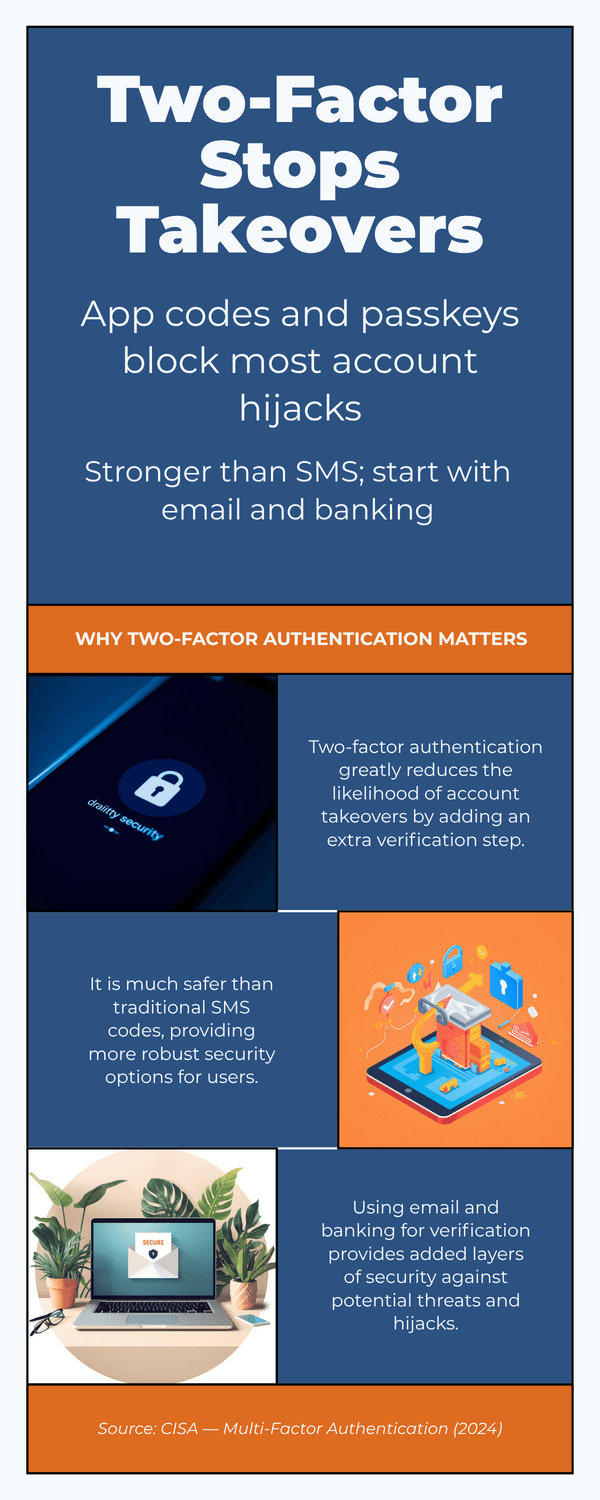
Two‑factor authentication stops many account takeovers. App‑based codes or passkeys are stronger than text messages. Start with email, bank, cloud storage, and your phone account. If a site only offers SMS, use it, then switch later when better options appear (CISA (2024), NCSC‑UK (2024)).
Back up before you need it.
Turn on automatic backups so a lost device or ransomware scare is an inconvenience, not a disaster. On iPhone, enable iCloud Backup. On Android, use Google One/Drive backup. On Windows and Mac, back up important folders to a trusted cloud or an external drive you unplug after use (Apple (2024), Google (2024), Microsoft (2024)).
Lock down device‑find and remote wipe.
Turn on Find My on Apple devices and Find My Device on Android. Make sure you can sign in from another device to locate or erase a lost phone or laptop. Test it once so you know what to do in a hurry (Apple (2024), Google (2024)).
Give your router and Wi‑Fi some love.
Rename the network to something generic, change the admin password, and use WPA2 or WPA3 encryption. Rebooting the router occasionally can clear bugs. If your router is very old and no longer gets updates, plan to replace it (CISA (2024)).
“Is this overkill?” It’s normal to ask that. Think of these as seat belts for your digital life. They work quietly in the background. Which two steps could you do today? Could you add one more next week?
The Key Takeaway
Updates on, strong unlock, authenticator codes, automatic backups, device‑find, and a secure Wi‑Fi setup.
Five minutes per item, big peace of mind all year.
8) What is the “Pause & Verify” protocol, and how do you teach it at home?
Your phone lights up at 9 p.m. A calm voice says there is a problem with your account and you must act now. Your pulse jumps. In that split second, will you react or follow a routine? The Pause & Verify protocol turns panic into a checklist you can trust.
Step 1: Pause your body.
Take one full breath. Your goal is simple. Buy yourself ten seconds so you can think. Scammers rely on speed and fear to push you into mistakes. National guidance is clear. Slowing down and refusing pressure cuts risk dramatically (FTC (2025)).
Step 2: Switch the channel.
End the call or close the message. Do not use any number or link they gave you. Contact the person or company through a saved number, your bank app, or an official website. This out‑of‑band check stops most phishing, vishing, and smishing attempts, including spoofed caller IDs (CISA (2024), NCSC‑UK (2024)).
Step 3: Confirm with your Family Pass‑Phrase.
Agree on a simple phrase only your household knows. Keep it ordinary. Share it in person or over a video call you initiated. Review it twice a year. In a crisis call, ask for the phrase first. No phrase, no action. Older‑adult safety programs recommend simple verification steps like this to stop imposter scams (AARP (2024)).
Teach it at the kitchen table in five minutes.
Write the three steps on a card.
Pick a pass‑phrase.
Practice two short scripts:
• Bank script: “Thank you. I will call my bank using the number on my card.”
• Family script: “Tell me the phrase. I will call you on the number I have saved.”Put the card near the phone and another on the fridge.
Schedule a six‑month refresh.
Add small safety anchors.
Set phone labels for real contacts, turn on spam filtering, and store bank numbers in your favorites. Carriers and agencies recommend reporting bad calls and texts so filters improve for everyone (FCC (2024), CISA (2024)).
“What if I mess up once?” It is normal to feel embarrassed. Focus on fast recovery. Freeze payments, change passwords from a clean device, and report it. A quick response limits damage and helps protect others who might be targeted next (FTC (2024)).
The Key Takeaway
Breathe, switch channels, confirm with a pass‑phrase.
Teach it once, practice twice a year, and post the card where everyone can see it.
A calm routine beats any script a scammer can read.
9) How do you check news, health tips, and miracle offers without getting duped?
You open your messages and see a “doctor” warning about a new cure. Your neighbor shares a video that sounds urgent. Do you forward it, or take a minute to check? Here is a calm routine that works for health, money, and everyday headlines.
Step 1: Check your feelings first.
Ask, “What is this trying to make me feel?” If it spikes fear, outrage, or excitement, pause. Scammers and clickbait use strong emotion to rush you before you think. Slowing down cuts mistakes and helps you verify on your own terms (WHO (2024)).
Step 2: Turn the headline into a claim.
Strip the drama. Write a plain sentence you can verify. Example: “This supplement cures arthritis in a week.” Now you can search that claim on reliable sources. Use a quick fact‑check search or a trusted health or finance site before you share (Google Fact Check Explorer (2024), Poynter/IFCN (2024)).
Step 3: Read “sideways,” not deeper.
Open a new tab and look up the source itself. Who are they? Are respected outlets reporting the same thing today? Lateral reading is faster than arguing with a single page. If only one blog says it, wait. Independent cross‑checks are a strong signal of trust (Poynter/IFCN (2024)).
Step 4: Match topic to the right referee.
Health claims: Look for safety warnings, approvals, and known risks on official portals. Be wary of “all‑natural” cures and miracle diets. Search your claim on the regulator’s site and your provider’s portal (FDA (2024)).
Investment offers: Confirm registration, fees, and risk. If a person or product is missing from regulator databases, stop. Real investments are findable and documented (SEC Investor.gov (2024), FINRA (2024)).
Government rules or benefits: Check the announcement on an official .gov page the same day you hear about it (FTC (2025)).
Step 5: Use smart search moves.
Try quotes around the key claim and add site:.gov or site:.edu. Add filetype:pdf for official documents. For images and clips, grab a still and run a reverse image search to see if it appeared earlier with a different story (WHO (2024)).
Step 6: Date and context check.
Is the story current? Old headlines often resurface with new dates. Look for the original publish date and updates. If a video claims “breaking news,” see whether major agencies posted the same alert today. No match is a warning sign (Google Fact Check Explorer (2024)).
Step 7: Decide what to do, not just what to believe.
If money or health is involved, act only through official channels you already trust. Open your bank app or your clinic’s portal from your own bookmark. Do not use links inside the message. This simple move blocks many AI‑amplified scams (FTC (2025)).
“Isn’t this too slow?” It’s normal to think that. Most checks take under two minutes. If the claim is real, it will still be true after you verify it. If it is fake, you just saved your friends from a scare.
The Key Takeaway
Feelings first, then facts.
Turn headlines into checkable claims, read sideways, verify with the right referee, and use your own trusted portals for any action.
10) What’s your step‑by‑step response plan if something goes wrong?
Your stomach drops. You clicked a link. Or you sent money. Or your account looks strange. Take a breath. Here’s a calm plan that protects you in the first hour and the first 24–48 hours.
First 10 minutes: Stop the damage.
1) Cut contact. Hang up, close the tab, and block the sender. Stop any remote‑access session.
Disconnect risky devices from Wi‑Fi if they’re acting oddly; reconnect after checks.
Freeze the money path. Call your bank or card issuer using the number on the card/app. Ask for a hold/recall on transfers, dispute card charges, or lock the card (FTC (2025)).
Collect evidence: screenshots, dates, amounts, sender addresses, and URLs. This speeds up recovery and reporting (FBI IC3 (2024)).
First hour: Reset the keys.
Change the password for the affected account from a clean device. Turn on two‑factor authentication (app codes or passkeys preferred). If email was involved, change email first—it unlocks the rest (CISA (2024)).
Check inbox rules and recovery options. Remove unknown forwarding rules, filters, backup emails, or phone numbers that an attacker added (Microsoft (2024) , Google (2024)).
Run a reputable anti‑malware scan or use your OS’s built‑in scanner. Update your device and browser.
Same day: Protect your identity and accounts.
Place a card/account alert and lower daily transfer limits in your banking app.
If personal data was exposed (ID numbers, medical, tax): create a recovery plan at the official portal for identity theft (IdentityTheft.gov (2024)). In the UK/EU, follow your national guidance and file a report with your local authority (e.g., Action Fraud UK (2024)).
Consider a credit freeze or fraud alert with the credit bureaus to block new‑account abuse (FTC (2024)).
Report—it helps recovery and stops repeat attacks.
Money or account scams: bank/card issuer; then file at the national portal (FTC (2025) , FBI IC3 (2024)).
Imposter/voice cloning: include phone numbers and recordings if possible (FCC (2024)).
Phishing emails or websites: use your provider’s report button and share the full header with your IT or email provider (CISA (2024)).
Social accounts: report the profile/post inside the app and enable extra verification.
When to call the bank or police right away.
Large transfers, crypto payments, or wires.
Compromised retirement/brokerage accounts.
Active impersonation targeting someone vulnerable. Quick calls improve the chances of a transaction recall (SEC Investor.gov (2024)).
“What if I’m not sure anything happened?” That’s normal. If you clicked but didn’t type credentials, change the password anyway and watch your accounts. Set alerts now so you’re notified of new payees, withdrawals, or sign‑ins.
The Key Takeaway
Breathe, break contact, freeze the money path, reset passwords with two‑factor, and report through official channels.
Fast, simple moves in the first hour make the biggest difference.
11) Which simple tools are worth using and which should you skip?
You don’t need a drawer full of security apps. A few well‑chosen tools do most of the work, quietly. Here’s a short, trust‑first list you can set up in an hour and a few things to avoid.
Must‑haves (start here).
Password manager. Creates long, unique passwords and remembers them for you. Look for built‑in breach alerts and secure sharing for family. Turn on biometrics for quick unlock (NCSC‑UK (2024) , CISA (2024)).
Authenticator app or passkeys. Stronger than SMS codes. Enable for email, bank, cloud storage, and your phone account. If a site only offers SMS, use it for now and upgrade later (CISA (2024) , NCSC‑UK (2024)).
Browser safety check. In Chrome, run Safety Check for password leaks, harmful extensions, and updates. In Edge/Firefox, use their security checks and built‑in phishing protection (Google (2024) , Microsoft (2024) , Mozilla (2024)).
Bank & card alerts. Turn on instant notifications for transactions, new payees, and large transfers. Set daily transfer limits. These catch problems early and reduce losses (CFPB (2024)).
Nice‑to‑have (situational).
Link/attachment scanners. For suspicious messages you must check, use a trusted preview or upload to a reputable scanner—but never for sensitive documents. When unsure, call the company using a number you already have (CISA (2024)).
Caller‑ID/spam‑block apps. Can cut nuisance calls, but still follow your Pause & Verify routine for any money or data requests (FCC (2024)).
Credit monitoring. Helpful if you’ve had a breach, but a credit freeze is a stronger default to stop new‑account fraud (FTC (2024)).
Built‑in features you already have.
Keep auto‑updates on, enable your OS’s malware protection, and turn on Find My/Find My Device for remote‑lock and erase. Test once so you know the steps under pressure (Apple (2024) , Google (2024) , Microsoft (2024).)
What to skip (or treat with caution).
“Inbox cleaners” that need full access. Some tools ask to read, send, and delete your mail. That level of access can create a bigger risk than it solves. Use your provider’s built‑in filters and report buttons instead (Google (2024) , Microsoft (2024)).
Miracle “AI antivirus” with bold promises. Prefer reputable vendors and built‑in protection. Be wary of products that push fear and upsells without clear tests or independent reviews (FTC (2025)).
VPNs you don’t need. A VPN can help on untrusted public Wi‑Fi, but you don’t need one at home for ordinary browsing. If you do use a VPN, choose a transparent provider with a clear privacy audit (NCSC‑UK (2024)).
“Do I need to buy a suite?” Not necessarily. Start with the tools you already own: password manager, authenticator, browser checks, and bank alerts. Add anything else only if it solves a specific problem for you.
The Key Takeaway
Fewer tools, better habits.
Lean on built‑ins, add a password manager and authenticator, keep alerts on, and skip anything that demands sweeping access or makes grand promises without proof.
12) Can you get safer in one week? (A 7‑day mini‑plan)
Seven small sessions. Ten to fifteen minutes each. No new gadgets. By next week, your accounts, devices, and habits will be much harder to crack.
Day 1: Update everything.
Turn on automatic updates for phone, laptop, and browser. Then run a manual check once. Updates close known holes that criminals target (CISA (2024)).
Day 2: Lock down your main accounts.
Add two‑factor authentication with an authenticator app or passkeys to your email, bank, and cloud storage. Prefer app codes over SMS when possible (CISA (2024), NCSC‑UK (2024)).
Day 3: Create your Family Pass‑Phrase and drill it.
Write a simple phrase only your household knows. Practice the “Pause and Verify” routine: breathe, switch channels, call back using a saved number. Use the pass‑phrase first on any crisis call (AARP (2024), FTC (2025)).
Day 4: Tidy your social privacy.
Make profiles private or friends‑only, hide birthday and location, and limit who can tag you. Remove posts about travel plans and routine locations (FTC (2025)).
Day 5: Set up a password manager and fix the top 10 logins.
Create long, unique passwords. Start with email, bank or broker, cloud storage, and your phone account. Turn on breach alerts inside the manager (NCSC‑UK (2024)).
Day 6: Turn on bank and card alerts.
Enable push alerts for transactions, new payees, and large transfers. Set daily transfer limits. This catches issues early and limits losses (CFPB (2024)).
Day 7: Print and post your one‑page checklist.
Write the three steps: Pause body, Switch channel, Confirm pass‑phrase. Add emergency numbers and bank contacts you already trust. Put one card by the phone and one on the fridge. Reporting scams helps too (FTC (2025)).
What if you miss a day?
No problem. Pick up where you left off. Small, steady actions beat heroic bursts. Which step could you finish right now?
The Key Takeaway
One focused week is enough to move from worried to ready.
Updates on, 2FA set, privacy tightened, password manager running, alerts active, and a family protocol you can trust.
To Conclude...
You don’t need to become “techy” to stay safe—you need a few steady habits. Updates on. Two‑factor on. A password manager. Bank alerts. And at home, a simple Pause & Verify routine: breathe, switch channels, confirm with your Family Pass‑Phrase. These moves protect your money, your privacy, and your peace of mind. Share the checklist with your family tonight. Tomorrow, finish one setting you’ve been meaning to turn on. Small steps, big calm.

🎓 Your "Tech Dignity" Toolkit
Ready to stop surviving the AI era and start owning it? I’ve built a library of resources specifically designed to help you stay safe, stay professional, and stay in control. Whether you want to fix a specific problem or master the whole machine, start here:
[FREE] The "Bypass the Bot" Bundle: Stop screaming at automated phone menus. Get the secret codes and scripts to reach a human every time. Download for FREE Here
Secure Your Family: Protect your loved ones from AI voice clones and deepfake scams with the Family Shield Anti-Scam Kit. Get Protected for $9
Upgrade Your Career: Use my "Strategy Sandwich" method to delegate grunt work to AI while keeping your professional edge with the Executive Director’s AI Workflow. Reclaim Your Time Here
Lock Down Your Privacy: Interrogate the "black box" and secure your data with the AI Truth & Privacy Protocol. Secure Your Data Here
Tame the Machine: Strip the "creepy" fake empathy out of AI and turn it into a silent tool with the "Strictly Business" AI Tuner. Take Control Here
The Ultimate Shortcut: Want the entire library? Secure your digital future with the Complete Mastery Collection (all products bundled for about 57% off). Get the Full Collection Here
Frequently Asked Questions
Q1) Is SMS two‑factor good enough?
It’s better than nothing, but app‑based codes or passkeys are stronger because texts can be intercepted or SIM‑swapped. If a site only offers SMS, use it now and switch to an authenticator app or passkeys when available (CISA (2024), NCSC‑UK (2024)).
Q2) I clicked a suspicious link but didn’t enter a password. What should I do?
Breathe. From a clean device, change the password for the related account (email first), turn on two‑factor, and run a malware scan. Watch bank/card alerts for a few days. Report the phish using your provider’s report button (CISA (2024), FTC (2025)).
Q3) How do I know if a health claim online is real?
Turn the headline into a plain claim and check it on trusted medical/regulator sites. For example, search the claim on the regulator’s portal and your provider’s site before you act (FDA (2024), WHO (2024)).
Q4) Someone called pretending to be family and asked for money. What now?
Hang up. Call them back using a saved number and ask for your Family Pass‑Phrase. If money was sent, contact your bank immediately and file a report. Voice cloning is convincing; your routine is stronger (AARP (2024), FCC (2024)).
Q5) Do I really need a password manager?
Yes—because it’s the easiest way to get long, unique passwords everywhere. It also flags breached logins and helps you change them quickly (NCSC‑UK (2024)).
Q6) What’s the safest way to verify a bank or government message?
Don’t use links or numbers in the message. Open your bank app or type the official site yourself. Or call the number printed on your card or statement. Out‑of‑band verification stops most scams—including AI‑polished ones (FTC (2025), CISA (2024)).
Q7) Do I need a VPN at home?
Usually not. A VPN can help on untrusted public Wi‑Fi, but at home your priority is strong Wi‑Fi encryption (WPA2/WPA3), a unique router password, and device updates (CISA (2024)).
Q8) I feel embarrassed that I fell for a fake. Should I still report it?
Yes. Fast reporting improves your chance of recovery and helps others avoid the same trap. Save screenshots, dates, and amounts, then file reports with your bank and the national portal (FBI IC3 (2024), FTC (2025)).
Q9) How often should I redo my safety settings?
Do a ten‑minute check once a quarter: run updates, review two‑factor on key accounts, glance at bank/card alerts, and test Find My/Find My Device. Refresh your Family Pass‑Phrase every six months (Apple (2024), Google (2024)).
Q10) Is it safe to paste personal info into AI chats?
Avoid sharing full IDs, account numbers, or private client data. Many services keep prompts to improve systems unless you opt out or use enterprise settings. Strip identifiers or choose tools with clear data‑use controls (NCSC‑UK (2024)).
Sources
CISA — Update Your Software (2024)
NCSC‑UK — Setting up 2‑Step Verification (2024)
FTC — Top Scams of 2024 (2025)
FTC — ReportFraud.gov (2025)
FBI IC3 — Internet Crime Report (2024)
AARP — AI Voice‑Clone Scam (2024)
FINRA — BrokerCheck (2024)
Apple — Find My (2024)
Google — Find My Device (2024)
Microsoft — Windows Update FAQ (2024)
Google — Chrome Safety Check (2024)
Microsoft — Protect Yourself from Phishing (2024)
Mozilla — Phishing and Malware Protection (2024)
Google Fact Check Explorer — Search Tool (2024)
Poynter/IFCN — International Fact‑Checking Network (2024)
Action Fraud UK —Report Fraud (2024)