Stop Googling, Start Delegating: How to Use AI Like a Junior Intern After 50
By Rado
You’ve probably had this moment: you “quickly” Google something, and suddenly you are 20 minutes in with 14 tabs open and no real answer. It is not that you are bad with technology. You were simply trained for years to treat the internet like a phone book: type some chopped-up keywords, skim, hope for the best. That habit worked for train times and recipes. It breaks down when you want thoughtful help that fits your life after 50.
The shift you need is not more tech jargon. It is a new picture in your mind. Instead of seeing AI as a mysterious search bar, you start seeing it as a junior intern sitting across the table from you, ready to be briefed, corrected, and reused. Once that clicks, your job is no longer to “hunt for the right keywords,” but to calmly explain what you want done.
🎧 Prefer to Listen Instead of Read?
Deep Dive into the Podcast Version of this Blog
📺 Watch the Explainer Version of this Blog on YouTube
Why “Just Google It” Stops Working When You Want Real Help
“Just Google it” used to be magic words.
Need the opening hours of a shop?
Done.
Forgot an actor’s name?
Two clicks and you knew.
The problem appears when the question is bigger than a quick fact. Planning a two-week trip.
Comparing health insurance options. Drafting a sensitive email to your boss. Have you ever tried to “Google” your way through one of those and ended up more confused than when you started?
Most of us still type in “keyword talk”:
“italy trip may 2025 budget weather”
“shoulder pain causes over 50”
“how use ai safely”
You get a long list of blue links, a wall of small print, and several ads pretending to be answers. Your brain has to do the heavy lifting. You click into one tab, then another, trying to remember which page said what. It is tiring, especially if you already feel stretched thin.
On top of the mental load, there is the safety piece. Every extra site you visit brings new cookie banners, tracking, and sometimes shady pop-ups. Older adults are especially wary here.
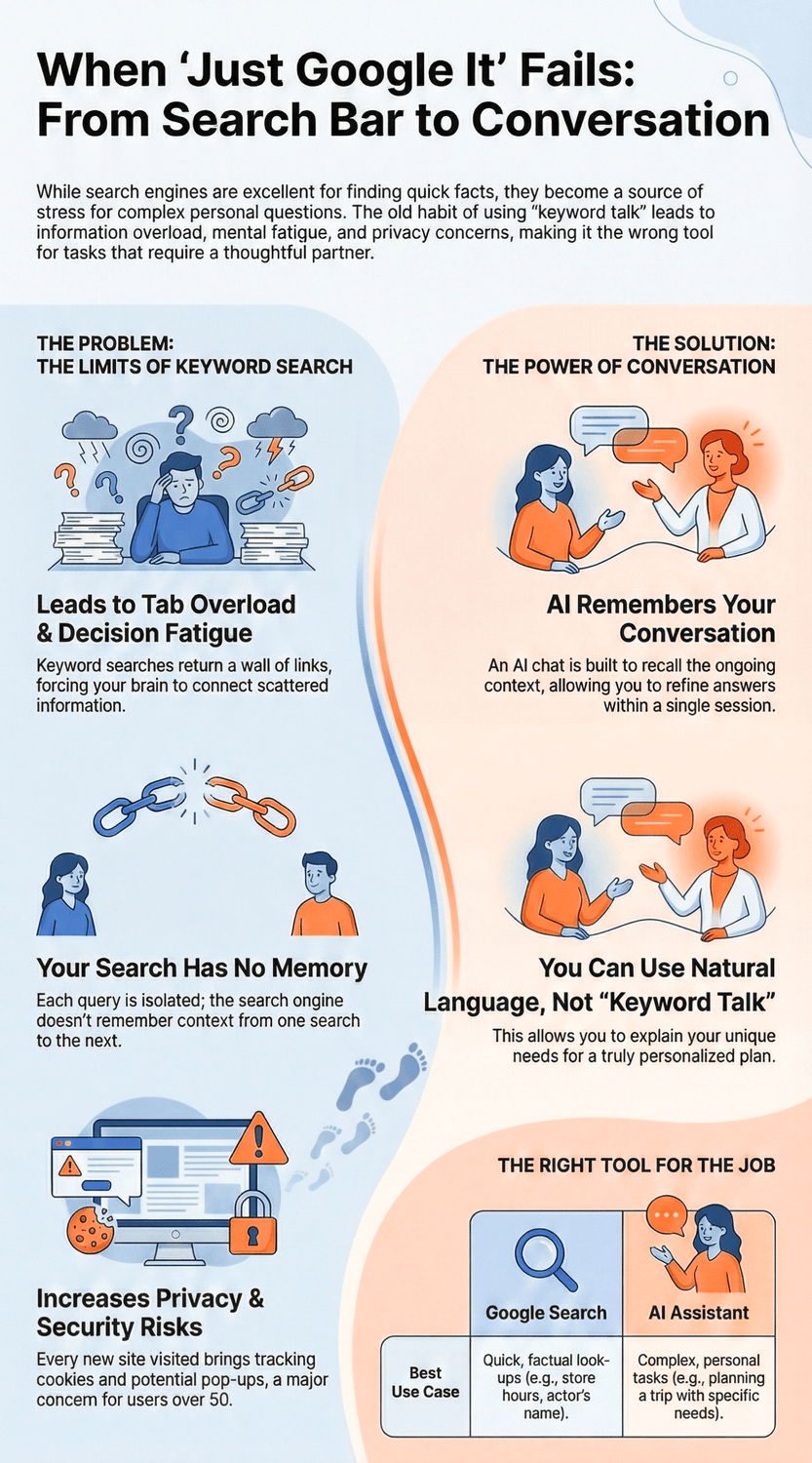
Research finds that privacy and security worries are consistently higher in people over 50 than in younger groups, and many say they are very concerned about how their personal data is used online, as shown in an Ipsos (2022) poll and in a post-pandemic study of older adults’ online safety by Pacheco (2024). It is completely normal if that makes you want to close the browser instead of exploring more.
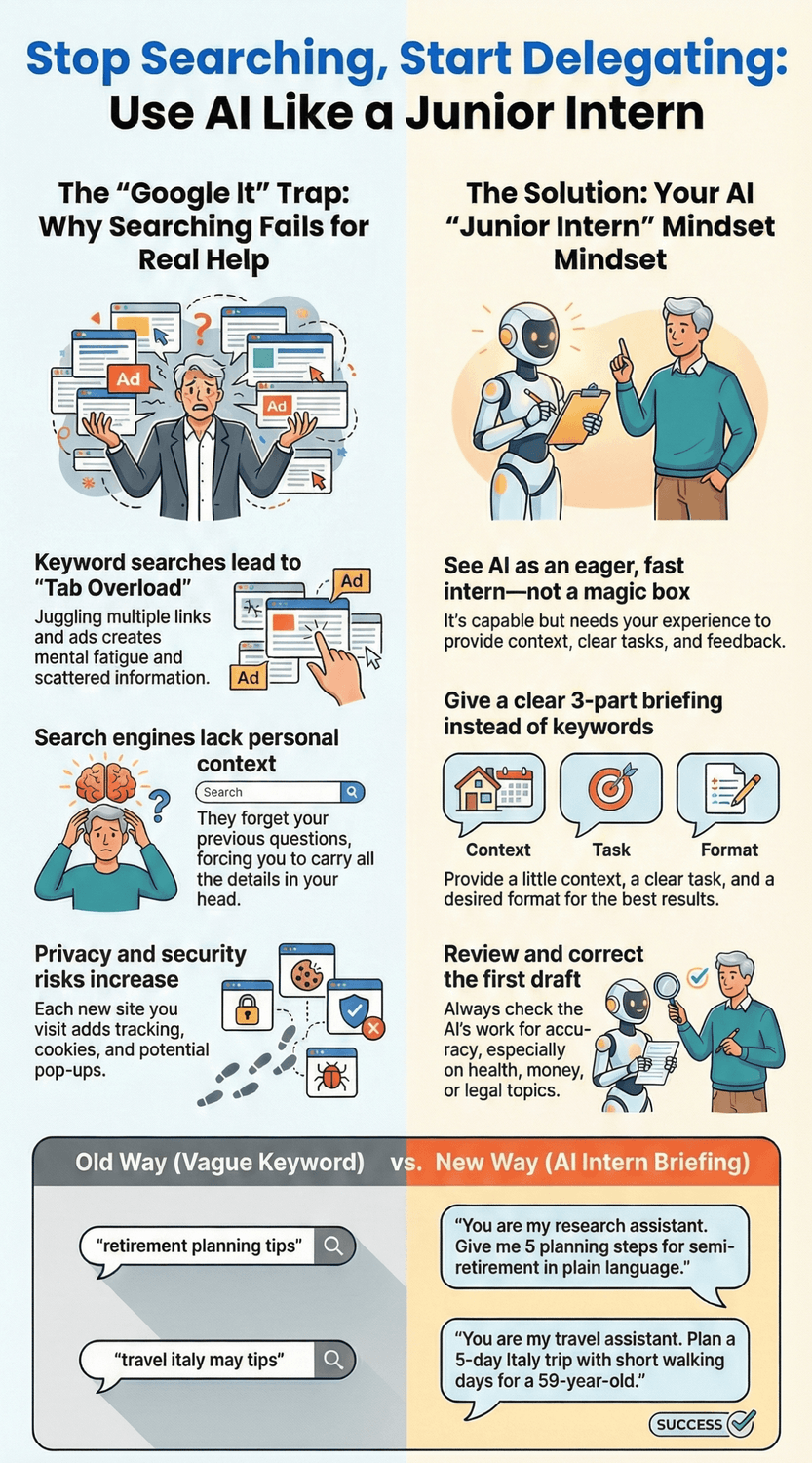
“So what, should I stop using Google?” Not at all. Search engines are still excellent for quick, factual look-ups. The issue is that we keep using keyword search for problems that actually need a partner, not a phone book.
Search engines also see each query in isolation. They do not really remember that yesterday you searched “Italy trains with luggage” and today you are asking “Florence or Bologna quieter may.” The context lives only in your head. You carry it from tab to tab. That works in your thirties when life is simpler and you have more energy to juggle details. It feels heavier later, when your time and attention are more precious.
AI chats work differently. They are built to remember the ongoing conversation inside a single chat. Imagine the difference between:
Typing separate, tiny Google searches like “cheap hotels, Bologna,” “things to do,” “train tickets,” or
Saying to an AI: “You are my travel assistant. I am 58, my knees are a bit sensitive, and I like quieter streets. Help me plan a simple 5-day Italy trip with short walking days.”
Which one sounds more human? Which one sounds more likely to give you a plan that respects your body, your budget, and your style?
You might be wondering if it is “allowed” to talk to a computer this way. It is. In fact, this conversational style is exactly how you unlock AI’s value. The search habit is not wrong, it is just incomplete. For real, personal help, you need a helper that can listen, remember, and adjust. That is where the “junior intern” mindset starts to shine.
The Key Takeaway
“Just Google it” is perfect for quick facts.
When you need tailored help, it quickly turns into tab overload and decision fatigue.
Conversation with an AI intern is the bridge from scattered searches to real support.
What Is the “Junior Intern” Mindset, and Why Does It Change Everything?
Imagine your first week at a new office years ago.
You were eager, quick, and willing to learn. But you still needed someone to say, “Here is the background, here is the task, and here is what ‘good’ looks like.” Without that, you guessed, made mistakes, and learned through feedback.
That is almost exactly how AI behaves. It is very fast, surprisingly capable in some areas, and completely clueless in others. It does not know your life, your health, your budget, or your boss. It needs you to be the experienced person in the room.
“So I’m still the one doing the thinking?”
Yes. That is the point. The intern does the heavy lifting, but you stay in charge of direction and quality.
Here is how the junior intern mindset works in practice:
AI is eager, not magical. It will always try to produce an answer. That does not mean the first answer is the right one.
You are the supervisor. Your job is to give context, set clear tasks, and decide what is useful.
Feedback is expected. When something is off, you send it back: “Shorten this,” “Make this friendlier,” “Add an example for someone over 50.”
It improves with you. The more you refine a prompt inside one chat, the better the results match your real needs.
Think about all the times you have trained real people. Maybe you taught a junior colleague how to reply to customers. Maybe you guided your children through homework. You already know how to say, “Here is what I want, here is why, here are a few examples.” That same skill transfers straight into AI.
For example, compare these two requests:
“Retirement planning tips.”
“You are my junior research assistant. I am 56, in Europe, self-employed, and I want to semi-retire in 8–10 years. Give me 5 basic planning steps in plain language, no investment jargon, and add one question I should ask a licensed advisor.”
Which one sounds more like something an experienced adult would say to an intern? Which one is more likely to give you practical, grounded next steps instead of random blog fluff?
It is normal to feel a bit silly at first, talking to a computer like this. You might ask, “Can I really just tell it to take on a role?” Yes. That is one of the simplest ways to guide AI. You can say:
“You are my travel assistant. I am 60, with light arthritis, and I prefer quiet streets to nightlife.”
“You are my writing intern. Rewrite this email to be warm but firm, and keep it under 150 words.”
“You are my learning coach. Explain this AI term using everyday examples, like bank apps and email.”
Notice what is happening. You are not throwing keywords at a search bar. You are delegating a task to a helper that understands natural language and can adjust when you push back. This alone reduces that “I have to know the magic words” anxiety.
“What if it makes mistakes?”
It will. That is why the intern metaphor is so helpful. You never assume a junior’s draft is perfect. You expect to read it, tweak it, maybe ask them to try again. With AI, you do the same, plus you stay extra cautious around health, money, and legal topics and verify those with trusted sources or professionals.
The real change is in how you feel. Instead of approaching AI as a test you can fail, you approach it as a conversation you guide. You are not trying to impress the system. You are training your intern.
The Key Takeaway
When you see AI as a junior intern, the pressure drops.
Your role is to bring judgment and direction.
Its role is to work fast, draft, and revise until it fits your real life.
How Do You Shift From Clicking Buttons to Having a Conversation With AI?
Let’s start with a familiar scene.
You open an AI chat window, the cursor blinks, and your mind goes blank. “What am I even supposed to type here?” So you fall back on old habits and type something that looks like a Google search. Then you feel disappointed when the answer is just… fine, but not really helpful.
It is normal to feel that way. For years, the rule of the internet was “type fewer words, get better results.” Now the rule has quietly flipped. With AI, more context and clearer sentences usually give you better help, not worse. No one really told you that, so you might still be playing by the old rules.
So how do you actually make this shift?
A simple way is to use a three-part structure every time you talk to AI. Think of it like giving instructions to a new coworker:
Context: Who you are and what is going on.
Task: What you want the AI intern to do.
Format: How you want the answer to look.
Here is a messy, “button-clicking” style request:
“travel italy may tips”
Now here is the same request in conversation style:
“You are my travel assistant. I am 59, traveling with my adult daughter in May, and we both prefer quiet streets and simple food. Please suggest a 5-day itinerary with short walking days, 2 hotel options per city, and a simple bullet list of what to book in advance.”
Which one feels more like delegating to a real helper? Which one would you rather receive if you were the intern?
“Do I have to write a long story every time?”
Not at all. You just need enough information so that someone who does not know you can make a decent first draft. Two or three clear sentences often beat a single keyword line.
Another helpful shift is to reuse and tweak your prompts instead of starting from zero. Let’s say you create a base prompt for emails:
“You are my writing assistant. Help me rewrite this email so it is warm, concise, and clear for a colleague around my age. Keep it under 150 words and avoid slang.”
You can save that in a note on your computer or phone. The next time, you paste it in, change a detail or two, and you are ready. Over time, you build your own small “prompt library” that fits your style and values.
It is also completely okay to talk to AI in stages. You might start with:
“Help me plan a simple weekend at home that feels restful, not busy.”
Then, when you see the first suggestion, you follow up:
“Shorten this list.”
“Add ideas that do not cost money.”
“Adjust this for someone with low energy after a busy workweek.”
That back-and-forth is not a sign you are doing it wrong. It is the whole point. The conversation lets the AI intern slowly move closer to what you actually need.
If you feel silly at first, remember that your brain has decades of practice with search boxes and almost no practice with AI chats. Of course it feels different. With a bit of repetition, your fingers will naturally start typing in sentences instead of chopped-up keywords.
The Key Takeaway
To move from clicking buttons to real help, stop thinking in single keywords.
Start thinking in small briefings: a bit of context, a clear task, and a simple format.
That is how your AI intern finally has a chance to shine.
What Kind of Context Does Your “AI Intern” Actually Need?
Imagine you’ve asked for help in real life like this:
“Can you… just fix this?”
The person blinks, looks at the paper in their hand, and has no idea what “fix” means, what “this” is, or what “good” looks like. That awkward moment? That’s exactly what happens when we throw vague prompts at AI.
“But I don’t know what details matter. How much do I have to say?”
That’s a fair question. The good news is, your AI intern doesn’t need your life story. It just needs the kind of basics you would tell a new colleague in the first 2–3 minutes of a task.
A simple way to think about context is in three buckets:
Who you are
What you’re trying to achieve
What you already have
1. Who you are
This isn’t about sharing secret details. It’s about giving enough shape so the answer fits your reality. For example:
“I’m 62, based in Europe, and I’m not very technical.”
“I’m 55 and work in an office, mostly with email and Word documents.”
“I’m planning for my retirement but I’m risk-averse and prefer simple explanations.”
“Is it safe to say my age or region?”
In general, yes. Those are broad details that help the AI adapt tone, examples, and assumptions. You don’t need to share your full address or anything that could be used as an ID; keep it general and you’re fine.
2. What you’re trying to achieve
This is where many people over 50 undershare. We ask for “help with a letter” when what we really mean is, “I need a polite but firm reply that doesn’t burn bridges.” The clearer your goal, the more useful the draft.
Compare these:
Vague: “Help with trip.”
Clear: “Help me design a simple 4-day city break in Prague that doesn’t exhaust me, with one main activity per day and time to rest in the afternoons.”
Or:
Vague: “Explain AI.”
Clear: “Explain what AI is in plain language for someone over 55 who uses email and a bank app, but feels unsure about anything more technical.”
Which version would you want if you were the intern?
3. What you already have
This is your raw material: text, notes, links, or even a rough idea. Instead of saying, “Write a speech,” you might paste the messy draft and say:
“Here is my rough speech. Please tidy it up, keep my tone, and shorten it to 3 minutes for a small retirement party.”
Or:
“Here are three hotels I’m considering. Put them in a table and compare price, location, and cancellation policy for a 60-year-old solo traveler.”
“I don’t always know what to paste.” That’s normal. A simple rule: if it’s already written and you want to improve or organize it, paste it. If it’s mostly in your head, describe it in a few sentences instead.
Finally, a quick note on privacy. It’s wise to avoid entering sensitive details like full ID numbers, full medical records, or complete financial account data. You can say “a heart condition,” “a medium pension,” or “a long-term health issue” instead of full diagnoses or account balances. You still give the AI enough context to be useful without putting everything on the table.
The Key Takeaway
Your AI intern works best when it knows who you are in broad strokes, what you’re trying to do, and what you already have.
A few extra sentences of context often save you ten minutes of frustration later.
How Do You Give Clear Instructions Instead of Vague Keywords?
Think about the last time someone asked you for help and said something like, “Can you just look at this?”
You probably thought, “Look for what? Fix what? Make it longer? Shorter?” You needed more than a single sentence to be useful.
AI has the same problem. When we type vague requests like “help with Excel” or “make this better,” it will try its best, but it has to guess. Sometimes it guesses well. Often it misses what you actually care about.
“So how specific do I really need to be?”
Happily, you do not need a huge prompt. You just need a simple structure that turns foggy wishes into clear instructions.
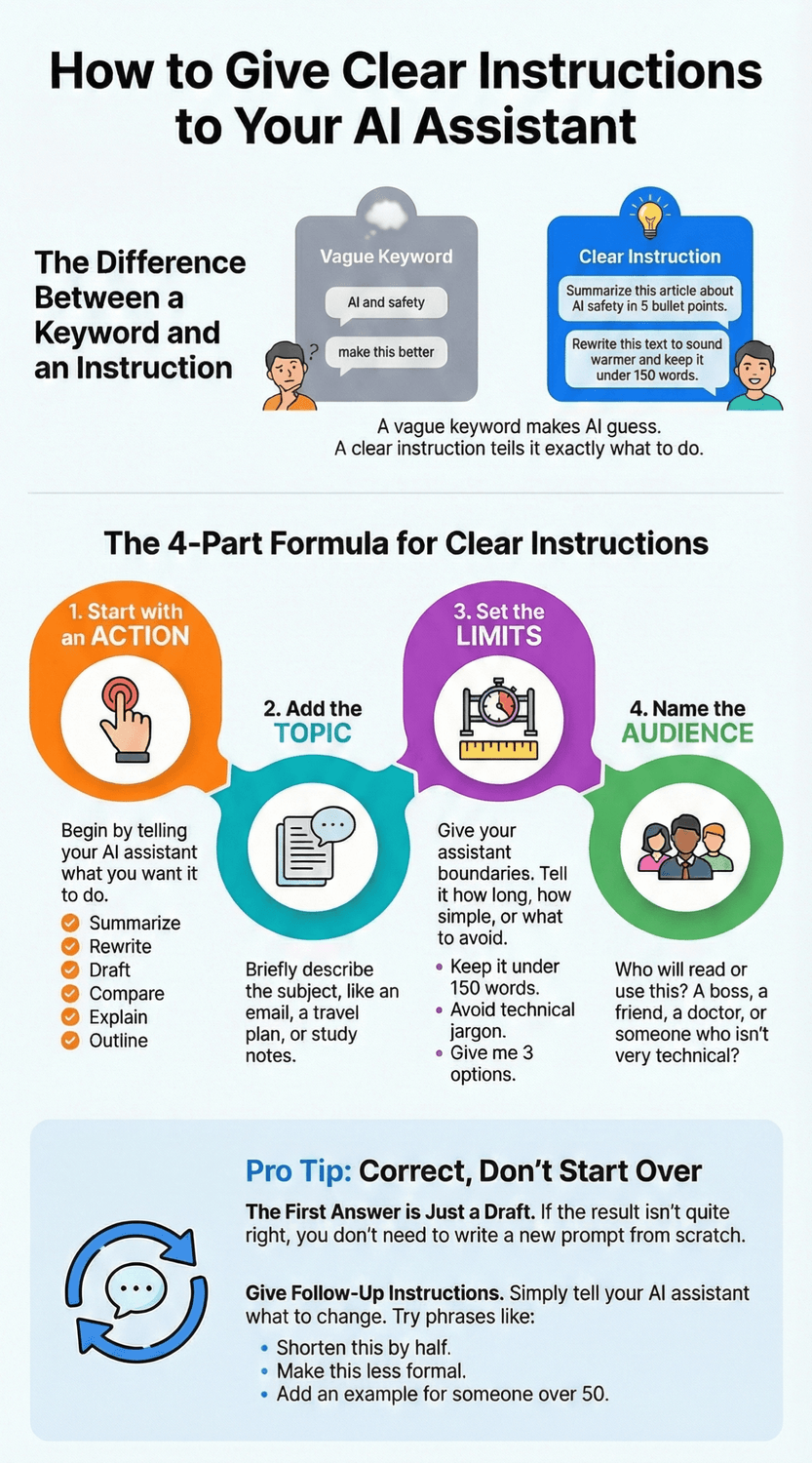
A handy formula looks like this:
Action + Topic + Limits + Audience
Let’s break that down with real examples.
1. Start with the action
What do you want the AI intern to do? Some useful verbs:
Summarize
Rewrite
Draft
Compare
Check
Explain
Outline
Brainstorm
Instead of “AI and safety,” you might say:
“Summarize this article about AI safety in 5 bullet points.”
Already clearer, right?
2. Add the topic
What are you working on? Email, travel plan, budget outline, study notes? Paste it or describe it briefly.
“Summarize this article about AI safety in 5 bullet points.”
(paste the text here)
Or:
“Draft a polite email asking my manager to move a meeting.”
3. Set limits
This is where you tell your intern how long, how simple, or what to avoid.
“Keep it under 150 words.”
“Avoid technical jargon.”
“Use friendly, respectful language.”
“Give me 3 options.”
For example:
“Draft a polite email asking my manager to move a meeting. Keep it under 120 words and make it sound calm, not apologetic.”
4. Name the audience
Who will read or use this? A boss, friend, doctor, or a person over 50 who is not very technical?
“Explain this AI term in simple language for a 55-year-old who uses email and a bank app, but is nervous about new tools.”
“This feels like a lot to remember.”
Give yourself permission to start small. Even adding two pieces, like Action + Limits, improves things a lot. For example:
“Rewrite this text to sound warmer and shorter.”
“Explain this like I am a beginner and remove any acronyms.”
One more tip: when the answer is close but not quite right, do not start over. Talk to your intern:
“Shorten this by half.”
“Make this less formal.”
“Add an example for someone over 50 with low tech confidence.”
Each small nudge teaches the AI what “good” looks like for you.
The Key Takeaway
Vague keywords make AI guess.
A simple pattern like Action + Topic + Limits + Audience turns you into a clear supervisor and helps your AI intern give you work you can actually use.

How Do You Review and Correct Your AI Intern’s Work Safely?
Let’s be honest.
When an AI answer looks neat and well written, it is tempting to think, “Wow, this must be right.” The formatting, the confident tone, the smooth sentences… it can feel more trustworthy than it really is. Have you had that moment where something sounds convincing, but a small voice in your head says, “Really?”
That small voice is important. It is not negativity. It is your experience.
With the junior intern mindset, you never treat the first draft as the final word. You treat it as a starting point. You might be wondering, “But how do I actually check this without spending ages on it?” Good question. You do not need a long process. You just need a simple habit.
Here is a quick review checklist you can keep in mind:
Does this match my real situation?
Is anything oddly specific or too vague?
Is this a sensitive topic where I should double-check elsewhere?
Take the first point.
If AI suggests a daily schedule that includes late-night work, but you know your energy drops after 7 pm, that is a mismatch. You can say:
“Adjust this plan for someone who gets tired in the evenings and prefers morning focus time.”
You are not “fighting” the AI. You are nudging your intern toward reality.
Next, watch for oddly specific details. For example, if it confidently lists a hotel that “always has free parking” or a medical fact that sounds very precise, ask yourself: “Do I know this is true, or is this a guess in a nice outfit?” It is completely normal to feel cautious here. Those are moments to verify via trusted websites or, in health and money topics, with qualified professionals.
“I don’t want to become a full-time fact-checker.”
You will not. Over time, you will learn which topics feel safe to accept with light checking, and which ones always need outside confirmation. A simple rule that helps:
Everyday tasks like rewriting an email, planning a packing list, or brainstorming gift ideas usually need only a quick glance.
Anything involving your body, your wallet, or the law deserves a second opinion.
Then there is the correction part. Many people feel shy about telling AI it got something wrong. They think, “Is it okay to say I don’t like this?” It is more than okay. It is essential.
Useful correction phrases include:
“This is too formal. Make it friendlier but still respectful.”
“Shorten this to half the length.”
“You forgot that I am in Europe / that I am over 50 / that my budget is limited.”
“Remove anything that sounds like medical advice and focus on lifestyle tips I can discuss with my doctor.”
Each time you correct, you are training your intern. The goal is not to catch every tiny flaw. The goal is to make sure the final result fits your life and your values.
Finally, a word about safety. It is wise to avoid pasting full ID numbers, full medical reports, or complete financial details into any online tool. You can still ask for help by describing the situation in general terms. For example, “a small pension,” “a joint pain problem,” or “a tight monthly budget” is usually enough context.
The Key Takeaway
Treat AI’s answers like a junior intern’s draft.
Trust your experience, ask “Does this really fit me?”, correct what feels off, and always double-check health, money, and legal advice with human professionals you trust.
How Can You Practice the Junior Intern Mindset in Just 10 Minutes a Day?
Picture this as a tiny daily ritual.
You make your morning tea or coffee, open your AI chat, and instead of doom-scrolling or checking the news, you give your “intern” one small, useful task. Ten minutes, then you close the tab and move on with your day.
“Can ten minutes really make a difference?”
Yes, because you are not trying to become an AI expert. You are training a habit. Little by little, you are teaching your brain, “I can ask for help. I can give instructions. I stay the boss.”
Here is a simple 7 day starter plan you can reuse or repeat.
Day 1 – Rewrite an email
Take a real email you need to send. Maybe to a colleague, your bank, or a family member.
Prompt idea:
“You are my writing intern. Rewrite this email so it is clear, polite, and under 150 words. Keep my basic message, just tidy it up.”
Paste the email, read the result, then ask yourself:
Does this sound like me?
What would I change?
If something feels off, say so: “Make it less formal” or “Use simpler words.”
Day 2 – Plan one small task
Choose something you have been avoiding. Organising a drawer, sorting papers, planning a doctor visit.
Prompt idea:
“You are my planning assistant. Help me break this task into 5 small steps that feel doable for someone who is often tired in the evenings.”
Notice how it feels to let the intern suggest steps, instead of carrying it all in your head.
Day 3 – Learn one concept
Pick a term that annoys you. “Algorithm,” “cloud,” “AI model.”
Prompt idea:
“Explain this term in simple language for a person over 50 who uses email and a bank app, but dislikes technical jargon. Use an everyday example.”
Ask follow up questions. “Give me another example.” “Explain it even more simply.” That back and forth is the conversation you are practicing.
Day 4 – Plan a small treat
Not everything has to be serious. Ask for ideas for a cozy evening, a Sunday walk, or a simple at home day.
Prompt idea:
“You are my lifestyle assistant. Suggest 5 simple, low cost ways to spend a relaxing Sunday at home for a 55 year old who lives alone.”
Then adjust: “Shorten the list” or “Remove anything that needs special equipment.”
Day 5 – Organise information you already have
Take a messy note, a list, or copied text.
Prompt idea:
“Turn this into a clear checklist for me. Group similar items together and remove duplicates.”
You might be surprised how nice it feels when your intern tidies things for you.
Day 6 – Travel or outing helper
Even if you are not travelling soon, pretend.
Prompt idea:
“You are my travel assistant. Plan a simple half day trip near a European city that avoids lots of stairs and crowds.”
Ask yourself: Would I enjoy this? What would I change? Tell the AI that.
Day 7 – Review and reflect
Today, ask the AI to help you look back.
Prompt idea:
“Summarise how I have used you this week based on our recent chats, and suggest 3 more everyday tasks I could delegate next week.”
“What if I miss a day?”
Nothing breaks. Just pick up again. The point is not perfection. It is building a sense that talking to your AI intern is normal and available, like reaching for glasses when you want to read.
The Key Takeaway
Ten quiet minutes a day are enough to turn AI from a strange toy into a familiar helper.
Small, repeated tasks build confidence, one real life prompt at a time.
How Do You Share This Mindset With Friends, Family, or Coworkers?
You are sitting with a friend, partner, or coworker. They sigh at their laptop and say, “I just don’t get this AI stuff. It’s too much.” Part of you wants to help. Another part worries, “I’m still figuring it out myself. Who am I to explain it?”
That hesitation is normal. You might be wondering, “Do I have to be an expert before I show anyone else?”
You don’t. You just need one simple story and one small demo.
The story is the junior intern metaphor.
The demo is a real life task.
Start with a simple story, not technical terms
Instead of starting with “algorithms” or “models,” try something like:
“I’ve started thinking of AI as a junior intern. It is fast and helpful, but it needs clear instructions and my judgment. I stay the boss.”
You can even share your own doubts.
“It felt strange at first, talking to a computer like a person. I worried I’d type the wrong thing. Then I tried giving it tasks, like I would give a new coworker, and it got easier.”
This honesty does two things.
It shows them they are not the only one who feels unsure.
It also quietly says, “If I can learn this in small steps, you can too.”
Show, don’t lecture
People rarely learn this by listening to a long explanation. They learn when they see one useful example that fits their life.
Ask a gentle question:
“What is one small thing that annoys you on the computer?”
“Is there an email or message you’ve been putting off?”
“Is there something you wish you understood better?”
Then suggest a tiny experiment together.
For example, if it is an email:
“Let’s tell the AI it is your writing intern. We will give it context, the task, and the format, just like we talked about.”
You might type:
“You are my writing intern. Help me rewrite this email to my landlord so it is polite but firm, and under 120 words. Here is my rough version.”
Then you both read the result. Ask them:
“What do you like?”
“What would you change?”
If they say, “It sounds too stiff,” you can say, “Great, let’s tell it that.” Then type:
“Make this friendlier and more natural, but keep the main message.”
Now they see the real magic: not the first answer, but the back and forth.
Be the calm guide, not the show off
It is tempting to try to impress others with “clever prompts.” That often backfires and makes them feel behind. Instead, stay simple. Use plain language. Repeat the pattern: context, task, format.
If they ask, “What if it says something wrong?” you can reuse what you learned:
“I always treat the first answer like a draft from an intern. I read it, fix what feels off, and double-check serious things like health or money.”
For coworkers, you can suggest low pressure uses. Maybe AI drafts meeting summaries, organizes notes, or suggests starting points for agendas. Emphasize that no one’s experience is being replaced. The goal is to make the boring parts lighter, not to judge anyone’s skills.
If you like, you can also share resources.
“By the way, I follow a blog called Rado SimpleAI that has beginner friendly prompt examples. It helped me get started without the stress.”
You do not have to convince everyone. Some will wave it away. That is okay. Focus on the ones who are curious but cautious, just like you were.
The Key Takeaway
You do not need expert status to help others.
A clear metaphor, one small shared example, and a calm tone are enough to show friends, family, or coworkers how to treat AI like a junior intern instead of a scary black box.
From Searcher To Delegator
For most of your online life, you were trained to be a searcher. Type a few magic words into a box, click through pages, and hope the answer is hiding somewhere. That made sense when the internet was mostly articles and menus. It feels much less helpful now, when your questions involve health worries, money decisions, work overload, or simple tiredness.
The quiet fear underneath is very real. Many adults over 50 say privacy worries and not knowing how their data is used are big reasons they hold back from new tools. Recent research by AARP (2025) and AARP (2021) found that about a third of older adults name privacy as their biggest barrier to tech adoption, and many are uneasy about what happens to their data online. If that has been you, it is completely normal. You were right to be cautious.
The shift you have been making in this guide is not about becoming “good at AI.” It is about taking back your role. You are no longer the person desperately hunting for the right keywords. You are the person who says:
“Here is my situation.”
“Here is the task.”
“Here is how I want it delivered.”
And you let your junior intern handle the heavy lifting while you stay in charge.
You have seen how this looks in practice: giving context instead of isolated keywords, asking for drafts instead of final verdicts, correcting AI like you would correct a new colleague, and using a simple daily practice to build confidence. You might be wondering, “Is that really enough?” For everyday life, it is more than enough. Work on older adults’ digital skills shows that simple, well-paced support that respects experience works far better than complex, one-off training courses, as highlighted by OECD (2024) and in a review of digital literacy tools by Oh et al. (2021).
So the next time you are tempted to open a dozen tabs, pause for a second. Ask yourself:
“Is this something I could briefly delegate to my AI intern instead?”
If the answer is yes, try one clear prompt:
“You are my junior intern. I am [your age], and here is what I am trying to do today…”
No drama. No pressure to be perfect. Just one small task, one short briefing, one draft you can improve. Over time, this becomes less of an experiment and more of a quiet habit, like putting on reading glasses.
You do not have to chase every new tech trend. You simply have to decide that your time and attention are worth protecting, and that AI can be a useful helper when it works inside your rules.
The Key Takeaway
You are not here to impress the machine.
You are here to be the experienced human in the room.
Start with one real task, give your AI intern a clear briefing, and let it help you carry the weight.

🎓 Your "Tech Dignity" Toolkit
Ready to stop surviving the AI era and start owning it? I’ve built a library of resources specifically designed to help you stay safe, stay professional, and stay in control. Whether you want to fix a specific problem or master the whole machine, start here:
[FREE] The "Bypass the Bot" Bundle: Stop screaming at automated phone menus. Get the secret codes and scripts to reach a human every time. Download for FREE Here
Secure Your Family: Protect your loved ones from AI voice clones and deepfake scams with the Family Shield Anti-Scam Kit. Get Protected for $9
Upgrade Your Career: Use my "Strategy Sandwich" method to delegate grunt work to AI while keeping your professional edge with the Executive Director’s AI Workflow. Reclaim Your Time Here
Lock Down Your Privacy: Interrogate the "black box" and secure your data with the AI Truth & Privacy Protocol. Secure Your Data Here
Tame the Machine: Strip the "creepy" fake empathy out of AI and turn it into a silent tool with the "Strictly Business" AI Tuner. Take Control Here
The Ultimate Shortcut: Want the entire library? Secure your digital future with the Complete Mastery Collection (all products bundled for about 57% off). Get the Full Collection Here
Frequently Asked Questions
Q1) Is it safe to share personal details with AI?
It depends what you share. Broad details like “I am 58 and live in Europe” or “I work in an office and mostly use email” are usually fine and actually help the AI adapt its answer. The problems start when people paste full ID numbers, account details, or very specific medical information.
You can stay safer by describing sensitive things in general terms. For example, say “a long-term heart condition” rather than copying a full medical report, or “a tight monthly budget” instead of full account balances. This way you still get tailored help without putting everything on the table. Studies of older adults show that privacy worries are a major barrier to tech adoption, and that they often use their own strategies to protect themselves online, as shown in work by AARP (2021) and Quan-Haase et al. (2020).
Short rule: age, region and broad context are fine. IDs, full records and exact codes are not.
Q2) Do I need to learn “prompt engineering” to use AI well?
No. You do not need fancy jargon or long technical prompts. You already know the core skill: explaining a task to another person. The junior intern mindset simply asks you to do that in writing.
A simple pattern such as “context + task + format” gets you most of the benefit. For example:
“I am 60 and tired in the evenings. You are my planning assistant. Break this task into 5 simple steps and put them in a checklist.”
That is not “engineering.” It is just clear communication. Research on digital literacy in older adults suggests that practical, everyday language is more effective than abstract technical teaching, as summarised byOh et al. (2021).
Q3) How is this different from using Google?
Search engines are great at facts. “What time does this museum open?” “What is the capital of Portugal?” For those, search is still perfect.
The trouble appears when your question is messy or personal. Planning a holiday with mobility limits. Writing a delicate email. Comparing several confusing options. Search makes you jump between many pages and keep all the context in your head. AI chats let you stay in one place, build up the story, and refine the answer.
So you do not have to choose one or the other. Use search for quick facts, and your AI intern for tasks that need more context, planning, or rewriting. Surveys of knowledge workers show that many now combine both: they keep search for checking facts, and use AI to save time on writing, planning and summarising, as seen in theMicrosoft Work Trend Index (2024).
Q4) What if AI gives me a wrong or strange answer?
Assume the first answer is a draft, not the truth. That mindset alone protects you. If something feels off, ask yourself three quick questions:
Does this match my actual situation?
Is anything oddly specific or strangely vague?
Is this about health, money, or law?
If it touches those sensitive areas, do what you would do with any article on the internet. Check trusted sites, ask a professional, or talk to someone you trust. Work on online health information, such as Friedman et al. (2022), stresses that encouraging older adults to seek information online only works well if we also help them manage privacy and accuracy risks.
When the answer is simply “not quite what you meant,” send it back. Tell the AI, “Shorten this,” “Make it more practical,” or “Adjust this for someone over 50 with low energy.”
Q5) Do I need a paid AI plan or special device to start?
For most everyday uses, no. A basic, reputable AI chat in your browser is enough to practice the junior intern mindset. If you already have a computer, tablet, or smartphone that can browse the web comfortably, you have what you need.
Where paid plans can help is if you work with long documents, large PDFs, or use AI heavily for your job. But it makes sense to first build confidence with small, free tasks. Many older adults say ease of use and setup are bigger barriers than cost itself, as highlighted by AARP (2025) and policy work on seniors’ digital skills by OECD (2024).
Q6) I feel embarrassed asking “basic” questions. Is that normal?
Very normal. Many people over 50 say they worry about looking silly or “behind” when they deal with new tools or devices. International reviews on seniors’ digital inclusion, such as OECD (2024), describe this kind of self-doubt as a major emotional barrier, not a lack of intelligence. That feeling can shrink your curiosity and make every question feel like a test.
Try reframing your questions as training for your intern, not a judgment on you. When you ask, “Explain this like I am a beginner,” you are not confessing weakness. You are giving clear instructions so the tool can actually help. And remember, most people are figuring this out as they go. You are not late. You are right on time for your own life.
Q7) How often should I use AI to really feel the benefit?
You do not need hours. Ten focused minutes a day, a few times a week, is enough to build a habit. For example, you might use your AI intern only for:
One tricky email
One small planning task
One confusing term you want explained
Regular, low-pressure practice like this fits well with what we know about how older adults build digital confidence: repeated, practical tasks in familiar situations work better than long, one-off lessons. This is a common theme in guidance such asOECD (2024) and related implementation roadmaps for seniors’ training programmes.
Sources
AARP - Tech Adoption Continues Among Older Adults: 2025 Tech Trends (2024).
AARP - Older Adults Wary About Their Privacy Online (2021).
Pew Research Center - How Americans View Data Privacy (2023).
OECD - Digital Skills for Seniors (2024).
Oh, S. S. et al. - Measurement of Digital Literacy Among Older Adults (2021).
Microsoft Worklab - AI at Work Is Here. Now Comes the Hard Part (2024).
Friedman, A. B. et al. - Addressing Online Health Privacy Risks for Older Adults (2022).
Quan-Haase, A. et al. - Online Privacy Concerns and Privacy Protection Strategies of Older Adults (2020).
Ipsos — A Majority of Americans Are Concerned About the Safety and Privacy of Their Personal Data (2022).
Pacheco, E. —Older Adults’ Safety and Security Online: A Post-Pandemic Exploration of Attitudes and Behaviors (2024).