The 4-Day Work Week Secret: How to Use AI to Reclaim Your Friday Afternoons
By Rado
If your Fridays feel like a slow leak of energy, you’re not imagining it. Meetings pile up, inbox fires flare, and by the time you finally look up… the afternoon is gone.
Here’s the good news: you usually don’t need to “work harder” to get time back. You need fewer repeat tasks, fewer blank-page moments, and fewer tiny decisions that quietly eat your day. That’s where AI can help, as long as you use it like a practical assistant, not a magic trick.
In this guide, I’ll show you a results-first way to compress a 40-hour workload into something closer to 32. We’ll pick the right tasks, set simple guardrails for privacy, and build a weekly rhythm that makes Friday afternoons feel like yours again.
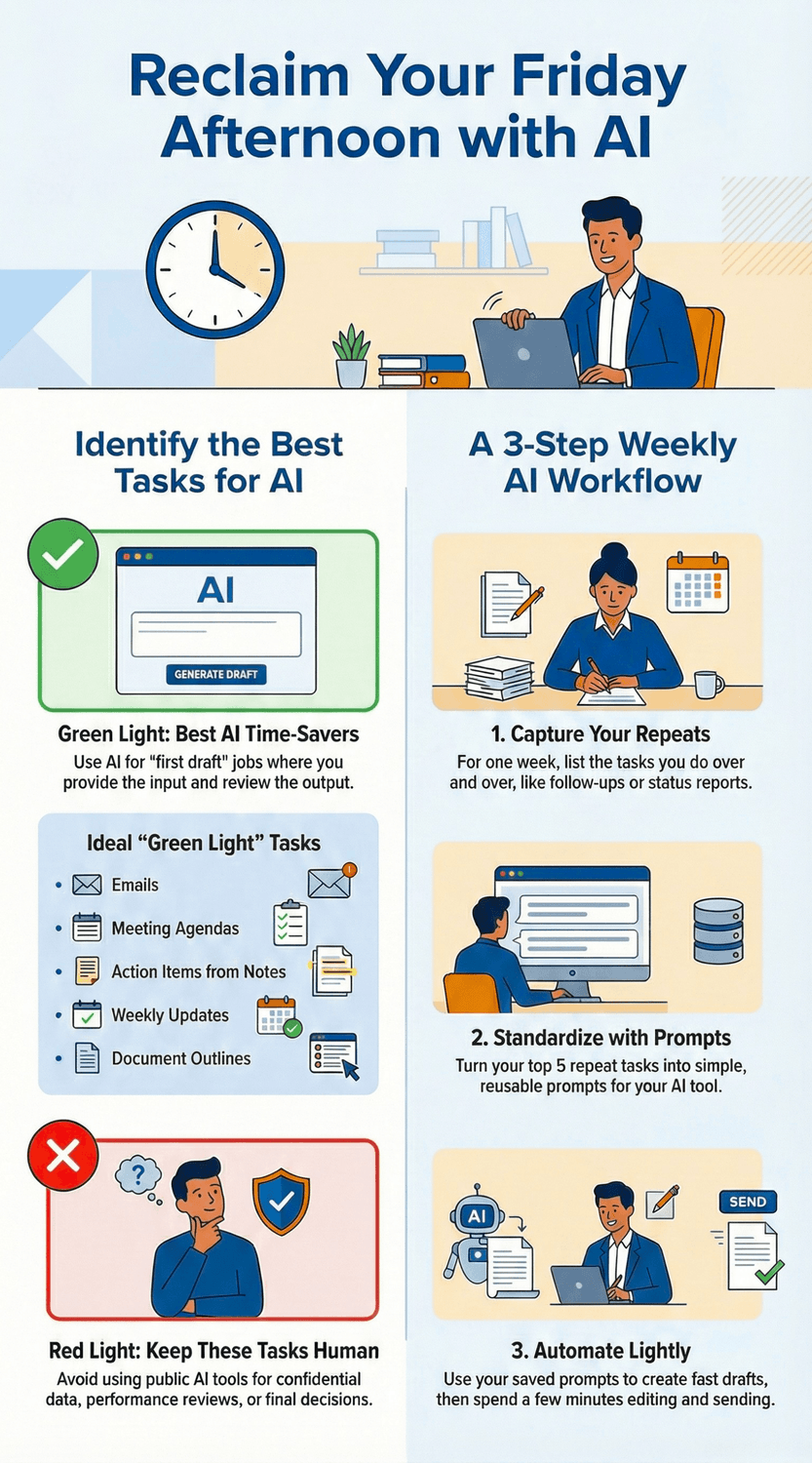
What does “reclaiming Friday afternoons” actually mean in real life?
Picture a normal Friday at your desk. You tell yourself, “I’ll wrap up early today.” Then a meeting runs long. A few “quick questions” land in chat. You skim emails, start three tiny tasks, and suddenly it’s 4:30.
If that sounds familiar, you’re not failing. You’re bumping into how modern work actually behaves. In its “infinite workday” analysis, Microsoft (2025) describes how work can start early, run late, and get sliced up by messages and meetings. (Microsoft)
So when I say “reclaim Friday afternoons,” I don’t mean a heroic one time sprint. I mean a repeatable outcome you can count on.
Here’s a practical definition:
Reclaiming Friday afternoons means you reliably finish your week’s core work by early Friday, without dropping quality, and without paying for it with late nights earlier in the week.
“Is that even realistic?” That’s a fair question. But we do have evidence that shorter weeks can work when people redesign how work gets done. In the UK’s large four day week pilot, most participating organizations chose to continue afterward, and the report documents improvements in areas like wellbeing and retention. That’s covered in Autonomy (2023).
And in Iceland’s major trials, reduced hours were tested at scale without cutting pay. The analysis found productivity was maintained or improved in many workplaces, alongside better wellbeing. That comes from Autonomy and Alda (2021).
Now, your situation might be different. You might not control company policy. You might not be able to cut meetings in half. It’s normal to feel a little stuck there. This blog’s “secret” is smaller and more personal: you use AI to compress the parts of your week that are repetitive and slow, so Friday stops being the day you clean up everyone else’s loose ends.
To make this real, pick one measurable Friday win. For example:
“By 1:00 pm Friday, my weekly update is sent.”
“By 2:00 pm Friday, inbox is down to 10 messages.”
“By 3:00 pm Friday, next week’s top 3 priorities are set.”
Why one win? Because vague goals create guilt. Clear goals create momentum. And once you get one Friday win consistently, you can stack a second one on top.
Before we move on, do a quick baseline. What typically steals your Friday afternoons? Meetings that should have been emails? Status updates that take too long to write? Follow ups because the “next step” wasn’t clear?
The Key Takeaway
Reclaiming Friday afternoons is not about hustling faster.
It’s about choosing one clear finish line, spotting your biggest Friday time leaks, and using AI to remove repeat friction.
Which parts of your week are easiest to shrink with AI (without risking quality)?
Think about the last time you had to write something “simple” at work. A status update, a recap email, a short brief. You knew what you wanted to say, but you still stared at the blank page longer than you wanted to. Then you rewrote it twice. Then you worried it sounded too blunt. Friday afternoon quietly slipped away.
“So what should I actually hand over to AI?” The safest wins are usually repeatable, low drama tasks where you already know the answer, you just don’t want to spend your time packaging it.
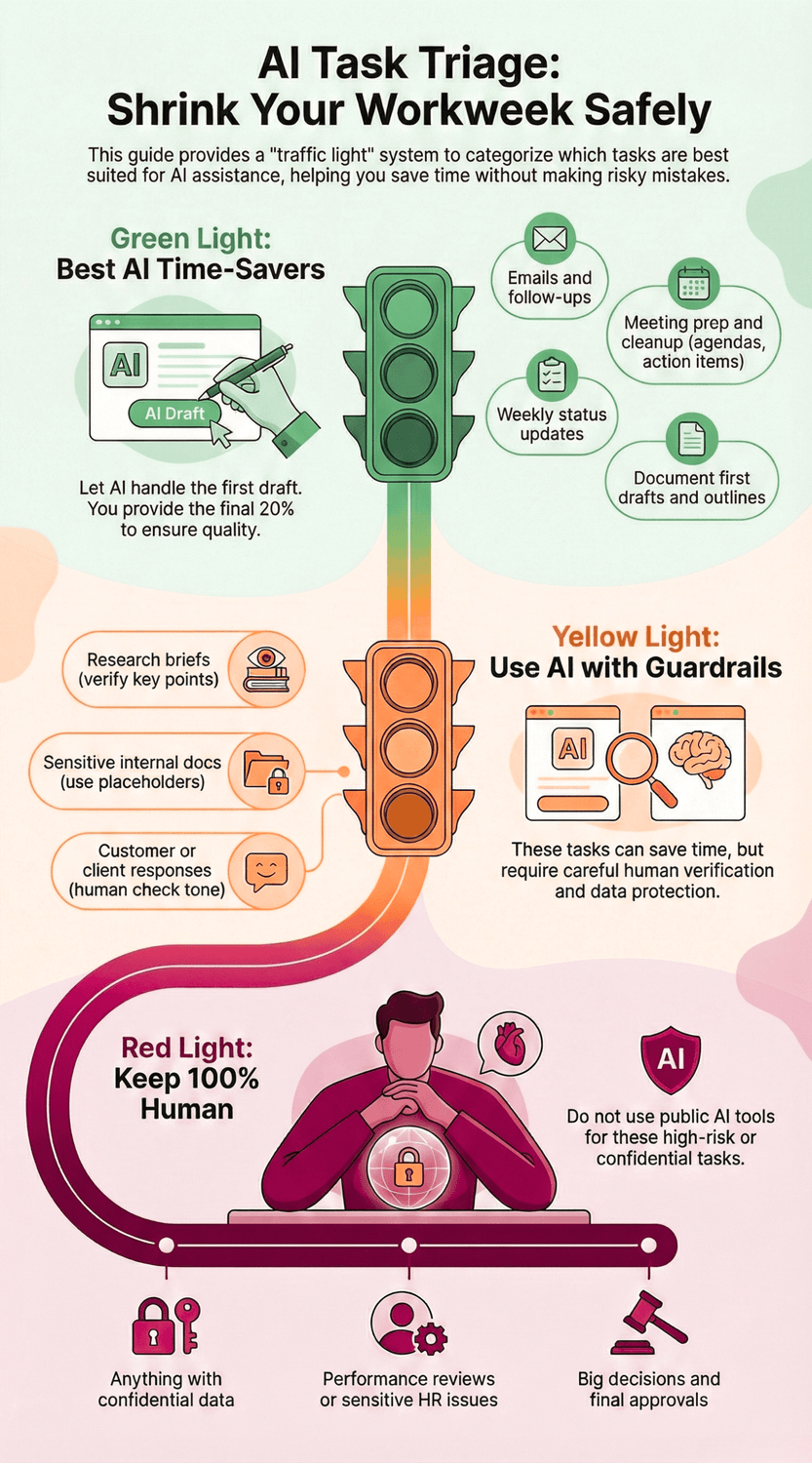
A helpful way to choose is a quick traffic light:
Green light tasks (best AI time savers)
These are “first draft” jobs. You stay in charge, but AI does the heavy lifting.
Emails and follow ups: turn messy thoughts into a clear, polite message.
Meeting prep: agenda from bullet points, questions to ask, a quick decision list.
Meeting cleanup: notes into action items, owners, and due dates.
Weekly updates: your rough bullets into a clean status report.
Document first drafts: outlines, headings, and a first version you can edit.
Why these work: research consistently shows the biggest gains when AI helps with writing and summarizing. In a controlled experiment, Noy and Zhang (2023) found people completed professional writing tasks faster and with higher quality when using ChatGPT.
Yellow light tasks (use AI, but add guardrails)
These can still save time, but you’ll want to be more careful.
Research briefs: ask for a structured summary, then verify key points.
Drafting policies or sensitive internal docs: keep details vague, use placeholders.
Customer or client responses: use AI for tone and clarity, then human check.
“But my work is too complex for templates.” Here’s the twist: even complex jobs usually contain small repeat chunks. The trick is to shrink those chunks so your brain is free for the real thinking.
Red light tasks (keep human, or use approved tools only)
Anything with confidential data you should not paste into a public tool
Performance reviews, disciplinary messages, sensitive HR issues
Big decisions and final approvals
Now, one more practical clue. If your week feels like nonstop messages and meetings, you’re not alone. Microsoft (2025) reports that many workers are interrupted constantly during core hours. So a smart “AI for Fridays” plan often starts with shrinking communication work first: emails, meeting notes, and updates.
The Key Takeaway
Start with green light tasks.
Let AI create the first draft, then you do the final 20% that keeps quality high.
That’s how you save time without feeling reckless.
How do you set up an AI workflow that saves time every week (not just once)?
Let’s start with a scene you probably know well. It’s Tuesday morning. You open your laptop with good intentions. Then you remember you still need to: answer three emails, prep an agenda, rewrite a status update, and turn last week’s meeting notes into “something presentable.” None of it is hard. It’s just… endless.
“Do I really need a whole system for this?” The truth is, AI saves the most time when you stop using it as a one-off rescue tool and start using it like a repeat assistant. The same way you don’t reinvent your grocery list every week, you don’t want to reinvent your prompts either.
Here’s a simple setup that works without turning your life into a project. Think of it as three layers:
1) Capture: notice what repeats
For one week, keep a tiny “repeat list.” Nothing fancy. Just jot down tasks you do again and again:
follow-up emails
meeting agendas
meeting recap emails
weekly updates
summaries of messy notes
Why start here? Because modern work gets chopped into pieces. Microsoft’s Work Trend Index special report describes how interruptions, messages, and meetings can stretch the day and steal focus. You’re not imagining it. (Microsoft)
2) Standardize: turn repeats into templates
Pick your top 5 repeats and create a “good enough” template for each. This is where AI shines, especially for writing and summarizing. In a controlled experiment, Noy and Zhang (2023) found people finished writing tasks faster and with higher quality when using ChatGPT.
Your templates can be short. A good prompt usually has:
Context: what this is for
Input: what you’ll paste in (bullets, notes, rough thoughts)
Output format: bullets, table, short email, action list
Tone: calm, direct, friendly
Constraints: word count, audience, deadline
If you’re thinking, “But I don’t have time to build a library,” keep it small. Five prompts is enough to feel a real difference.
3) Automate lightly: save clicks, not control
You don’t need complex automation. The goal is fewer steps.
Save prompts in a doc called “Friday Folder.”
Create one calendar block: Thursday 30 minutes, Friday protected.
Use AI to draft, then you edit and send.
And here’s the key habit that makes it weekly: a 15-minute Friday setup.
Ask yourself:
What must be done before Friday afternoon feels free?
What can be drafted earlier in the week?
What can be turned into a reusable prompt?
The Key Takeaway
A weekly AI workflow is just three moves: capture repeats, standardize them into five prompts, and protect one short setup block so Friday doesn’t get eaten alive.
What are the best copy-paste prompts for emails, meetings, and weekly updates?
Imagine it’s Thursday afternoon. You’ve done the real work. But your Friday is still at risk because you need to “just quickly” write three emails, tidy meeting notes, and turn a few bullet points into a weekly update. None of it is difficult. It just eats time.
“Are prompts really worth saving?” Yes, if you stop treating each message like a fresh writing project. In a controlled study on professional writing tasks, people using ChatGPT finished faster and produced higher-quality work on average. That’s the basic advantage here: faster first drafts, then you steer. Noy and Zhang (2023). (Science)
Now let’s make this practical. Below are prompts you can paste into your AI tool. Replace anything in [brackets].
1) Email: clear follow-up (with a next step)
You are my work assistant. Write a short, friendly follow-up email.
Context: [project/topic]
What happened so far: [1–3 bullets]
What I need from them: [decision/info/action]
Deadline: [date/time]
Tone: calm, professional, not pushy
Length: 90–120 words
End with one clear question that makes it easy to reply.
2) Email: polite decline or boundary (without sounding cold)
Draft a polite reply that says no (or not now) while keeping the relationship positive.
Request they made: [paste or summarize]
Why I can’t do it: [1 sentence]
What I CAN offer instead: [option A, option B]
Tone: respectful, firm, helpful
Length: under 120 words
Give me 2 versions: (1) warm, (2) very direct.
3) Meeting agenda from messy notes
Turn these notes into a simple meeting agenda.
Goal of the meeting: [goal]
Time available: [30/45/60 minutes]
Participants: [roles]
My notes: [paste bullets]
Output format:
1) Opening (2 min)
2) Topics with timeboxes
3) Decisions needed
4) Pre-reads / prep
5) Close with next steps
Keep it concise.
4) Meeting notes into action items (sendable)
Convert these meeting notes into an action list.
Notes: [paste notes]
Output as a table with: Action | Owner | Due date | Dependencies.
If the owner is unclear, suggest a likely owner and mark it "confirm".
Also write a 5-sentence recap I can paste into an email.
5) Weekly update from rough bullets
Turn my rough bullets into a weekly status update.
Audience: [boss/team/client]
Tone: clear, confident, not salesy
My bullets: [paste]
Output format:
- Wins (3 bullets)
- In progress (3 bullets)
- Risks/blocks (if any)
- Next week priorities (top 3)
Keep it under 200 words.
The “shorter + clearer” fixer (works on almost anything)
Rewrite the text below to be clearer and shorter.
Rules: keep meaning, remove filler, keep a friendly professional tone.
Give me:
1) a 2-sentence version
2) a 5-bullet version
Text: [paste]
If you try these and think, “Why does this feel like it’s actually helping?” It’s because you’re removing the blank-page problem. And you’re making the “busywork layer” of your week faster, which is often what steals Friday afternoons.
The Key Takeaway
Start by saving time on the three repeat areas that quietly drain Fridays: emails, meeting prep/cleanup, and weekly updates.
Copy-paste prompts turn those into quick drafts you can finish in minutes.
How do you avoid the trap of spending more time “prompting” than working?
Let’s be honest. It can feel great at first. You type a prompt, get a decent draft, and think, “Wow, this is going to save me hours.”
Then you do the next thing that quietly steals your Friday: you start polishing the prompt instead of finishing the task.
“Isn’t that just part of learning?” It’s normal to feel that. But if your goal is time back, you need a simple rule: AI should reduce steps, not add steps.
And modern work already has too many steps. Microsoft’s “infinite workday” report shows how heavy email and constant messages can fragment your day and make focus feel rare. That’s exactly why you can’t afford a 12-minute prompt journey for a 3-minute email. Microsoft (2025).
The “Two-Pass” method (fast, repeatable, low stress)
Pass 1: Get a usable draft.
Tell the AI what it is, who it’s for, and the format. Then stop. No perfecting. No debating word choices.
Pass 2: Tighten with one instruction.
“Make this shorter.”
“Make the ask clearer.”
“List next steps as bullets.”
That’s it. Two passes. If you’re on pass 5, you are not saving time anymore.
Use a “Stop Rule” so you don’t spiral
Try one of these:
3 tries max. If it’s not good after 3, rewrite it yourself or use a saved template.
5-minute cap. If prompting hits 5 minutes, ship a simpler version.
One prompt, one job. Do not ask for summary + email + tone + action list in the same prompt.
Google’s own prompt design guidance warns that prompts can fail when you cram in too many tasks, repeat yourself, or leave the output format vague. Clear structure and clear formatting requests help you get better results with less effort. Google Cloud (2026).
Focus on the problem, not the “magic prompt”
If you catch yourself searching for the perfect phrasing, pause and ask: “Do I even know what I want here?” That’s the real bottleneck most days.
Even Harvard Business Review has pushed back on the obsession with “magic prompts,” arguing that clearly defining the problem and boundaries matters more than getting fancy with wording. Acar (2023).
The Key Takeaway
Use AI like a fast draft partner, not a hobby.
Two passes, a stop rule, and one prompt per task keeps you moving and protects your Friday.
If prompting starts to feel like “work about work,” you’ve gone too far.
Keep it structured, cap your iterations, and move on.
How do you protect privacy and keep work data safe when using AI?
You’re about to paste a chunk of text into an AI tool so it can “clean it up.” It includes a customer name, a contract detail, and a little note about a delay. You pause. You might be wondering, “Is this safe… or am I about to create a problem?”
That’s a fair question. It’s also a smart instinct.
A simple rule that many workplaces use is: don’t put personally identifiable information or confidential work content into publicly available AI tools. If you need a clear example of that kind of policy wording, NCDIT (2025) spells it out in plain language. (it.nc.gov)
Use the “3-bucket” filter before you paste anything
You don’t need legal training for this. Just sort what you’re about to share:
Public: things you’d be comfortable posting on your website
Internal: routine work info that’s not sensitive (generic process notes, non-confidential drafts)
Confidential: client details, pricing, contracts, private HR info, credentials, personal data, unreleased plans
If it’s confidential, don’t paste it. It’s normal to feel unsure here, so when in doubt, treat it as confidential.
Safer ways to use AI without sharing the real data
Here are “safe-ish” patterns that still save time:
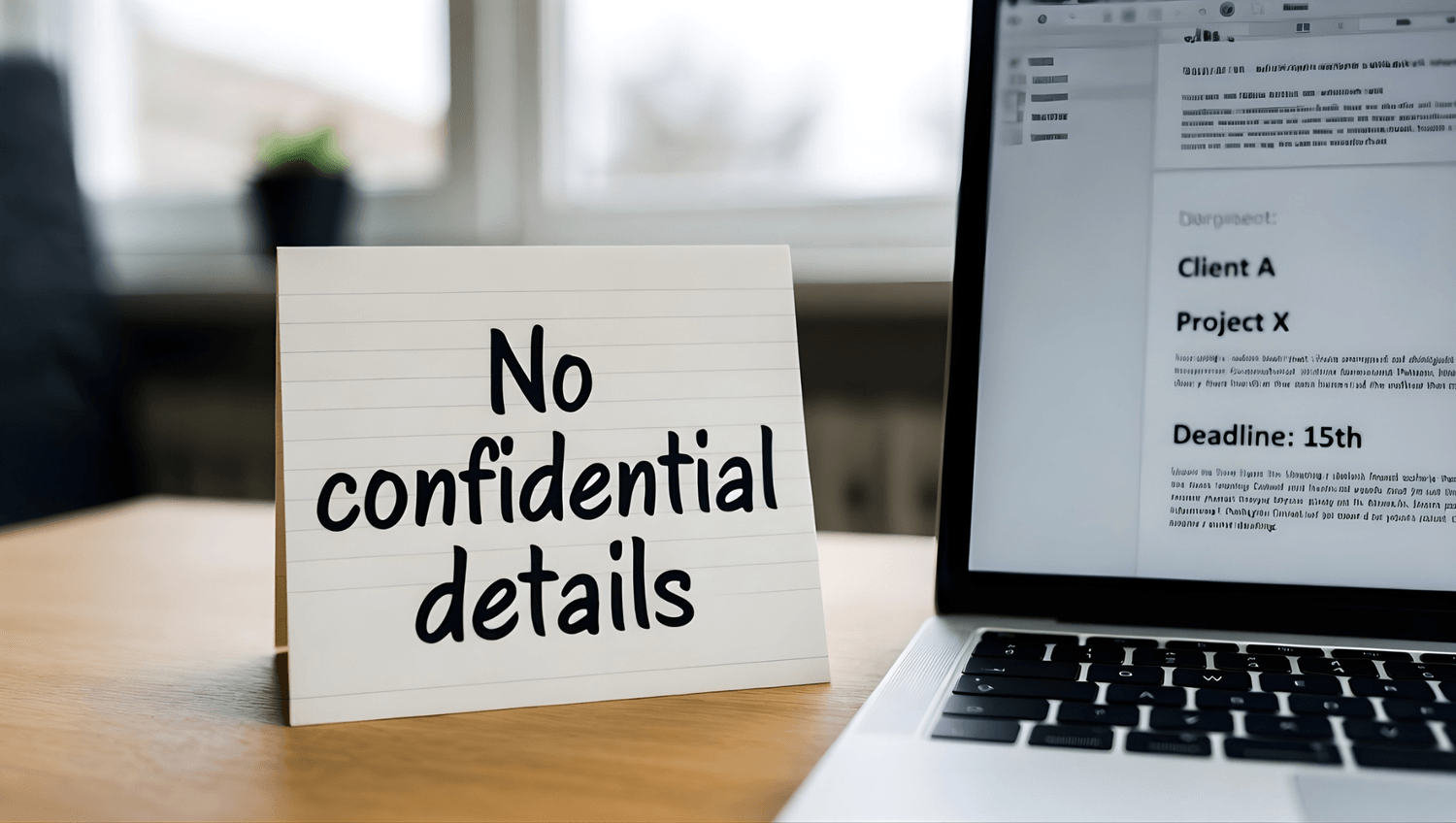
Use placeholders: “Client A,” “Project X,” “$X,” “Location Y.”
Summarize instead of pasting: give bullet points in your own words.
Ask for structure, not content: “Give me a 5-section update template” or “Give me questions to clarify next steps.”
This lines up with how regulators and standards bodies think about risk. NIST (2024) flags data-related risks as a key part of managing trustworthy AI, which is another way of saying: treat data handling as part of the job, not an afterthought. (NIST Publications)
Watch out for the “invisible” risks: plugins, connected apps, and prompt injection
If your AI tool can read files, browse, or connect to other apps, you need to be extra careful. Why? Because attackers can sometimes hide instructions inside content that an AI system might follow.
That’s not scare talk. It’s a known category of risk in the security community. OWASP (2025) lists prompt injection and sensitive information disclosure as major risks for LLM applications. (OWASP Foundation)
So ask yourself: “Am I using plain chat, or is this tool connected to my files and systems?” That one question changes the risk level.
Practical guardrails that keep you productive
Keep confidential info out of public tools.
If your company offers an approved AI tool, use that for internal work. For example, Microsoft (2025) explains how Microsoft 365 Copilot handles data within the Microsoft 365 environment. (Microsoft Learn)
Always review outputs before sending. AI can be wrong, and wrong quickly is still wrong.
The Key Takeaway
Protecting privacy with AI is mostly about habits.
Sort your data into public, internal, and confidential.
Use placeholders and summaries.
And be extra cautious with tools that connect to your files.
How do you measure time saved so this becomes your new normal?
It’s Friday at 2:30 pm. You finish a task and think, “Nice, I’m ahead.” Then Monday comes, and somehow you’re back to rushing again. Sound familiar?
“How do I make the time savings stick?” If you don’t measure anything, your brain will default to the old story: “I’m still busy, so nothing has changed.”
You don’t need a complicated dashboard. You need a tiny scoreboard.
Step 1: Pick one Friday finish line
Choose something you can clearly say “yes” or “no” to:
“My weekly update is sent by 1:00 pm Friday.”
“My inbox is under 15 messages by 2:00 pm Friday.”
“Next week’s top 3 priorities are written down by 3:00 pm Friday.”
Start with one. It’s normal to feel tempted to fix everything at once, but one finish line gives you traction.
Step 2: Track just three numbers for two weeks
Here are three that usually reveal the hidden time leaks:
Email time (total minutes per day)
Meeting spillover (minutes spent after meetings writing notes, chasing actions, clarifying decisions)
Weekly update time (minutes from “blank page” to “sent”)
Why these? Microsoft’s Work Trend research describes how the day gets interrupted by meetings, email, and notifications so often that focus becomes fragmented. That makes communication work a prime place to win time back. Microsoft (2025).
Step 3: Measure outputs, not vibes
If you want one simple principle, it’s this: compare “before” and “after” using the same kind of work. Harvard Business Review has long pushed the idea that productivity measurement needs real baselines, not guesses. Chew (1988).
So, decide what “done” looks like:
Weekly update: under 200 words, includes wins, risks, next steps
Meeting recap: action list with owner and due date
Email: clear ask + deadline + polite close
Now you’re measuring something real: time-to-done for the same output.
Step 4: Look for one repeatable win
Here’s a helpful reality check. In a large customer-support study, researchers measured productivity as issues resolved per hour and found average gains when a generative AI assistant was introduced. The lesson is not “AI does everything.” The lesson is “pick a metric that matches the work.” Brynjolfsson, Li, and Raymond (2025).
For you, the metric might be: “time to first draft” or “time to send.”
The Key Takeaway
If you want Friday afternoons back for good, track one finish line and three simple numbers for two weeks.
You’ll quickly see where AI is truly saving time, and where you’re still leaking it.
What if your boss or team isn’t on board with AI yet?
It’s Monday. You’re on your second meeting. Someone says, “We’re not using AI here. Too risky.” You nod, but inside you’re thinking, “I’m not trying to replace my job. I’m trying to stop spending Friday rewriting the same update.”
If that’s you, you’re not alone. A lot of workplaces are still figuring out the rules, and that uncertainty makes people either avoid AI completely or use it quietly. Even the Financial Times has reported cases where unclear guidance leaves employees confused about what’s allowed and what isn’t. Financial Times (2025).
So what do you do? You keep it calm and practical.
Step 1: Lead with outcomes, not tools
Instead of “I’m using ChatGPT,” try:
“I’m speeding up admin work so my updates are clearer and faster.”
“I’m using a drafting assistant for first drafts, then I review and edit.”
Why? Because “AI” can sound like a big policy debate. “Faster drafts and clearer notes” sounds like better work.
Step 2: Start with a low-risk pilot
“What’s low risk?” A fair question. Here are safe starters that usually don’t touch sensitive data:
Meeting agenda from your own bullet points
Meeting notes turned into action items (with names removed if needed)
Weekly update drafted from your rough bullets
If your company has HR or compliance guidance, follow it. SHRM offers policy resources that stress having clear rules around things like confidentiality and intellectual property. SHRM (2023).
Step 3: Use simple transparency when it matters
If your team is sensitive to this, try a gentle disclosure:
“Drafted with AI assistance, edited and verified by me.”
No drama. No oversharing. Just clarity.
And if you handle personal data, remember: data protection rules still apply. The UK regulator’s guidance on AI and data protection makes that plain, especially around fairness, transparency, and appropriate handling of data. ICO (2023).
Step 4: Bring evidence, not arguments
After two weeks, show before and after:
“Weekly update took 35 minutes before, now 12.”
“Meeting recap used to take 20 minutes, now 6.”
Would your boss argue with clearer updates delivered faster?
The Key Takeaway
If your team isn’t ready for “AI,” lead with results.
Start with low-risk drafting tasks, follow policy, be lightly transparent, and prove the time savings with one simple pilot.
To conclude...
If you take nothing else from this guide, take this: getting Friday afternoons back is not about working faster in a panic. It’s about removing repeat friction so your best energy goes to the work that actually needs you.
A lot of people feel like the week “spills” into Friday because the day gets broken up by messages, email, and meeting follow-ups. That pattern shows up clearly in Microsoft (2025). And it explains why the biggest wins often come from shrinking the admin layer of work first: the drafts, summaries, recaps, and updates.
The research supports that idea. In a controlled writing study, people using ChatGPT finished faster and produced higher-quality work on average. That’s from Noy and Zhang (2023). And when AI tools are used inside real workplaces, productivity gains show up there too, like the measured improvements in customer support when AI assistance was introduced in Brynjolfsson, Li, and Raymond (2025).
So here’s your simple next step for next week:
Pick one Friday finish line (weekly update sent by 1:00 pm, inbox under 15 by 2:00 pm, etc.).
Choose three repeat tasks and use the copy-paste prompts for them.
Track time-to-done for two weeks and keep what works.
And if you want an easy way to stick with it, create a one-page “Friday Folder” with your five best prompts and your weekly checklist. Keep it boring. Boring is good. Boring is reliable.
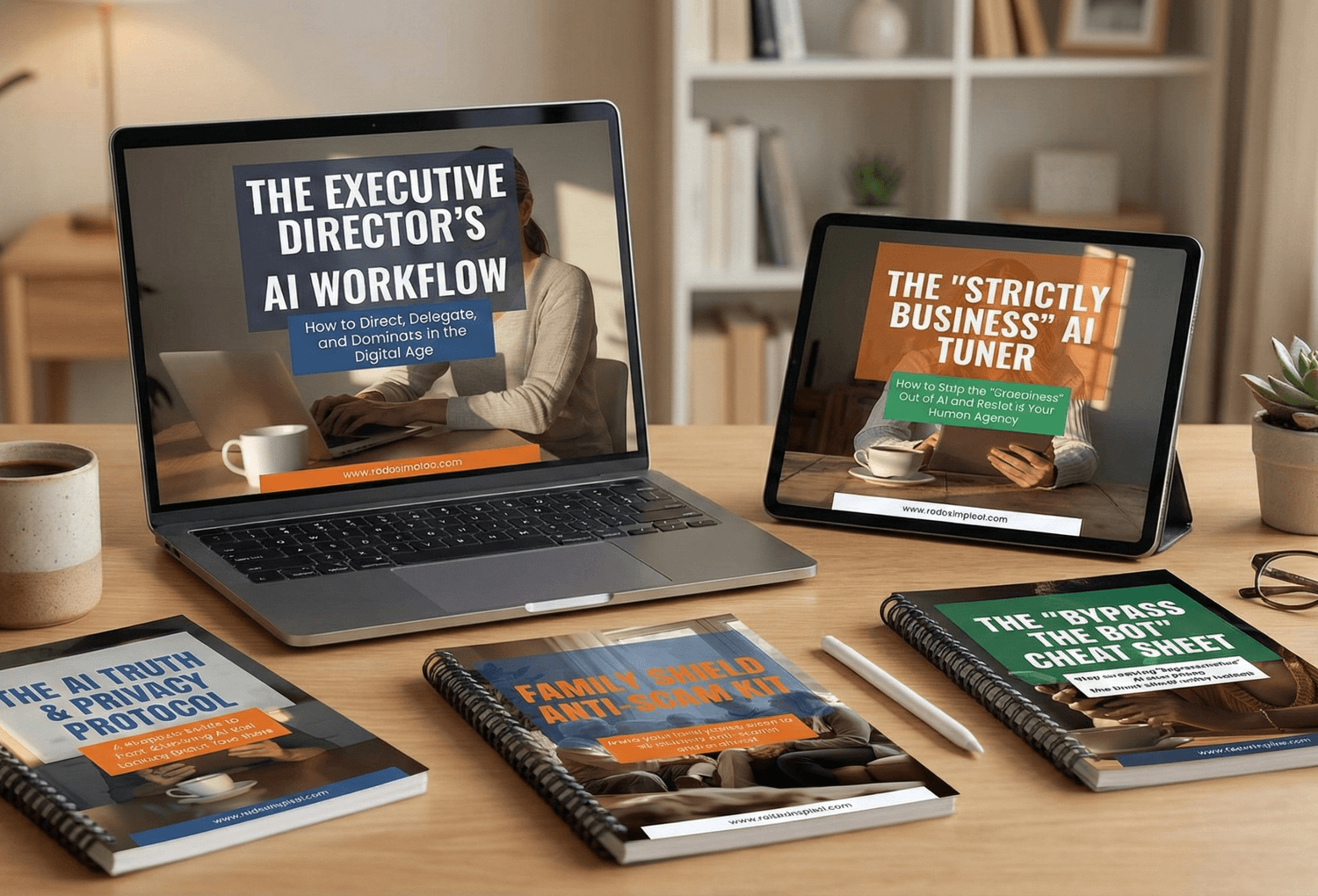
🎓 Your "Tech Dignity" Toolkit
Ready to stop surviving the AI era and start owning it? I’ve built a library of resources specifically designed to help you stay safe, stay professional, and stay in control. Whether you want to fix a specific problem or master the whole machine, start here:
[FREE] The "Bypass the Bot" Bundle: Stop screaming at automated phone menus. Get the secret codes and scripts to reach a human every time. Download for FREE Here
Secure Your Family: Protect your loved ones from AI voice clones and deepfake scams with the Family Shield Anti-Scam Kit. Get Protected for $9
Upgrade Your Career: Use my "Strategy Sandwich" method to delegate grunt work to AI while keeping your professional edge with the Executive Director’s AI Workflow. Reclaim Your Time Here
Lock Down Your Privacy: Interrogate the "black box" and secure your data with the AI Truth & Privacy Protocol. Secure Your Data Here
Tame the Machine: Strip the "creepy" fake empathy out of AI and turn it into a silent tool with the "Strictly Business" AI Tuner. Take Control Here
The Ultimate Shortcut: Want the entire library? Secure your digital future with the Complete Mastery Collection (all products bundled for about 57% off). Get the Full Collection Here
Frequently Asked Questions
Q1) Is it realistic to save a full 8 hours a week?
Sometimes, yes, but don’t start there. Aim for 30–90 minutes a day by cutting repeat writing and recap tasks first. The goal is consistency, and the results add up over time, especially if your workday is already fragmented, as described in Microsoft (2025).
Q2) Do I need to be tech-savvy to use AI for this?
No. You mostly need two things: a clear input (your bullets or notes) and a clear output format (email, action list, short update). If you can explain a task to a helpful colleague, you can write a prompt that works.
Q3) Is it safe to paste work information into an AI tool?
Treat it like sending something outside your company. A good default is: never enter personal or confidential info into publicly available tools, which is stated plainly in NCDIT (2025). If your organization has an approved tool, use that and follow your internal policy, plus basic data protection principles like the ones outlined by ICO (2023).
Q4) What if the AI drafts something that’s wrong or awkward?
That’s normal. Use AI for the first draft, then you review, fix facts, and adjust tone before sending. Also, keep a “two-pass” habit so you don’t waste time polishing prompts instead of finishing the work.
Q5) What if my company or boss is not comfortable with AI yet?
Start with low-risk tasks like agendas, meeting notes cleanup, and weekly updates using placeholders. Focus on outcomes (clearer notes, faster turnaround), and keep your use aligned with policy and intellectual property guidance like SHRM (2023).
Sources
Microsoft — Breaking down the infinite workday (2025)
Noy, S. and Zhang, W. — Experimental evidence on the productivity effects of generative artificial intelligence (2023)
Brynjolfsson, E., Li, D., and Raymond, L. — Generative AI at Work (2025)
Autonomy — The results are in: The UK’s four-day week pilot (2023)
Alda and Autonomy — Going Public: Iceland’s journey to a shorter working week (2021)
NIST — Artificial Intelligence Risk Management Framework: Generative AI Profile (2024)
OWASP — OWASP Top 10 for Large Language Model Applications (2025)
Microsoft — Data, Privacy, and Security for Microsoft 365 Copilot (2025)
SHRM — Make Sure Generative AI Policies Cover Intellectual Property (2023)
Chew, W. B. — No-Nonsense Guide to Measuring Productivity (1988)
Acar, O. A. — AI Prompt Engineering Isn’t the Future (2023)
Google Cloud —Overview of prompting strategies (n.d.)