Wisdom Over Speed: How 30 Years of Experience Makes You a Better AI Prompter
By Rado
You have probably seen those videos where someone fires off rapid prompts into ChatGPT and gets perfect results in seconds. If you are anything like my readers, that can feel a bit discouraging. You might be thinking, “I type slowly. I am not a tech person. Maybe I missed the boat on this.”
Here is the good news. AI does not reward speed. It rewards wisdom. These tools are hungry for context, judgement, and real life experience. In other words, they work best when someone like you is in the pilot seat, not when they are left to run wild on their own.
In this blog, we will look at why your decades of domain knowledge are the missing ingredient for strong prompts, how to talk to AI as a trusted assistant, and how to do it without turning your life into a homework project. By the end, you will see that you are not behind at all. You are already bringing the most valuable asset to the table: a lifetime of insight.
📺 Watch the Explainer Version of this Blog on YouTube
Why does your experience matter more than typing fast into AI?
Imagine, you are watching a short video where someone rattles off prompts into ChatGPT at lightning speed. Windows open, outputs appear, everyone applauds their “prompting skills.” Meanwhile you are thinking, “By the time I type one careful prompt, they have done ten.”
Here is the quiet truth: AI is not grading you on speed. It is grading you on substance.
Recent global polling by Pew Research Center (2025) shows that adults 50 and older are more likely than younger adults to feel mainly concerned, rather than excited, about AI in daily life. (Pew Research Center) That does not mean they are less capable. It usually means they think more carefully about risks and consequences.
Studies on technology and older adults also find that many feel tools are not really designed with them in mind and that they need better support to use them well. Forbes (2019) and Generations / ASAging (2020) both highlight ongoing frustrations with usability, privacy, and feeling talked down to. (Forbes) At the same time, research from AARP (2025) and University of Michigan (2025) shows that plenty of older adults are already using AI at home when it clearly supports independence and saves time. (AARP) So the real question is not “Can you do this?” It is “Does this feel worth the effort?”
AI tools like ChatGPT are pattern machines. If you give them a thin, rushed prompt, they will give you a thin, generic answer. If you give them the kind of rich context that only comes from 20 or 30 years of real work, they can finally respond in a way that feels specific and helpful. That “rich context” is your everyday experience with clients, projects, and problems that never fit neatly into a template.
Now think about your work. For years you have been turning messy situations into clear questions: “What is really going on here? What matters most? What can wait?” That is exactly what good prompting is. You are already doing the hard part in your head. AI simply needs you to say it out loud.
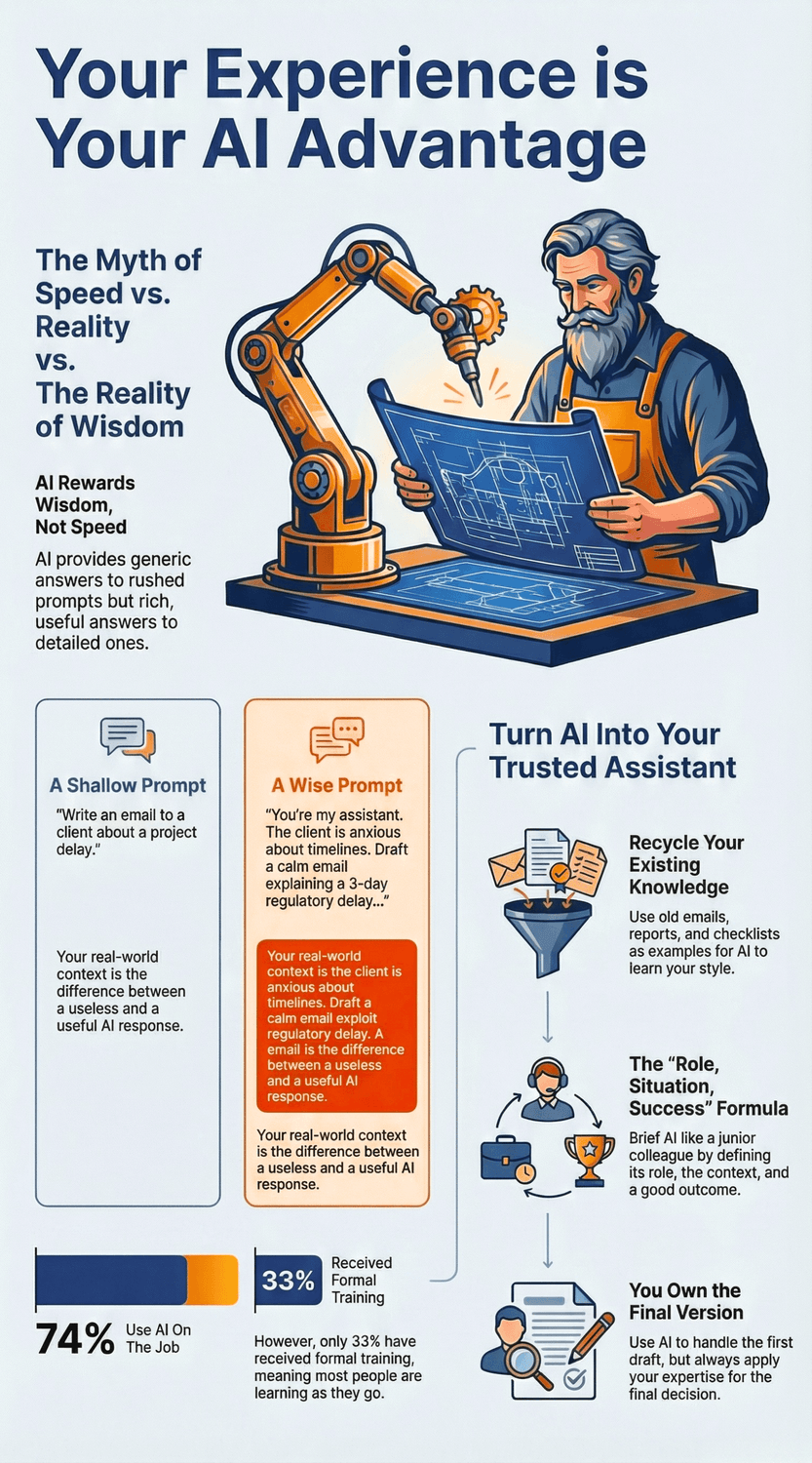
Compare these two prompts:
“Write an email to a client about a project delay.”
“You are my assistant. I am a project manager in healthcare. The client is usually detail focused and anxious about timelines. We are delayed by 3 days because of a regulatory review. Draft a short, calm email that explains the delay, outlines the new schedule, and offers one concrete step we are taking to prevent this in the future. Keep it respectful, not overly cheerful.”
Which one feels closer to how you would brief a colleague? Which one is more likely to produce something you would actually send? The second prompt is slower to type, but it carries your judgement, your sense of tone, and your understanding of the relationship. That is your advantage.
There is another point many workers miss. A recent workplace survey reported by Lifewire (2025) found that while most full time employees using AI at work do so regularly, only about one third have received formal training on how to use it well. (Lifewire) Younger colleagues may type faster, but you are often the one who can tell when something “sounds wrong,” is missing a key detail, or might confuse a customer.
“But what if it still takes me a whole minute to write a prompt?” That is fine. You already spend more time than that drafting a tricky email from scratch. The difference is that a thoughtful prompt is reusable. Once you write it once, you can save it and slightly adjust it next time.
The Key Takeaway
Your value in AI prompting is not how quickly your fingers move.
It is how clearly your mind sees the situation. Speed can be hired. Your wisdom cannot.
How does domain expertise turn AI from a toy into a trusted assistant?
You are testing a new AI tool on a quiet Sunday. You type, “Give me tips to improve customer service.” It spits out a neat list: “listen more, be empathetic, resolve issues quickly.” Useful? A little. But it could have been written for a coffee shop, a hospital, or an insurance call center. It feels like a toy, not a colleague.
The missing piece is your world. Your domain.
“Domain expertise” simply means everything you know from years on the job: the typical cases, the weird exceptions, the politics, the deadlines, the unspoken rules. Human-in-the-loop research shows that AI systems become far more accurate when people with domain knowledge review and guide them, not just generic users. IBM (2025) describes this as combining automation with human nuance and ethical judgement so you keep speed without losing sense.
“But I am not an AI specialist. Does my kind of experience really matter?” Yes. Studies on human-in-the-loop approaches in industry show that AI performs best when experts step in for tricky, ambiguous situations and edge cases, because they know what “good” really looks like in context. Uber (2024) and Appen (2024) both highlight that human judgement is crucial for handling rare or messy cases and for keeping quality high.
So how do you bring that into a simple prompt box?
Instead of asking, “How can I improve customer service?”, you might say: “You are my assistant. I manage a small team in a regional bank. Our biggest issue is customers waiting on hold when online banking goes down. Give me three specific process changes that reduce frustration for older customers who do not like apps, plus one short phone script my team can use on stressful days.” Now the AI is not guessing. You have told it the sector, the real problem, who the customers are, and what “useful” looks like.
It is normal to feel that this level of detail sounds like extra work. But notice where the effort comes from. You are not inventing anything new. You are simply unpacking what your brain already knows about your job. Research on AI at work suggests that the real gains show up when organizations redesign workflows around human strengths, instead of treating AI as a toy on the side. McKinsey (2025) calls this a “skill partnership” between people and AI, where human expertise and machine pattern spotting work together.
“What if I miss something important in my prompt?” That is a fair concern. This is where your review skills shine. After AI responds, you can ask: “What did you assume about my clients?” or “What might go wrong if we followed this advice?” Your follow up questions help train the tool for next time, the same way you would coach a junior colleague.
Over time, you will notice a shift. The more you feed AI with real details from your practice, the less it feels like a generic answer machine and the more it feels like a capable assistant that speaks your language. You are not just “using a tool.” You are shaping it with your experience.
The Key Takeaway
AI becomes a trusted assistant when you pour your domain knowledge into it.
Your stories, patterns, and edge cases are what lift it from generic tips to practical help that fits your world.
What makes experienced professionals naturally better prompters?
You are in a meeting. A younger colleague is screen sharing, typing into AI with the speed of a court typist. The tool spits out a plan that sounds impressive at first glance. Everyone nods. You are the one who says, “Hang on, this misses three real world problems our clients always run into.”
That moment is exactly why your experience is gold for prompting.
Cognitive science has shown for decades that experts do not just know more facts. They see patterns. They group details into meaningful chunks, which lets them grasp a situation quickly and decide what matters. Researchers like Gobet (2023) and Lappi (2022) describe expertise as having more and richer “chunks” stored in memory that guide problem solving.
So when you read an AI answer, you are not just checking the grammar. Your brain is scanning for patterns: “This sounds like a typical beginner mistake.” “This ignores the compliance angle.” “This assumes a perfect client, which I have never met in my life.” That quiet pattern spotting is exactly what AI needs from you.
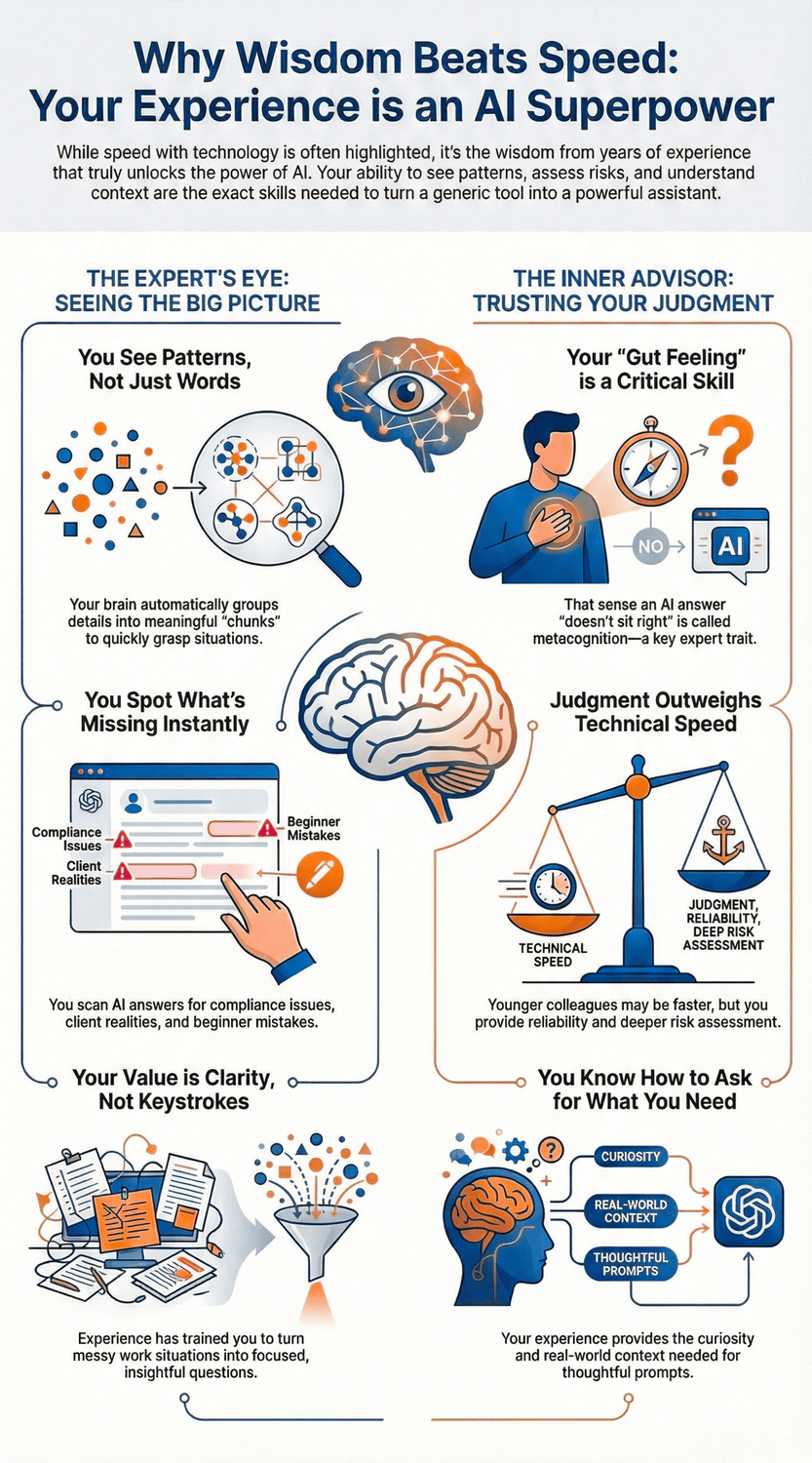
There is another strength that often grows with age: monitoring your own thinking. Studies on metacognition in later adulthood find that many older adults remain good at judging what they know, spotting gaps, and adjusting strategies when something feels off Hertzog & Dunlosky (2011). When you read an AI draft and think, “I cannot quite explain why, but this does not sit right,” that is metacognitive monitoring in action. It is a feature, not a flaw.
“But younger people grew up with this tech. Surely they are better at it.” They do bring real strengths: speed, comfort clicking around, a willingness to test new tools quickly. Yet workplace research and employer surveys consistently highlight older workers for reliability, institutional memory, and deeper judgement about risks and trade offs SHRM (2022), Generations / AARP (2023). AI benefits most when those strengths stay in the loop.
On top of that, many workers over 50 say they want chances to use their skills and keep learning, not to be sidelined. Surveys from AARP (2021, 2022) show that older employees are often very open to upskilling, especially when new tools are clearly tied to real tasks and respect their experience. That curiosity plus your history with real clients, budgets, and deadlines is exactly what makes prompts thoughtful instead of shallow.
So where does this leave you with AI? Each time you turn a messy work situation into a focused question, you are doing “prompt design” in your head. Each time you sense that an AI answer is incomplete, you are doing quality control that many people half your age cannot yet do. You might be slower on the keyboard, but you are faster at spotting what truly matters.
The Key Takeaway
You are already thinking like a strong prompter.
Your pattern recognition, self awareness, and years of seeing what works in real life are advantages that AI cannot replace.
They are the very skills that turn prompts from simple questions into powerful instructions.
How can you feed your hard earned knowledge into AI without extra “homework”?
You finish a long day, open ChatGPT, and suddenly feel that school feeling again. Blank box. Blinking cursor. Your brain whispers, “I should create some clever prompt system… but I am tired already.”
It is normal to feel that way. Many people quietly assume that “using AI properly” means building a whole new workflow from scratch. The truth is kinder: you can feed AI with the knowledge you already have, using the materials you already use.
Start by thinking in terms of recycling, not reinventing. You already have gold sitting in your email folders, old reports, slide decks, checklists, and meeting notes. Instead of starting from a blank prompt, you can copy a real example and say:
“Here is an email I sent to a client that landed well. Learn the tone and structure. From now on, help me draft similar emails for other situations. Ask me questions if something is unclear.”
“Isn’t that too long for a prompt?” Not really. AI handles long text well. Your example does most of the teaching for you. You are not explaining your style in theory, you are showing it in practice.
The same works for templates and checklists. Let’s say you have a standard way to review a proposal or a patient file or a project plan. You can paste that checklist and ask:
“Turn this into a reusable prompt. When I paste a new document, use these steps to review it and give me a clear summary plus a short list of risks.”
Now your old checklist has become a mini assistant. No extra homework, just a smarter use of what you already built.
If typing feels slow or tiring, you can lean on your voice. Many devices and browsers have built in dictation. Speaking a rough prompt like, “Okay, I am preparing for a review meeting. The project is behind because of supplier issues, the client is nervous about cost, and I need three talking points that are honest but calming,” can feel more natural than typing it all out. You can always tidy the wording after AI responds.
“Do I need a big system to store all these prompts?” Not at the beginning. A simple notes app, a Word file, or a paper notebook is enough. Each time you write a prompt that works well, save it. After a few weeks, you will have a small “prompt pantry” you can reuse instead of starting from zero.
And remember, your first version never has to be perfect. You can tell AI, “This is a rough draft, help me improve it,” and treat the conversation like a back and forth, not a one shot test you either pass or fail. That mindset alone removes a lot of pressure.
The Key Takeaway
You do not need to create more homework to work well with AI.
Start with the emails, reports, and checklists you already trust, reuse them as examples, and slowly build a tiny library of prompts that fit your real life.
What simple prompt habits help you work with AI like a senior partner?
Think about the best junior colleague you have ever mentored. The work went well not because they were perfect, but because you had a clear way of briefing them, checking their work, and nudging them in the right direction. Working with AI is very similar. The good news? You already know this dance.
A useful way to think about prompting is as a three step habit: role, situation, success.
Set the role: “You are my assistant in…”
Describe the situation: who, what, where, constraints.
Define success: what a good answer looks like.
For example:
“You are my assistant. I am a team lead in a logistics company. A long term client is upset about repeated delays. Draft a short, calm email that acknowledges the problem, outlines two concrete fixes we are putting in place, and avoids sounding defensive.”
Compare that to “Write an email to an upset client.” Which one sounds more like you talking to a real colleague? Which feels more likely to hit the right tone?
“What if AI misunderstands my request?” A simple habit here is to ask it to replay the brief:
“Before you start, repeat back what you understood from my instructions in 3 bullet points.”
This small step lets you correct course early: “No, the client is new, not long term” or “Focus more on next steps than apologies.” It is the same kind of clarification you would give in a meeting.
Another helpful habit is to use before and after examples from your own work. Paste something you have already written and say:
“Here is a report summary I like. Tell me what you notice about the tone and structure, then create a similar summary for the text below.”
You do not have to explain your style in fancy terms. The example teaches AI for you.
You might also worry, “What if AI’s answer sounds nice but is actually off?” That is a fair concern. Get used to asking for options instead of a single “final” answer:
“Give me three variations: one very simple, one more detailed, and one that challenges my assumptions.”
Seeing multiple versions makes it easier to keep your judgement in the loop, instead of blindly accepting the first thing you see.
Finally, try adding guardrails directly into your prompt:
“Keep it under 200 words.”
“Avoid buzzwords and clichés.”
“If you are uncertain, say so.”
You are allowed to tell the tool what to avoid. In fact, it helps it serve you better.
“This sounds like a lot to remember.” In practice, it quickly becomes muscle memory: role, situation, success, replay, options, guardrails. The more you use these habits, the more AI feels like a senior partner you brief clearly, not a mysterious black box.
The Key Takeaway
Treat AI like a junior colleague: give it a clear role, a detailed situation, and a concrete definition of success.
Ask it to restate your brief, request options, and build simple guardrails into your prompts so your experience stays firmly in charge.

How do you start if you still feel slow or unsure around new tools?
You are sitting at your desk, coffee in hand, staring at yet another “Try our AI feature!” popup. Part of you is curious. Another part thinks, “This is going to turn into a project, and I do not have the energy for that.”
If that sounds familiar, you are not alone. It is completely normal to feel slow, clumsy, or “late to the party” with new tech. The key is not to fix everything at once. The key is to start small and start real.
Instead of asking, “How do I learn AI?”, try a different question: “Where do I already feel friction every week?” Is it writing tricky emails? Summarising long PDFs? Turning meeting notes into something you can actually use? Pick one of those tasks and make that your doorway. You do not need a full AI curriculum. You just need one useful experiment.
“But what if I press the wrong button and break something?” So create a safe practice space. Use non sensitive material at first. Take an old newsletter, a dummy document, or a generic problem and say, “Help me rewrite this more clearly for clients in their 50s,” or “Turn these rough notes into a bullet list.” Nothing serious is at risk, and you get to test how the tool behaves.
A gentle way to begin is with a “first month” plan:
Week 1: Just watch yourself work and notice where AI might help. No pressure to use it yet.
Week 2: Choose one task and try AI once a day for that task only.
Week 3: Keep what worked, drop what felt annoying. Maybe add a second simple task.
Week 4: Save the prompts that helped, and decide what you want to keep doing next month.
This is not about becoming an expert. It is about building familiarity, like learning a new kitchen gadget by using it for one recipe at a time.
You might feel hesitant to ask for help. “Everyone else seems to get this. I will look silly.” It is normal to think that. But remember how many times people came to you over the years with “quick questions.” You did not judge them. You just shared what you knew. You are allowed to ask a colleague, a younger family member, or a coach to sit with you for half an hour and walk through a few prompts.
Ask yourself: What would feel like a small win this month? Not “master AI,” but something like, “Have AI draft the first version of one email each day,” or “Use AI to summarise one long document a week.” Small wins stack. Confidence grows quietly in the background.
The Key Takeaway
You do not need to move fast or know everything to begin.
Start with one real task, in a safe space, and aim for small, repeatable wins.
Feeling slow or unsure is not a sign you are behind.
It is simply the starting point for your version of working with AI.
Where can your experience and AI work together next?
There are parts of your work that light you up and parts that quietly drain you. Maybe you enjoy solving complex client problems, but you dread turning those solutions into tidy reports. Or you love mentoring younger colleagues, but get stuck in spreadsheets and routine emails.
This is where AI can sit beside your experience, not in front of it.
Start by asking a simple question: “Which tasks truly need my judgement, and which just need my time?” Your judgement jobs are things like deciding on trade offs, calming a nervous client, sensing that a deal smells wrong, or spotting a risk others missed. Your time jobs are formatting, summarising, drafting, reorganising, and generating first versions.
“What does that look like in practice?” Here are a few gentle starting points:
Training and mentoring. You can feed AI a few real situations your team often struggles with and ask it to generate practice scenarios or role play scripts. You stay the expert who chooses what is realistic and what is not, while AI handles the repetition.
Client care and communication. Use AI to draft the first version of emails, follow up notes, or FAQ answers, especially for questions you have answered a hundred times. Your experience still shapes the tone and final details.
Problem solving. When you are stuck on a decision, you can describe the situation and ask, “Give me three possible ways forward, each with pros and cons.” You do not need AI to decide. You need it to widen the menu so your judgement can choose.
Planning and organisation. If your head is full of half formed ideas, dictate them into AI and ask it to group them into themes, timelines, or action steps. You can then refine what matters most.
“I am worried about relying on it too much.” A simple rule of thumb is: AI handles the first draft, you own the final version. If something feels too sensitive, too personal, or too high stakes, keep AI in a supporting role, not a lead one.
It also helps to plan one work experiment and one personal experiment. At work, maybe you choose “rewrite one tricky email per day” or “summarise one long document per week.” At home, you might use AI to plan a weekend trip, simplify a medical leaflet, or organise a hobby project. This way, you see benefits in both worlds, which makes the learning feel more worthwhile.
“What if I try this and it still feels clumsy?” That is normal at the beginning. The goal is not a perfect system. The goal is to notice, over time, which combinations of “my experience plus AI” actually make life easier.
The Key Takeaway
Let AI take the weight of first drafts, summaries, and structure, while your experience steers the decisions, tone, and priorities.
Start with one work task and one personal task, and let your own results guide where this partnership grows next.
Your experience is the “missing feature” AI has been waiting for
If you take one thing from this article, let it be this: you are not late to AI. You are the person these tools were actually built to support.
Surveys keep showing that many adults over 50 feel more concerned than excited about AI in daily life, and that is completely understandable. Pew Research Center (2025) found that people in your age group are often more wary about its broader impact, especially around control and trust. At the same time, AARP (2024) and University of Michigan (2025) show that a growing share of older adults are already using AI tools at home to stay safer, more informed, and more independent.
The real gap is not age. It is support and training. A workplace survey reported by Lifewire (2025) found that around three quarters of full time workers use AI at work, but only about one third have had proper training. That means most people, including your colleagues, are also figuring it out as they go.
Your 20 or 30 years of experience give you something AI cannot fake: pattern recognition, judgement, and a sense of what “good enough” looks like in your field. Research on expertise and metacognition shows that seasoned professionals are especially good at spotting when something feels off and adjusting course. Hertzog and Dunlosky (2011) note that older adults’ ability to monitor their own thinking often remains strong, even when memory changes. That is exactly the skill you use when you read an AI answer and think, “Nice words, but this would never fly with my client.”
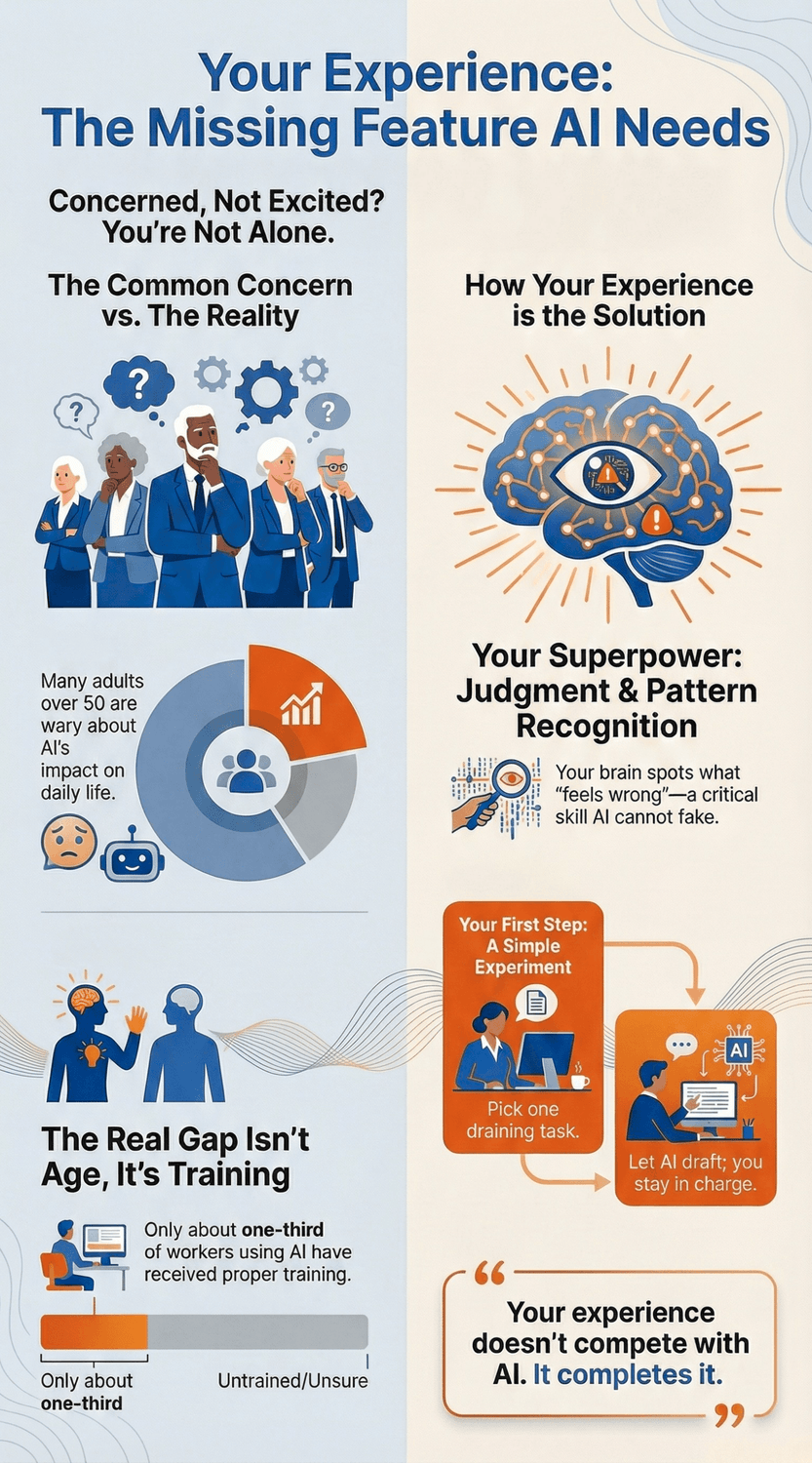
So, where do you go from here? You do not need a grand plan. Pick one real task this week that already drains your energy. Let AI draft the first version while you stay in charge of the brief and the final decision. Save one prompt that works well. That is all.
Over time, those small experiments stack up. AI handles more of the typing and formatting. You keep steering the tone, priorities, and decisions. Your experience does not compete with AI. It completes it.
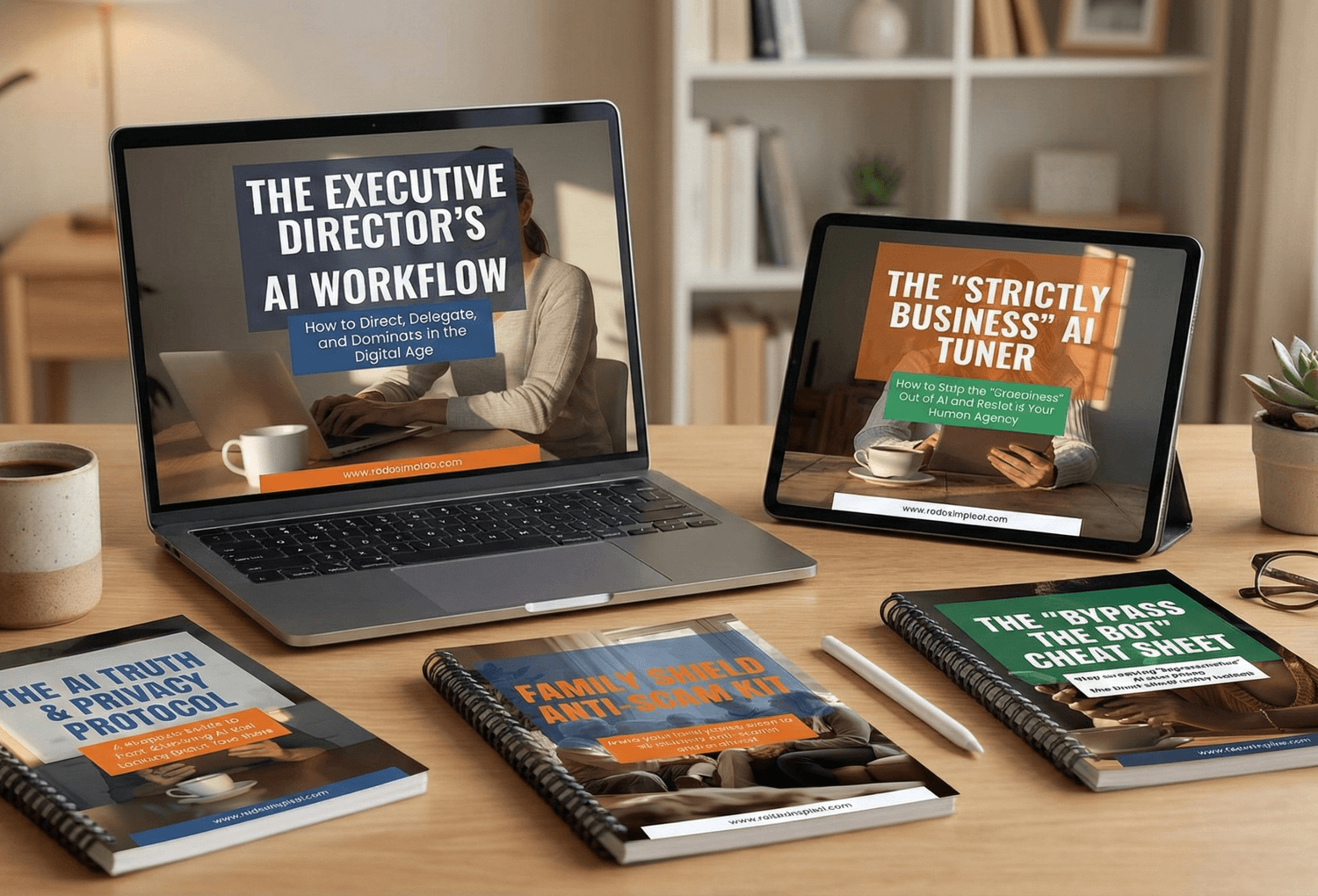
🎓 Your "Tech Dignity" Toolkit
Ready to stop surviving the AI era and start owning it? I’ve built a library of resources specifically designed to help you stay safe, stay professional, and stay in control. Whether you want to fix a specific problem or master the whole machine, start here:
[FREE] The "Bypass the Bot" Bundle: Stop screaming at automated phone menus. Get the secret codes and scripts to reach a human every time. Download for FREE Here
Secure Your Family: Protect your loved ones from AI voice clones and deepfake scams with the Family Shield Anti-Scam Kit. Get Protected for $9
Upgrade Your Career: Use my "Strategy Sandwich" method to delegate grunt work to AI while keeping your professional edge with the Executive Director’s AI Workflow. Reclaim Your Time Here
Lock Down Your Privacy: Interrogate the "black box" and secure your data with the AI Truth & Privacy Protocol. Secure Your Data Here
Tame the Machine: Strip the "creepy" fake empathy out of AI and turn it into a silent tool with the "Strictly Business" AI Tuner. Take Control Here
The Ultimate Shortcut: Want the entire library? Secure your digital future with the Complete Mastery Collection (all products bundled for about 57% off). Get the Full Collection Here
Frequently Asked Questions
Q1) Am I “too old” to get good at AI prompting?
No. Age is not the limiter here. Confidence and support are. Global polling from Pew Research Center (2025) shows that adults in midlife and later are more cautious about AI, but that does not mean they use it less when it clearly helps them. In fact, AARP research finds that older workers are staying in the workforce longer and are keen to keep learning, especially when training respects their experience and links to real tasks.
What you bring to AI prompting is decades of context, client stories, and “I have seen this before” moments. That is exactly what makes prompts powerful. Typing speed is secondary.
Q2) Do I need to learn “prompt engineering” like a new profession?
For most people, no. You do not need a new job title. You need a handful of simple habits. A widely shared survey summarised by Lifewire (2025) shows that many workers are already using AI tools without any formal training.
Start with three basics:
Give AI a clear role (“You are my assistant in…”).
Describe the real situation in your words.
Say what a good answer looks like (“2 options, under 200 words, plain language”).
If you can brief a junior colleague, you already know how to “do prompt engineering” at the level that matters for your day to day work.
Q3) What if AI makes mistakes and I do not spot them?
This is a valid concern, and you are right to take it seriously. Even big consulting and tech firms stress that human review is essential. IBM’s guidance on human in the loop and Uber AI’s data quality work both emphasise that experts need to check AI outputs for accuracy and edge cases.
A simple safety routine:
Use AI for first drafts, never for final decisions.
Double check facts that affect money, health, contracts, or safety.
Ask AI to list its assumptions, then compare those against your real world knowledge.
Your scepticism is not a problem. It is part of the safety system
Q4) Will AI make my experience less valuable at work?
Current research suggests the opposite. A recent report from McKinsey Global Institute (2025) describes the future of work as a “skill partnership” where machines handle routine tasks while humans frame problems, guide AI, and make decisions.
At the same time,SHRM’s “Age of Opportunity” report (2025) highlights older workers’ strengths: reliability, institutional memory, judgement, and willingness to learn. Those are exactly the skills AI cannot copy. Learning basic prompting lets you express those strengths more efficiently, not replace them.
Q5) I am slow at typing. Can I still be effective with AI?
Yes. Prompt quality is about clarity and context, not words per minute. Many devices and browsers now include voice dictation, so you can literally talk your prompt out loud and let the tool transcribe it.
You can also build a small library of reusable prompts. Once you have a prompt that works for “calm, clear project delay emails” or “simple summaries for non technical clients,” you can copy and tweak it instead of rewriting from scratch. Over time, your prompts become assets, a bit like templates you have always used in your work.
Q6) How do I practice without risking mistakes on real clients or projects?
Create a “sandbox” for yourself. Use older, non sensitive documents, public examples, or fictional scenarios that feel realistic. Ask AI to summarise, rewrite, or reorganise them. That way you can test how it responds, try different instructions, and see what feels useful before you bring it into live work.
You can also start with personal tasks that matter to you but are low risk, like planning a weekend trip or organising home projects. Once you are comfortable with the feel of the tool, it will be much easier to bring it into professional contexts.
Q7) How much time should I invest in learning AI if my schedule is already full?
You do not need to turn AI into a side job. A practical goal is 10–15 minutes a day, focused on tasks you already do. For example, let AI draft one email each workday, or summarise one report per week.
Research on upskilling fromAARP and others stresses that ongoing learning in midlife works best when it is woven into real work, not bolted on as extra homework. Small, steady experiments will serve you better than a single intense course you never use.
Sources
Pew Research Center — How People Around the World View AI (2025).
Pew Research Center — Artificial intelligence in daily life: Views and experiences (2025).
AARP — Older Adults are Navigating AI (2024 survey; article 2025).
AARP / FinHealth Network — How AI is Impacting the Future of Work Among Adults Age 50-Plus (2024).
University of Michigan, Institute for Healthcare Policy & Innovation — Commentary: Older Americans are using AI – study shows how and what they think of it (2025).
Generations / American Society on Aging — Usability and privacy concerns around tech designed for older adults (2020).
Forbes / UCSD researchers — More Seniors Are Embracing Technology. But Can They Use It? (2019).
Lifewire — 74% Use AI on the Job. Only 33% Know What They’re Doing (2025).
IBM — What Is Human In The Loop (HITL)? (accessed 2025).
Uber AI Solutions — Human-in-the-Loop (HITL) for AI Data Labeling (accessed 2025).
McKinsey Global Institute — Agents, robots, and us: Skill partnerships in the age of AI (2025).
F. Gobet — Expert Memory: A Comparison of Four Theories (1998).
O. Lappi — Gaze Strategies in Driving: An Ecological Approach (review 2022, cited via related expertise work).
C. Hertzog & J. Dunlosky — Metacognition in Later Adulthood: Spared Monitoring Can Benefit Older Adults’ Self-Regulation (2011).
SHRM Foundation — Age of Opportunity: Redefining Talent with the 65-and-Over Workforce (2025).
AARP International —Living, Learning and Earning Longer: Additional Resources (2020).